Shortly Review: Features, Benefits, and Limitations

We are now in an era where AI writing software is becoming as creative as the humans who design them. Writing assistants have advanced to the point where they can draft content that not only informs but also stirs emotions in a relatable and perfect way. This evolution means that content creators can now trust AI with more of their workload, reducing stress and the time spent deliberating over the most appealing words and sentences.
One such software that exemplifies this shift is Shortly AI. Designed specifically to ease the burden on content creators, Shortly AI allows users to set up the ideal format for their articles, enabling the software to handle the heavy lifting. This results in more efficient content creation, freeing creators to focus on higher-level strategic work while maintaining high-quality outputs.
Shortly AI is designed with the specific purpose of easing the workload for content creators. By allowing users to set up the ideal format for their articles, the software takes on the heavy lifting, streamlining the writing process. Shortly AI promises to eliminate issues with poor formatting and writer’s block, positioning itself as the only writing assistant you’ll ever need—all without straining your budget.
In this Shortly AI review, we’ll explore how well it lives up to these lofty claims. We’ll examine its features, performance, and overall value to see if it truly stands out in the crowded field of AI writing tools. Let’s dive in.
What is Shortly AI?
Shortly AI is a writing tool that uses artificial intelligence to generate text. It’s designed to help content creators and marketers produce better content through a simple yet powerful user interface (UI).
Like other AI writing tools, you need to provide some initial data for it to generate content. Additionally, Shortly AI includes features that act as a content assistant, making the writing process smoother.
For example, if you write a few introductory lines and then click the ‘write for me’ button, the AI will continue from where you left off. This approach, which is not common among many AI writing tools, offers a refreshing change.
With Shortly AI, you don’t have to worry about content writing or formatting—just focus on other tasks. It can quickly generate creative and original text tailored for various audiences. Writer’s block can be a real challenge, but Shortly AI is here to help you overcome it!
How Does Shortly AI Work?
There are two ways to get the Shortly AI machine to write for you:
1. Using Write for me
The “Write for me” button in Shortly AI allows the AI to continue your writing whenever you are stuck or need assistance. Simply click the button, and the AI will take over from where you left off.
2. Using Slash Commands
Slash commands provide a more powerful way to work with the AI. You can highlight text and use the relevant keyboard shortcut or type the command with your text in square brackets, then click the “Write for me” button, e.g., /instruct [write about…].
Shortly AI leverages the GPT-3 model to generate impressive content. GPT-3, which stands for Generative Pre-Trained Transformer 3, allows for the creation of content within minutes. This model enables Shortly AI to function like a personal assistant, assisting in curating and formatting blog posts and website copy.
The more you use Shortly AI, the better it understands your writing style. It captures readers’ attention by utilizing several article writing styles and prototypes of captivating content.
Additionally, it knows which words and phrases are effective in titles, headlines, and subheadings, and uses them uniquely and smartly. Shortly AI is designed to understand the topic you’re writing about and generate beautiful, value-added content ideas accordingly.
Shortly AI Features – What It Offers?
Having explicitly explained the concept of ShortlyAI as a copywriting tool with lots of potential and amazing features, it is time to highlight some of the benefits it offers. These features to be discussed are interesting and useful.
And as a content writer with years of experience, the following are features of Shortly AI that I find to be fascinating.
1. Simple User Interface
One of the most fascinating features of ShortlyAI is its simple yet surprisingly powerful user interface (UI). The interface is streamlined and exclusively focused on the text writing and editing app. When you log in to your dashboard, you’ll see only a simple page and a link to “start writing.”
Compared to other writing software I have reviewed, ShortlyAI boasts the simplest writing interface, which is one of the aspects I love about the software. There is no long list of menus and options to overwhelm you, no multitude of buttons—just a snippet of recent work done on the app and a “New” button to start a new project.
This minimalist interface might make you think that ShortlyAI lacks features, but that’s not the case. Instead of overwhelming you with numerous options, ShortlyAI presents two straightforward choices for the type of content you want to work on: blog and story.
So far, it produces the best quality long-form content compared to the rest of the industry. This simplicity and focus on quality make it a standout choice for writers seeking efficiency and ease of use.
2. Article Brief
Another interesting feature of the Shortly writing app is its ability to understand your brief. When creating new content in the app’s text editor, you’ll notice a small box for adding an article brief.
The purpose of this box is for you to write a few lines or a brief description of the article you want to create. This gives the AI insight into your desired blog post, enabling it to generate potentially better outputs tailored to your specifications.
3. Output Length
While writing an article with the Shortly AI editor, there’s an option to use a slider to adjust your preferred article word count or the amount of text generated whenever you click on the ‘write for me’ feature.
This feature is particularly valuable because many AI writing tools struggle to generate longer text in a single go. If you find that the word count or text quality of your ShortlyAI output is below your expectations, you can modify the output length. This adjustment helps significantly.
My preferred method is to reduce the output length per section and proceed step by step until you have a complete long-form article. This approach ensures better quality throughout the content creation process.
4. Shortly AI ‘Write for me’ Feature
The ‘write for me’ feature in ShortlyAI is designed to assist you when you encounter writer’s block. Simply click on ‘write for me’, and the ShortlyAI text generator will continue from where you left off, maintaining your voice and style.
If you’re unsatisfied with the generated content, you have the option to undo the work or press the ‘regenerate’ button for an improved result. The text editor interface is akin to Google Docs, making it intuitive and easy to use.
5. Availability of Text Commands
Shortly AI offers a text commands feature, allowing users to conduct deep research on specific keywords rather than relying solely on the main menu writing functions. For example, by instructing Shortly AI to “write about the present weather situation in Colorado,” you’re providing a clear directive to the AI writer.
Furthermore, users can refine their instructions by including additional signs (such as plus or minus) after the root keywords. For instance, typing “write about the present weather situation in Colorado. + Raining – Sunny” instructs the app to focus more on rainy weather and less on sunny conditions.
Additionally, Shortly AI supports various other text commands such as /expand, /rewrite, and /shorten, among others, offering users more control and flexibility in their writing process.
6. Unique and original text output
One of the standout features of Shortly AI is its capacity to generate unique, value-driven, and original text outputs regardless of the desired word count specified by the user.
This means that the text produced within the Shortly writing app is entirely original and distinct, without any issues when subjected to plagiarism checks.
7. Availability of handy slider
Another useful feature of the Shortly app is the handy slider tool. This feature allows users to adjust the amount of the article being generated or specify the exact word count for each iteration when using the tool.
Who is Shortly AI For?
Simply put, Shortly AI serves individuals from diverse backgrounds who rely on text or content creation. This encompasses business proprietors, freelance writers, affiliate marketers, and content creators. Whether crafting website content, blog posts, marketing materials, or promotional content, Shortly AI aims to assist users in generating quality output efficiently.
1. Content Writers and Bloggers
Utilizing GPT-3 technology, Shortly AI is a widely-used software designed for generating high-quality articles and content. As a content writer, leveraging this AI tool can significantly enhance productivity without compromising the integrity of your work for clients.
Imagine completing a 5000+ word article, typically requiring 4-5 days of work, in just 2-3 hours—such efficiency undoubtedly brings a sense of relief and accomplishment. If you’re a content writer or blogger seeking to streamline your workflow and boost productivity, exploring Shortly AI is highly recommended.
2. Copywriters
Are you frustrated by the lackluster performance of your sales copy, failing to convert and drive sales? Imagine the relief of harnessing Shortly AI to craft compelling copy with a superior conversion rate.
Thanks to ShortlyAI’s capabilities, you can effortlessly generate a multitude of engaging copies that captivate audiences. Whether it’s ads or sales copy, the output will exude professionalism akin to that of top-tier copywriters.
Moreover, leveraging the speed and proficiency of AI over human copywriters, you can employ instruction commands to prompt the app to create tailored ads or sales copy to meet your specific needs.
3. Author or fictional writer
For fiction writers or authors, Shortly offers a valuable tool in the process of crafting a book. Simply access the Shortly app and initiate a new document by selecting “create a new document.” Within this interface, opt for “write a story” to enter the dedicated space for story creation. From there, begin fleshing out your ideas by clicking the designated button. With Shortly AI at your disposal, you’ll soon find yourself with a completed book, making the writing process smoother and more efficient.
Shortly AI Pricing
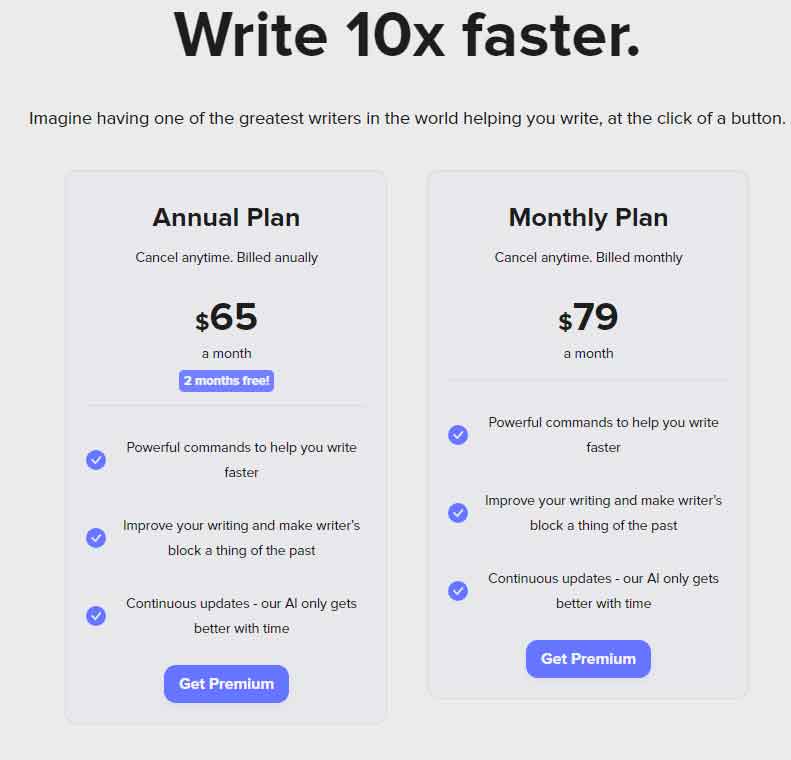
Shortly AI offers two main pricing plans: monthly and yearly subscriptions.
1. Monthly Plan
- Cost: $79 per month
- Features: Unlimited number of words throughout the month
- Recommended for: Freelance writers with few clients or business owners with limited resources
2. Yearly Plan
- Cost: $65 per month (to be multiplied by 12 months)
- Features: 40% discount for paying annually, equating to two months of free access
- Recommended for: Copywriters, bloggers, and top business enterprises
The yearly plan offers significant cost savings and is ideal for those who plan to use Shortly AI extensively over the long term.
Shortly AI Pros and Cons
Having used and got myself acquainted with the Shortly AI app, the following are what I consider to be the ups and downs of this leading article writing tool.
Pros of Shortly AI
- It is easy to use
- Availability of simple but powerful interface
- It can be used to generate different kinds of content that are suitable for different purposes
- Regardless of the subscription plan you are using, Shortly AI offers unlimited words credit
- It’s very fast
- Minimal interface
- Complete freedom
- It has human-like quality and creativity
- Shortly AI has a very strong bond with Grammarly
- Availability of powerful commands for making the tasks a lot easier; etc
Cons of Shortly AI
- It always provides wrong statistics and inadequate pricing data and as such, you’ll have to correct it
- Lack of integration
- Limited features (it is mostly suitable for long-form content and stories)
Final Verdict – Is Shortly AI Worth It?
While the technology behind Shortly AI’s article writing app is undeniably impressive, there are certain limitations to its effectiveness, especially when it comes to writing technical articles or blog posts, such as tutorial topics. In these cases, ShortlyAI may offer limited value due to the inherent limitations of AI in understanding complex technical concepts and audience needs. While the generated content is generally unique and fresh, there may be instances where the output is repetitive or off-topic.
As with any AI writing tool, users should expect to spend a considerable amount of time proofreading, editing, and refining the content generated by Shortly AI to ensure it meets their standards and effectively communicates their intended message. Despite these limitations, ShortlyAI remains a valuable tool for creators, bloggers, authors, and other professionals who create long-form content.
I recommend taking advantage of ShortlyAI’s free trial to test the software yourself and determine if it aligns with your content creation needs and preferences.