Placeit Review: Discover Its True Potential
Sounds like a comprehensive review is on the way! It’s great that you’re highlighting a tool that has been personally beneficial to you in various design projects. Placeit’s Mockup Generator seems to be a standout feature for you, and I’m sure many designers will be eager to learn more about its capabilities and how it can streamline their workflow.
Looking forward to hearing more about the user interface, licensing terms, pricing, and alternatives to Placeit as well. Let’s dive into the review and uncover all the details!
Placeit.net Review
| Subject | Rating |
|---|---|
| Templates | 4.0 |
| Ease of Use | 4.5 |
| Features | 4.0 |
| Customer Support | 3.0 |
| Pricing | 5.0 |
Summary
Placeit.net is an all-in-one tool that fulfills all your designing requirements. I think it would be a highly resourceful platform for freelancers, content creators, YouTubers, advertising teams, musicians, social media marketers, bloggers, and design enthusiasts.
About Placeit
Placeit is a handy online tool that lets you create various marketing and personal items like mockups, animated videos, graphics, social media images, logos, and more. It was started by Envato in 2012, the big digital assets marketplace.
Placeit offers over 87,000 templates. They wanted to make designing easier and cheaper for everyone, so they made thousands of templates available.”
Placeit User Interface
Placeit has a sleek and modern interface that’s easy on the eyes. You’ll find all the design tools neatly organized at the top. If you’re looking for something specific, just type it into the search bar.
You can access your downloaded assets and manage your account from the top right corner. While there aren’t any mobile apps, the tool works smoothly in your mobile browser. Overall, it’s user-friendly and perfect for beginners.”
Placeit Features
Placeit is a platform for creative individuals. Here, you will find a variety of powerful tools, each covering a specific aspect of designing. Let me walk you through each of them.
1. Placeit Mockups Tool
A mockup is a digital model of your product that shows how it will look once made or printed. For designers working on client projects, this tool is a lifesaver. It saves time and prevents mistakes before production! Placeit Mockup Generator has a vast collection of over 38,000 templates covering various categories:
- Clothing like Face Masks, T-shirts, Hoodies, Sportswear, Tank Tops, and more.
- Electronics such as Android and iOS mobiles, MacBook, and App Mockups.
- Print Materials like Books, Magazines, Business Cards, and Stationery.
- Print-on-Demand items like Mugs, Bags, Phone cases, and Wall art.
- Promotional Materials like Billboards, Facebook Ads, and Banners.
Now, let’s explore some important mockup types in detail.
T-shirt Mockups
If you’re designing and selling custom clothing or merchandise, this tool can help you see how your product will look! Start by picking the type of t-shirt you want, like Crew neck or V-Neck. Then, choose a color and upload your design.
You can also select the model’s age, gender, and ethnicity to see how it looks on different people. You can filter results based on your preferences and use tags like Bestselling or Newest. Once you’re happy with your design, you can save it or download it as a PNG. You can even edit the background to match your style!”
Video Mockups
Video Mockups give you a great way to see how your product fits in real settings. You can choose from a variety of products like mugs, hats, t-shirts, and more. Let’s pick a hat for example! Then, you can change the hat’s color, add your logo or design, and even include background music. After that, just hit download! It’s a cool way to market your products quickly. Perfect for promoting on social media!”
App Mockups
App Mockups let you see how your apps and websites look on real devices. Placeit offers mockups for different devices like Android, iOS, Mac Book, and more. You can even make cool videos with the App Demos tool. Just add your image or URL, choose a soundtrack, and you’re done!
I found this tool really useful. If you’re in ecommerce or software, App Mockups can help your business stand out!”
Print on Demand Products
Print on demand offers a variety of creative products such as coffee mugs, pillows, phone cases, bags, and wall art. It’s a great place to try out different designs and products!”
2. Placeit Design Tool
Placeit has its own Design tool, like Canva and VistaCreate. It has over 10,300 templates in many categories. Once you pick a template, you can customize it in lots of ways. You can edit text, change fonts and colors, tweak the background, and add frames or patterns. Here are the main types of designs you can make with the Placeit Design tool.”
Apparel and Print Templates
These include things like book covers, flyers, posters, t-shirts, and business cards. T-shirt designs are especially popular. Just pick a design, make some changes, and download it as a PNG. You can even use the same design to make a t-shirt mockup later!”
Music and Podcast Templates
If you’re in the music industry, Placeit is great for promoting your podcasts, music covers, or albums. For instance, when I looked for health podcast covers, here’s what I found. They have a vibrant and modern selection of templates, so you’ll always have fresh ideas!”
Social Media Templates
Designing social media posts is a breeze with Placeit. They have templates for platforms like Facebook, Twitter, Instagram, and more. Check out these Instagram story templates! Pick one and customize it however you want. While the design tool is good, I personally prefer Canva and VistaCreate for social media posts.”
3. Placeit Video Maker
Placeit’s Video Maker tool is really powerful! With over 900 animated templates, you can create gaming videos, social media clips, slideshows, and even intros and outros for your YouTube channel. Let’s take a closer look at some of the key ones.”
Intro/Outro Videos
Content creators sometimes find it hard to make eye-catching intros and outros for their videos. But with Placeit, it’s easy! Their video tool offers hundreds of engaging templates. Just hover over a template to see it in action. Then, on the editing screen, you can customize colors, fonts, add text, music, and even adjust playback speed. When you’re done, just download your creation in MP4 format.”
Social Media Videos
Videos bring your posts to life. For influencers, Placeit is a handy tool to make Instagram videos and stories, Facebook cover videos, and promo videos for brand advertising.”
4. Placeit Gaming Templates
If you’re in the gaming industry, Placeit has a special section just for you. It’s got everything you need to brand your YouTube or Twitch channel! You can make gaming merchandise, design stream overlays, banners, and panels for Twitch, as well as thumbnails, banners, and end cards for YouTube, and more! Let’s dive into the main assets you can create with Placeit’s gaming templates.”
Streaming Templates
Gamers often livestream on platforms like YouTube and Instagram. If you use OBS or Twitch, Placeit has a bunch of stream overlays and ‘Coming Soon’ screens that look trendy and colorful! You can also find Twitch banners, panels, Discord themes, and more.”
YouTube Templates
YouTubers have access to a great collection of assets to spice up their channels and videos. Placeit provides hundreds of banner, end card, and thumbnail templates for your YouTube channel. You can also create fun and colorful intros and outros with this tool!”
Blank Canvas Tool
Placeit now offers a Blank Canvas tool where you can create your designs from scratch. It’s currently in Beta Mode. With Blank Canvas, you have the freedom to mix and match their backgrounds, graphics, and fonts to create your own custom designs.”
Additional Placeit Tools
Besides the mentioned tools, Placeit offers a few more handy features for designing:
- Image Cropper: Easily resize your images to fit over 25 social media formats. Just upload your PNG or JPG image, adjust it using a slider or select a social media ratio, then download.
- Video to GIF Converter: Convert your MP4 or MOV videos into GIFs. Note that files larger than 100 MB or longer than 40 seconds aren’t supported.
- Online Video Cropper: Resize your videos to specific dimensions. Upload your video in MP4 or MOV format, select dimensions for social media or enter custom ones, then download your file.
Placeit Pricing
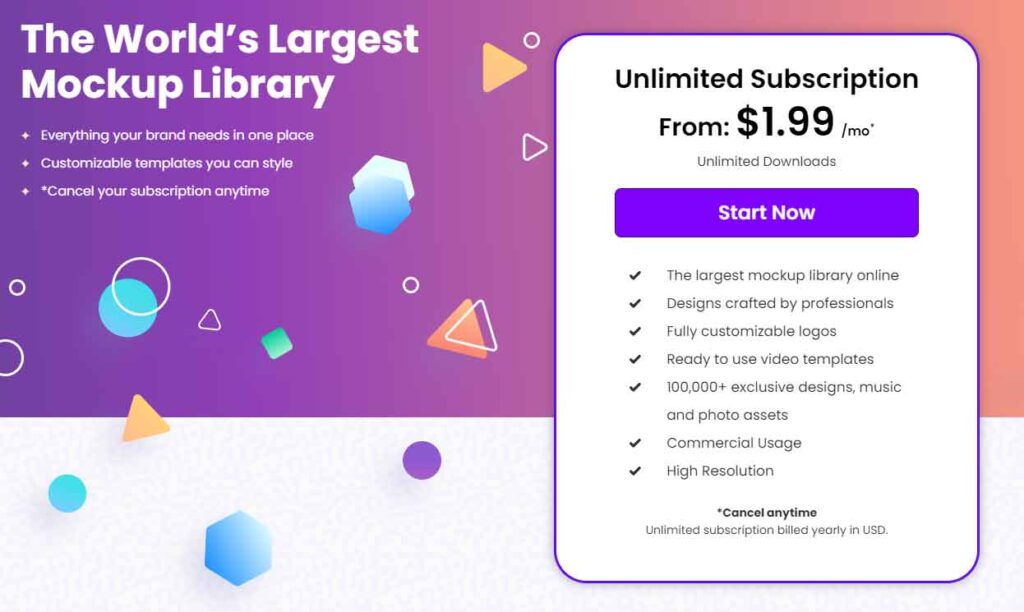
Placeit offers both free and subscription plans. With the free plan, you can download limited templates for personal and commercial use, which is great for beginners. But if you’re a freelancer or running a business, the monthly subscription at $14.95/month is a good option.
Right now, Placeit has heavy discounts on their annual plan, offering a yearly subscription for just $24. With the subscription, you get access to over 60,000 templates, including images, videos, logos, and mockups, with unlimited downloads.”
How Can You Cancel Your Placeit Subscription?
It sounds like there’s room for improvement in Placeit’s subscription renewal process. Automatically renewing subscriptions without prior notice can indeed be inconvenient for users who don’t wish to continue.
Providing clearer communication and options for users to opt-out or manage their subscription renewal preferences would likely result in a better experience for customers. Offering multiple channels for users to cancel their subscription, such as email and phone, is a good step towards providing flexibility and convenience.
Placeit Customer Support
Placeit provides customer service via email tickets and live chat, although their live chat team may not always be available. However, I found that they responded to my queries within a few hours, and their staff were knowledgeable.
Additionally, Placeit offers an FAQ page to address common questions. They also have a YouTube channel, tutorials, and a blog where you can find educational content about design to help you learn more.
Placeit Pros
Placeit Pros
Enormous Template Collection: With over 19.8k mockups, 10k design templates, 3k logos, and 911 animated video templates, Placeit offers plenty of inspiration for creativity. The mockups are especially impressive.
- Backed By Envato: Being part of Envato, a highly reputable name in the design industry, adds trust to Placeit’s product.
- Commercial Usage and Unlimited Downloads: Annual subscribers can download unlimited assets for personal and commercial projects, even for client use.
- Easy to Use: Placeit is incredibly user-friendly, requiring no professional design skills. It’s accessible via web browser, making it convenient for anyone.
- No Software Needed: As a web-based app, Placeit eliminates the need for software installation, accessible from mobile or web browser.
- Affordable Pricing: At $14.95/month, Placeit offers access to its vast collection of 33k+ images, logos, and video templates.
- No Extra Payment for Logos: Logos are now included in the annual subscription, eliminating additional fees.
Placeit Cons
- No Apps: Placeit lacks dedicated desktop or mobile apps, limiting its accessibility.
- Not the Best for Designing: While user-friendly, Placeit may not be the top choice for comprehensive design needs compared to more mature tools like Canva.
- Limited Download Options: Logos can only be downloaded in PNG format, with no option for vector downloads.
- Slow Video Processing: Rendering previews of videos on the Placeit website can be time-consuming, affecting user experience.
- Problems with Video-Audio Sync: Audio syncing with video animations and transitions needs improvement for smoother integration.
Placeit Alternatives
1. Canva
Canva is a leading online design tool offering access to millions of resources, from images to videos, graphics, audios, and backgrounds. It also provides advanced features like Background Remover, Custom Downloads, Version History, and integrations with numerous services.
With a feature-rich free plan, Android and iOS apps, and strong collaboration features, Canva stands out among design tools. It’s particularly excellent for designing social media posts. Pricing starts at ₹499/month for up to 5 users, or you can begin with the free plan.
2. Envato Elements
Envato Elements is indeed the go-to marketplace for digital assets, boasting an extensive collection of over 53 million creative resources. From stock images and videos to audio tracks, graphics, web templates, fonts, themes, plugins, and more, they have it all.
Individual subscriptions start from $16.50/month, making it accessible for those looking to purchase high-quality digital assets.
3. Free Logo Creator
The Free Logo Creator is a simple and efficient online logo maker ideal for small businesses and entrepreneurs. It streamlines the logo design process with a user-friendly interface.
Here’s how it works: Enter your business name, select your industry, and browse through a range of related logo designs. Once you find one you like, customize it to your liking and download the free logo file.
What’s great about this tool is its variety of logo styles, ranging from vintage to contemporary designs. Plus, each file is vector-supported, ensuring scalability. If you’re seeking graphic design solutions that are both cost-free and high-quality, look no further than this logo maker program.
4. VistaCreate
Crello, now known as VistaCreate, is a rising star in the design industry, offering a robust set of features. With a vast collection of stock assets including photos, videos, and animations, VistaCreate provides users with ample resources for their creative projects.
Additionally, the platform offers an impressive free plan and seamlessly functioning mobile apps, catering to users on the go. For those prioritizing animated templates, VistaCreate stands out as an excellent option to explore. Priced at $10/month, it offers great value for its features and capabilities.
Who Should Use Placeit?
Placeit is indeed a versatile platform that caters to a wide range of users, making it highly resourceful for various purposes. Advertisers and marketers can leverage the Mockups Tool to design realistic models of their apps and products, gaining valuable insights for manufacturing.
Bloggers, content creators, and YouTubers can utilize the Logo Maker to craft creative logos, YouTube banners, and thumbnails. Additionally, the design tool can be used to create graphics for various platforms.
Musicians and video editors can take advantage of the video maker to produce intros, outros, presentations, and more. Gamers can explore the Gaming tool to create mascots, OBS streaming overlays, animated logos, and other gaming-related assets.
Overall, Placeit offers a comprehensive suite of features suitable for freelancers, content creators, YouTubers, advertising teams, musicians, social media marketers, bloggers, and design enthusiasts alike.
Conclusion
What a comprehensive review of Placeit! It’s clear that you’ve explored its features thoroughly. I’m sure readers will find your insights helpful in making their decision about whether to use Placeit. Your suggestion of starting with the free plan for beginners and considering the annual subscription for freelancers and businesses is a practical approach.
As for other design and mockup tools, there are indeed many options out there, each with its own strengths. Canva, Crello (now VistaCreate), and Envato Elements are among the popular ones. It would be interesting to hear about your experiences with them.
Thanks for sharing your thoughts and signing off with such a friendly message! I’m sure your readers will appreciate it.