Pictory Review: Is It the Ultimate Video Editing Tool?
You probably know that using more videos in your online business can make a big difference. But if you’re like many online course creators and experts, making high-quality videos all the time can be hard and expensive.
But things are changing. Generative AI technology is making video creation easier and more accessible. In this article, we’ll take a look at Pictory AI, a fast-growing platform for AI video marketing. It helps you make and edit HD videos in just minutes.
Whether you’re already making educational videos or you’re new to creating info products, Pictory has something for you.
We’ll explore its features, talk about how you can use it, and look at its pricing plans. This will help you figure out if it’s the right AI video tool for your business. And if you want more options, check out our list of the best AI video generators and editors for creators.
Quick Verdict
Short on time? Here’s the gist:
Pictory is pretty impressive. It’s perfect for quickly making short videos for different parts of your marketing plan. But if you need something with more personality, like for creating full online courses, it might not be the best fit. For educational videos and marketing, though, Pictory is a great tool to have in your arsenal.
What Does AI Video Software Like Pictory Do?
Pictory is a top-notch AI video maker and editor that turns your text into amazing videos without needing a camera or a fancy studio setup.
All you do is feed Pictory your text, whether it’s from a blog post, article, or custom script, and pick your presenter or video style. Using its smart AI, Pictory transforms your words into visuals, adds a fitting soundtrack, and crafts a polished video clip perfect for social media, blog posts, or online courses.
But that’s not all. Pictory also lets you edit your videos easily using text inputs, so no need for tricky software or tech skills. It’s perfect for content creators who want a simple way to enhance their recordings.
Here’s what Pictory can do
- Make incredibly lifelike AI videos from your text.
- Use AI presenters, voice-overs, and soundtracks.
- Automatically add captions to your videos.
- Edit videos using a text editor.
- Create AI-powered video highlights.
- Revamp, repurpose, and improve your existing content.
Pictory is tailored for modern content creators who sell online courses, run communities, publish lots of content, and grow their audience across different platforms. Now, there are plenty of AI video makers out there claiming to do what Pictory does. But the quality of AI-generated videos can vary a lot between tools.
So, is Pictory really as awesome as it seems? Let’s dive into its features to find out.
Pictory AI App Features
Pictory harnesses the power of generative AI to handle various tasks, such as transforming text into video, extracting text from videos, and streamlining editing by sourcing suitable stock footage, images, and soundtracks for your content.
Once you log in to your Pictory account, you’ll find four primary content creation tools prominently displayed on the dashboard. Let’s discuss how you can use these tools to generate AI video content.
1. Text To Video Generation
The Text-To-Video Generation feature in Pictory lets you effortlessly turn your text into engaging AI videos. Whether you’re copying and pasting from a script or article, or typing custom text, Pictory does the heavy lifting to create a top-notch video.
Here’s what it does with your text input:
- Turns your text into a captivating visual narrative.
- Finds suitable images, videos, and visuals that align with your content.
- Provides a selection of background soundtracks to match the mood of your video.
- Generates AI voiceovers to bring your content to life.
2. AI Generated Voices
Pictory’s AI voices are lifelike narrators that bring your text content to life in your videos. You have a variety of options, including male or female voices and different accents.
Here’s what you can do with Pictory’s AI voices:
- Choose from a selection of human-like voiceovers to narrate your content.
- Use multiple AI voices for different scenes in your video.
- Adjust the tone, mood, and speed of the voice to match your text.
- If you prefer, you can also upload your own audio recordings to use in your videos.
How realistic are these AI voices?
Most users would struggle to differentiate between Pictory’s AI voices and real human speech. However, there’s potential for enhancement as these AI-generated audios may sound a bit flat and less engaging, particularly in longer videos.
Nonetheless, it remains a useful feature, especially for crafting brief educational videos tailored for social media platforms.
3. Article Or Blog Post To Video Conversion
One of the standout features of Pictory is its ability to repurpose your blog content, expanding its reach and enhancing engagement. Here’s how it works:
Instead of manually entering your script into the text editor, simply provide Pictory with the URL of your blog post. Pictory then retrieves the content from your website and uses AI to identify key sections for your video scenes.
Let’s try this with one of the recent articles from Learning Revolution. After clicking Proceed, Pictory takes a few minutes to download and analyze your article, extracting its core message for the AI video.
Once processing is complete, Pictory displays your article in its text editor alongside the scenes it identified for your video. You can review, add, or remove scenes and edit the content as needed.
The remaining steps are similar to creating a video from text. Choose a video template, select a soundtrack from Pictory’s recommendations, add your voiceover or opt for an AI voice, and then review and finalize the visuals for each scene.
And just like that, your AI video is ready to share with your audience. This feature proves invaluable when you want to enhance your blog posts with videos for increased engagement or connect with audiences on visually-oriented platforms.
4. Automatic Video Captions And Transcription
Pictory offers a convenient solution for transcribing videos and adding captions without the hassle. Here’s how it works: When you upload a video, Pictory automatically generates captions and produces a full transcript. If your video features multiple speakers, Pictory’s AI transcript feature can detect and distinguish them in the text editor.
You can easily copy the transcript from the text editor to Google Docs or any other word processor, or use it directly to create a WordPress blog post. Moreover, Pictory creates a detailed timeline of your video scenes with closed captions, giving you a clear overview of where each part of your text appears.
Additionally, Pictory provides various tools for editing and formatting your video captions, along with different themes to customize the subtitles in your content. Overall, this feature is a valuable tool for streamlining your content creation process and adding significant value to your videos.
5. Text Based Video Editing
Video editing can often feel daunting, requiring proficiency in professional software and familiarity with various optimization features. However, Pictory’s text-based video editor changes the game, making video content modification as straightforward as creating a text document.
While it doesn’t replace professional editing tools, Pictory’s editor streamlines many common editing tasks, which would otherwise consume significant time.
For instance, once your video is transcribed, you can edit its content directly within the text editor. Pictory offers intelligent filters like “automatically remove filler words” and “remove silences,” significantly expediting the editing process.
As you make changes to the transcript, they are seamlessly reflected in the video itself. Additionally, you can utilize the search filter in the text editor to pinpoint specific words or sections for removal, eliminating the need for repetitive playback.
Overall, Pictory’s text editor proves to be a valuable tool, simplifying editing tasks and accelerating content creation.
6. Create Highlights From Long Videos
Introducing Pictory’s AI-powered video highlights tool! 🎬
Ever wished you could give your audience a quick rundown of a long video? Well, now you can with Pictory! Our tool automatically pinpoints the most crucial parts of your video and creates a highlights package, saving your viewers time and giving them the essence of your content.
Here’s how it works
- Upload your video to Pictory’s video editor.
- Choose the length of your highlights clip.
- Our AI technology identifies the key sections of your video and lists them separately in the Highlights section.
- You have the freedom to edit, add, or remove scenes from the highlight reel, tweak the script, and include additional content wherever you see fit.
- Your video adjusts automatically as you make changes to the highlights reel.
- Once you’re happy with the result, select a captions template and hit publish!
With Pictory, delivering concise yet impactful video content has never been easier. Try it out today and captivate your audience in no time! 🚀
7. Create Videos From Visuals
Combining various images, presentation slides, or videos into a single video clip is simplified with Pictory. Instead of manually arranging content on different tracks, users can conveniently upload them to Pictory and adjust their appearance using drag and drop options.
Moreover, users can easily paste their script from a document or blog post and incorporate either an AI voice or their own audio recording in the background. Pictory also offers a range of standard video editing tools and features to enhance content quality.
8. Expanded Visual Library
Pictory’s visual library now grants access to over 10 million Getty Images, simplifying the creation of standout videos with tailored content. By leveraging AI and your specified preferences, Pictory suggests a curated selection of relevant visuals for you to choose from. It’s worth mentioning that the Getty Images visuals tool is currently exclusively accessible as a premium feature.
However, free and standard plan users will still receive AI-suggested visuals from Storyblocks. Regardless of your plan, Pictory ensures you have access to quality stock content for your projects.
Overall Impression Of Pictory’s AI Video Generation And Editing Features
Pictory accelerates video creation with its intuitive tools and features. We found its text editor, script-to-video, and video transcription capabilities particularly noteworthy, offering diverse content creation opportunities. While its AI voice-over features are comparable to other tools in the industry, there’s potential for enhancement.
Overall, Pictory proves to be an impressive tool for course creators and marketers aiming to leverage video for business expansion. However, pricing and affordability are crucial factors to consider, which we’ll delve into in the following section.
Pictory AI Pricing
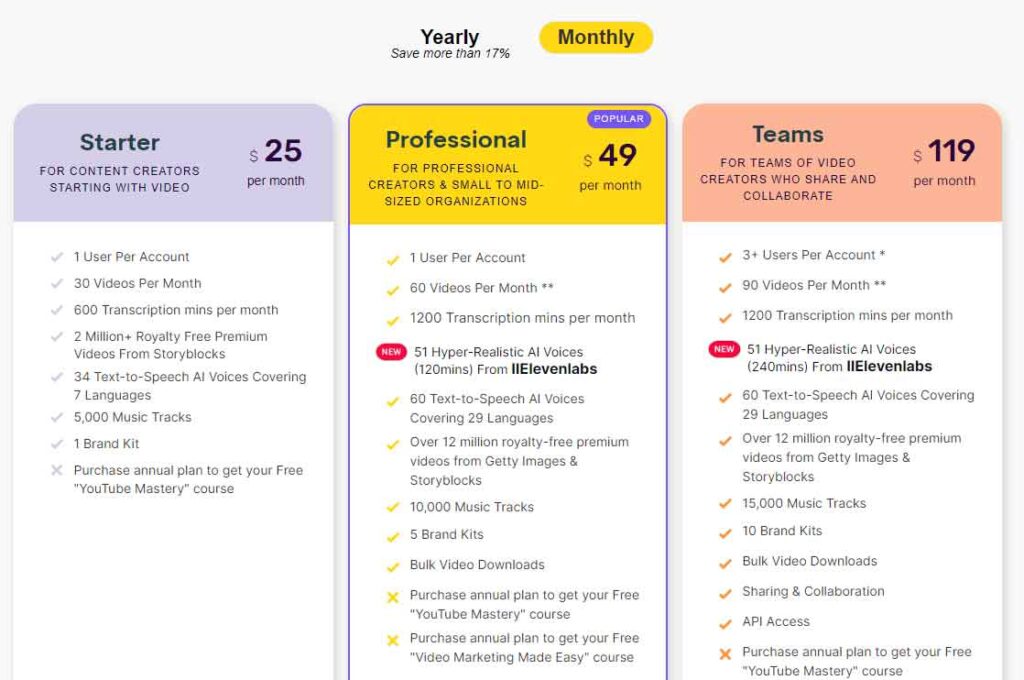
Pictory offers three paid plans, all with a free trial allowing you to create 3 video projects of up to 10 minutes each. To activate the trial, you’ll need to provide your credit card details, but you won’t be automatically charged unless you decide to continue.
Moreover, opting for annual billing grants you a 15% discount compared to monthly payments. Now, let’s explore what each paid plan entails:
1. Standard Plan – $19/month
- Create 30 videos, each up to 10 minutes long, using Pictory’s text-to-video and other AI features.
- Access 34 AI voices, generate 10 hours of video transcript, and edit recordings up to 1 hour long.
- Ideal for testing AI video on a smaller scale or using video marketing moderately.
2. Premium Plan – $39/month
Enjoy higher usage limits and additional features.
- Create up to 60 videos, each up to 20 minutes long, and edit recordings up to 3 hours.
- Access the Video Highlights feature in Pictory’s video editor and integrate with Hootsuite for scheduling social media posts.
- Offers excellent value for money and suits online course creators and marketers who heavily rely on videos.
3. Teams Plan – $99/month
- Designed for agencies and enterprise clients.
- Features significantly higher usage limits and collaborative tools to facilitate team project creation.
Each plan provides access to Pictory’s core generative AI features and over 3 million stock images and videos. Choose the plan that best aligns with your video creation needs and budget.
Pictory AI Use Cases
There are numerous ways to leverage Pictory’s features to enhance your video marketing strategy. Let’s explore some examples and use cases to illustrate its capabilities:
1. Explainer Videos
Making explainer videos is an excellent way to demonstrate to potential customers what your product can do for their businesses. With Pictory, you can easily create captivating explainer videos. Just upload your script, select appropriate visuals, and include AI voiceovers to bring your message to life.
2. Educational Videos
As an online course creator, it’s crucial to consistently share valuable content that educates your audience and establishes your expertise in your field. Pictory makes it simple for you to produce AI videos for your website, YouTube, and other online platforms. All you need to do is pinpoint the common questions your audience asks and create specific videos for each question using Pictory’s script-to-video feature.
3. Video Press Releases
Turning your text press releases into AI videos can help you grab attention and make an impact in the busy world of PR. Pictory enables you to easily transform your written press releases into engaging videos. You can then share these videos separately with journalists and relevant influencers, making it easier for them to notice and share your news.
4. Blog Post Summaries
Incorporating videos into your blog posts can significantly enhance their appeal and boost their SEO effectiveness. With Pictory’s Highlights feature, you can craft concise summaries of your blog posts that convey the main points to your readers. By embedding these videos in your posts, you can expedite the indexing of your content and draw traffic from Google’s video searches, ultimately enhancing your blog’s visibility and reach.
5. Videos For TikTok And YouTube Shorts
TikTok, YouTube Shorts, and Facebook Reels are incredibly popular platforms for video creators, attracting billions of views each month. You can tap into this thriving market by producing short AI videos that offer quick solutions to your audience’s challenges. With Pictory’s extensive stock library, you can easily find relevant visuals for almost any topic. Simply select the appropriate visuals, add your script, and create a 60-90 second video tailored for these platforms.
Furthermore, Pictory offers versatility beyond just short videos. You can convert text scripts and blog posts into engaging videos. Additionally, Pictory generates auto-captions and video transcripts, and provides a range of editing options to refine your videos before sharing them with your audience.
6. Online Course Lessons
If you’ve already recorded lessons for your online courses, Pictory can assist you in generating video transcripts. By transcribing your videos, you can enrich your lesson descriptions and provide your audience with extra learning material. This additional content enhances the learning experience for your students and reinforces the key points covered in your lessons.
7. Repurposing Blog Content
Transforming your popular blog posts into videos for your YouTube channel and Facebook Page is made simple with Pictory. By consistently converting your written content into engaging videos, you can cultivate a loyal following on YouTube, attract thousands of referral visitors to your website, and even establish an additional revenue stream for your business.
This strategy not only expands your audience reach but also maximizes the value of your existing content across multiple platforms.
8. Creating Blog Posts From Videos
If you’re an experienced video creator with a treasure trove of recordings on your YouTube channel, consider repurposing them into articles and blog posts. This strategy can fuel the growth of your brand’s blog, enhance your content’s search engine optimization (SEO), and attract thousands of monthly visitors from organic searches.
With Pictory’s transcription feature, transforming your videos into text is a breeze. Within minutes, you can convert your video content into written format. Once transcribed, all you need to do is format the text as a blog post and publish it on your website.
This approach not only leverages your existing video content but also expands your online presence and drives traffic to your website through valuable written content.
Pictory AI Pros And Cons
Before reaching a verdict, let us share the main strengths and weaknesses of Pictory
Pros
- Very easy to use and designed for non-technical users.
- Quickly creates videos from text content.
- Its text editing feature is as simple as editing an email.
- Pictory’s mammoth stock library is perfect for creating high-quality videos.
- Its transcription quality is surprisingly good.
Cons
- Its AI voices are a little bland and lack emotion.
- Its AI voices are a little bland and lack emotion.
- The results of the video highlights feature aren’t accurate, and you need to edit them before use.
- Pictory doesn’t have AI presenters, a feature many competitors offer.
Are Pictory’s AI Video Marketing Features Right For Your Business?
While Pictory is still evolving and not perfect, it’s already an impressive tool that has the potential to save you countless hours every month in video creation. We were particularly impressed with many of its features, although we hope to see improvements in its AI voice-over feature and the addition of AI presenters to its core offering.
While it may not be suitable for online course creation at the moment due to its lack of personality, Pictory can still play a crucial role in your video marketing strategy. By generating quick AI videos for your social media profiles, landing pages, and various stages of the marketing funnel, you can effectively engage your audience and drive conversions.
Overall, we believe Pictory is worth using and would be a valuable addition to any marketer’s toolkit.