Opus Clip Review: Elevating Your Video Content with Ease

In today’s fast-moving world of social media, capturing attention quickly is key. People have short attention spans, so content needs to be both engaging and immediate. Opus Clip is an AI tool designed to help with this. It transforms existing videos into short, catchy clips that are perfect for platforms like YouTube Shorts, Instagram Reels, and TikTok.
But does Opus Clip really deliver on its promises? Let’s dive into its features, pricing, and the pros and cons to see if it’s the right fit for your content creation needs.
What is Opus Clip?
Opus Clip is an AI-powered video editing tool designed to automatically transform long-form videos into engaging short clips tailored for social media platforms like TikTok, YouTube Shorts, and Instagram Reels. It achieves this by:
- Analyzing your video: Using advanced AI algorithms, Opus Clip scans your video content to identify key moments, engaging sections, and potentially viral snippets.
- Extracting highlights: Based on its analysis, the tool automatically selects the most captivating excerpts from your video, ensuring each clip has its own narrative arc and holds viewers’ attention.
- Adding finishing touches: Depending on your chosen plan, Opus Clip can even optimize the clips with captions, text overlays, or even background music for added engagement.
Essentially, Opus Clip acts as a virtual editor, saving you the time and effort of manually selecting, trimming, and arranging video segments.
Opus Clip Features
Opus Clip stands out as a comprehensive AI-powered video editing tool designed to streamline the process of creating engaging short content for social media platforms. Here’s a detailed look at its features:
1. AI Curation
Opus Clip uses advanced AI to analyze long videos. It picks out the most exciting parts and turns them into short clips that could go viral. This AI-driven method ensures the content is engaging and perfect for grabbing the audience’s attention.
2. AI Virality Score
One unique feature of Opus Clip is its AI Virality Score. This tool analyzes thousands of successful videos to predict the viral potential of each clip. It helps creators understand which clips are likely to perform best on social media platforms.
3. AI CoPilot
The AI CoPilot feature gives creators more control over their content. It allows them to choose specific timeframes for clipping and search for clips using keywords. This ensures that the final product matches the creator’s vision closely.
4. AI B-Roll Addition
To boost storytelling and visual appeal, Opus Clip can add contextually relevant B-roll footage to clips. This feature is vital for keeping viewers engaged and making the content visually dynamic.
5. AI Dynamic Layout
Opus Clip’s AI also automatically adjusts the screen layout, switching between full screen, two-person, three-person, screen share, and more. This dynamic layout feature ensures that speakers and visuals are shown in the most engaging way possible.
6. Active Speaker Detection
The tool’s predictive AI analyzes moving faces to keep the speaker centered in the video frame. This is especially helpful for interviews or panel discussions, ensuring the active speaker always stays in focus.
Pro Plan Features
For professional users, Opus Clip offers a Pro Plan with extra features like a team workspace, social media scheduler, export options to Adobe Premiere Pro, various aspect ratios, and multiple brand templates. Upcoming features include custom fonts and music, caption animation, clip trimming and extending, filler word removal, and more.
Multi-Language Support and Templates
Opus Clip supports multiple languages and offers trendy templates to help you create professional-quality videos quickly and easily. It also provides caption translation services, making it simpler to reach a global audience.
Opus Clip Pricing
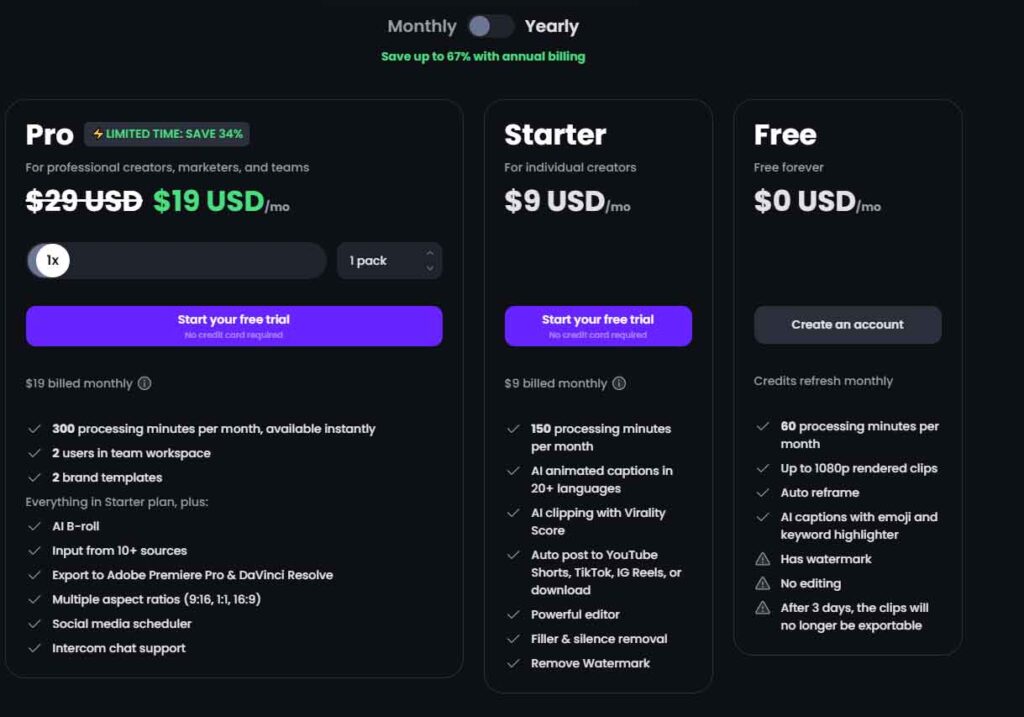
Opus Clip offers a variety of pricing plans tailored to different needs, whether you’re an individual creator or part of a professional team. Here’s a breakdown of their current pricing:
1. Free Plan
- Price: $0 USD/month
- Features: Includes 60 processing minutes per month, up to 1080p rendered clips, auto reframe, AI captions with emoji and keyword highlighter. Clips have a watermark, and no editing is possible after 3 days, at which point clips will no longer be exportable.
2. Starter Plan
- Price: $9 USD/month (monthly billing only)
- Features: Provides 150 processing minutes per month, AI animated captions in 20+ languages, AI clipping with virality score, the ability to auto-post to YouTube Shorts, TikTok, IG Reels, or download. It includes a powerful editor and filler silence removal. This plan removes the watermark.
3. Pro Plan
- Price: Starting from $19 USD/mo (billed monthly) or $9 USD/mo (billed annually – limited time saving of 67% as of February 2024)
- Features: Aimed at professional creators, marketers, and teams. Includes 3600 processing minutes per year, 2 user accounts in a team workspace, everything in the Starter plan plus AI B-roll, input from 10+ sources, export to Adobe Premiere Pro, DaVinci Resolve, multiple aspect ratios (9:16, 1:1, 16:9), a social media scheduler, up to 5 brand templates, and Intercom live chat support.
4. Enterprise Plan
- For: Organizations needing over 10 seats, large volume usage (over 500 hours/month), and API access.
- Details: Interested parties are encouraged to contact Opus Clip directly for pricing and more information.
Each plan is designed to meet specific user needs, from free access for casual users to comprehensive support for professional teams looking to maximize their content output and engagement.
Opus Clip Pros and Cons
Opus Clip’s AI-powered approach to video repurposing holds great promise, but like any tool, it has its strengths and weaknesses. Let’s weigh the pros and cons to help you decide if it aligns with your content creation needs:
Opus Clip Pros
- Effortless Content Repurposing: Opus Clip’s AI automates the time-consuming task of selecting and editing video highlights, saving you significant time and effort.
- Enhanced Engagement: AI-powered features like B-roll and dynamic layouts aim to create visually engaging and potentially viral clips, potentially boosting audience engagement.
- Free Trial and Competitive Pricing: The free plan allows you to experiment, and paid plans offer a range of features at competitive prices.
- Additional Editing Options: Basic editing tools alongside AI allow for further customization and tailoring to your brand aesthetic.
Opus Clip Cons
- Limited Control: While AI offers convenience, it sacrifices some creative control. If you have a specific vision, manual editing might be more suitable.
- Learning Curve: Mastering the platform and leveraging its features effectively might require some learning and experimentation.
- Watermark in Free Plan: The free plan includes a watermark, potentially hindering the professional presentation of your clips.
Final Verdict
Opus Clip provides a robust solution for content creators aiming for AI-assisted efficiency and increased engagement. If you’re keen on leveraging AI’s creative capabilities and value speed and convenience, exploring Opus Clip is a wise choice. However, if you prioritize absolute control over your content or work with specific formats better suited for manual editing, you may find alternative solutions more suitable.
Remember, trying out Opus Clip’s free plan, despite its limited features, is the ideal way to experience it firsthand and determine if it fits seamlessly into your content creation process.