GreenGeeks Review: Sustainable Hosting for Your Website

Choosing the right web hosting is crucial for your online journey. With so many options available, it can be challenging to make the best decision. Today, I want to introduce you to GreenGeeks, a highly recommended hosting provider. But does it live up to the hype? Let’s dive into this detailed GreenGeeks Review for 2024.
After testing GreenGeeks hosting for over 250 days, I’ve gathered comprehensive insights. This review covers everything—from uptime performance and website speeds to server capabilities, backup management, customer support quality, pricing plans, and their refund policy.
One standout feature was their backup management. It truly surprised me! Curious to learn more? Let’s explore the Greengeeks review.
Decent Web Hosting with Fast, Helpful Support
GreenGeeks offers competitive pricing for shared hosting, providing good options whether you need hosting for one site or multiple sites. While their features are solid, there aren’t many exclusive perks apart from their environmental initiatives, which appeal to eco-conscious customers but may be basic for others.
Where GreenGeeks truly shines is in customer support. I consistently received quick responses via live chat, often within a minute. Their phone support is also fast and staffed by knowledgeable agents. They also offer email support, ticket support, and a comprehensive knowledge base.
All shared plans include a free domain name and nightly backups, which is a nice addition. The platform is well-designed and user-friendly, with a straightforward sign-up process (though there’s a slightly cumbersome user verification step).
VPS hosting plans are a bit pricier and have fewer features, but they do come with managed support and generous data transfer limits (up to 10 TB).
Overall, GreenGeeks is a solid choice with affordable rates, good performance, and a user-friendly interface. What sets them apart is their strong commitment to the environment—they purchase three times the amount of carbon credits they use for hosting and plant a tree for every hosting plan they provide.
Features Of GreenGeeks
GreenGeeks’ plans include essential features like domain names, SSL, and email. While their features are generally serviceable, there are a few noteworthy additions. Alongside their strong environmental policies, GreenGeeks also offers some of the top web server technologies in the industry. Unlimited Resources With Higher-Tier Shared Plans
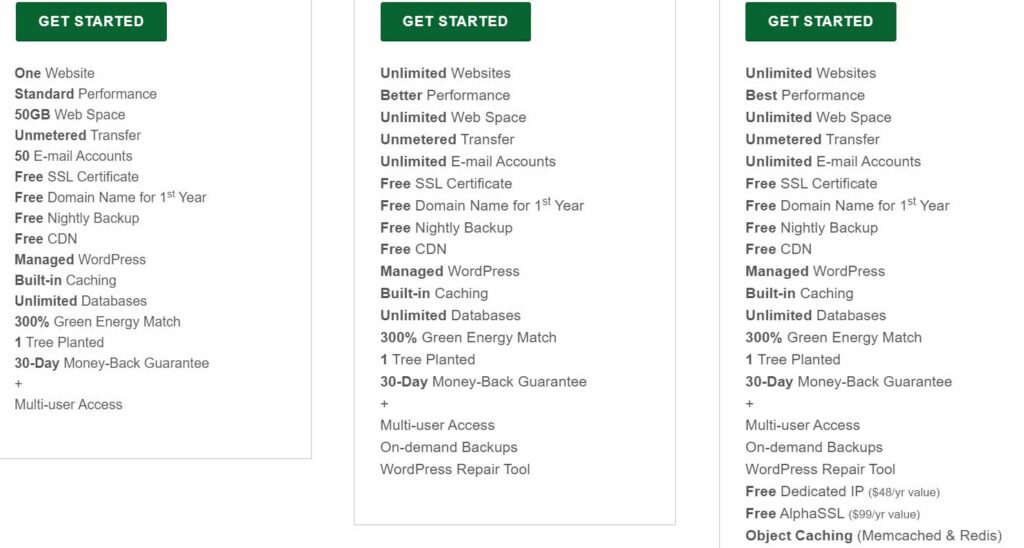
All of GreenGeeks’ plans come with unmetered data transfer, allowing you unlimited bandwidth within reasonable usage limits to accommodate your growing number of visitors.
When you move beyond the basic plan, you also gain access to unlimited storage, email accounts, and the ability to host an unlimited number of websites.
Initially, GreenGeeks’ free CDN offer stood out as a notable feature. However, after confirming with support, I discovered that GreenGeeks has discontinued this service, despite it still being advertised.
This change leaves only a few other added-value features, but they are noteworthy, such as the nightly backups included with every plan.
1. LiteSpeed Server
A key performance feature of all GreenGeeks plans is the LiteSpeed web server. Unlike the standard Apache used by most providers, LiteSpeed offers superior performance, especially when paired with the LiteSpeed Cache plugin. This combination provides significant speed enhancements for WordPress sites.
The caching feature is particularly impactful. It serves static versions of your web pages to visitors, reducing the need to connect to the database and reload content with each visit. It also automatically updates these cached versions whenever you add or modify content.
2. WordPress Repair Tool
One of GreenGeeks’ distinctive features is the WordPress Repair Tool. It can automatically address various WordPress performance and security issues by checking and restoring core files, optimizing the database, and more.
This toolkit is seamlessly integrated into your customer account and is backed by GreenGeeks’ excellent technical support when needed. In-house developed tools like this are often more compatible with the host’s server configuration, eliminating the need for manual configuration that third-party plugins may require.
3. Industry Leading Environmental Policies
Web hosting consumes significant energy, and few providers offer carbon-neutral services with a commitment to 100% renewable energy offsets. GreenGeeks stands out with a remarkable pledge to offset 300% of its energy use through renewables, surpassing other hosts’ environmental efforts.
Additionally, GreenGeeks plants a tree for every plan purchased, further enhancing its eco-friendly initiatives.
GreenGeeks Features at a Glance
| Free domain name? | ✔ |
| Free SSL? | ✔ |
| Money-back guarantee* | 30 days |
| Uptime guarantee | 99.9% |
| Managed hosting features? | ✔ |
| Data centers | 4 in North America, 1 in Europe, 1 in SE Asia |
Ease Of Use
1. GreenGeeks is Easy to Work
Setting up a site with GreenGeeks was generally quick and straightforward for me. Their user interface is well-designed and intuitive, and I managed to purchase a plan and set up my account in just a few minutes.
However, I encountered frustration with GreenGeeks’ fraud detection system. I had to wait until their call center opened the next day to resolve issues and begin using the services I had already paid for.
Once your site is up and running, though, it operates on the standard cPanel interface. If you’re new to cPanel, there may be a slight learning curve, but it’s generally straightforward and familiar.
2. Creating a New Account with GreenGeeks
When you click the “Get Started” button for any GreenGeeks plan, you’ll be directed to a screen to enter your desired domain name and proceed to payment. You can pay with a credit card or through PayPal.
Once payment is completed, your site will either be verified automatically or flagged for further review, requiring you to contact support.
In my case, the verification system flagged my site after hours, so I had to wait until the next day to resolve the issue with GreenGeeks’ call center. Fortunately, the wait time for the call was brief, and the representative promptly approved my site.
3. Connecting a Domain Name and Installing WordPress
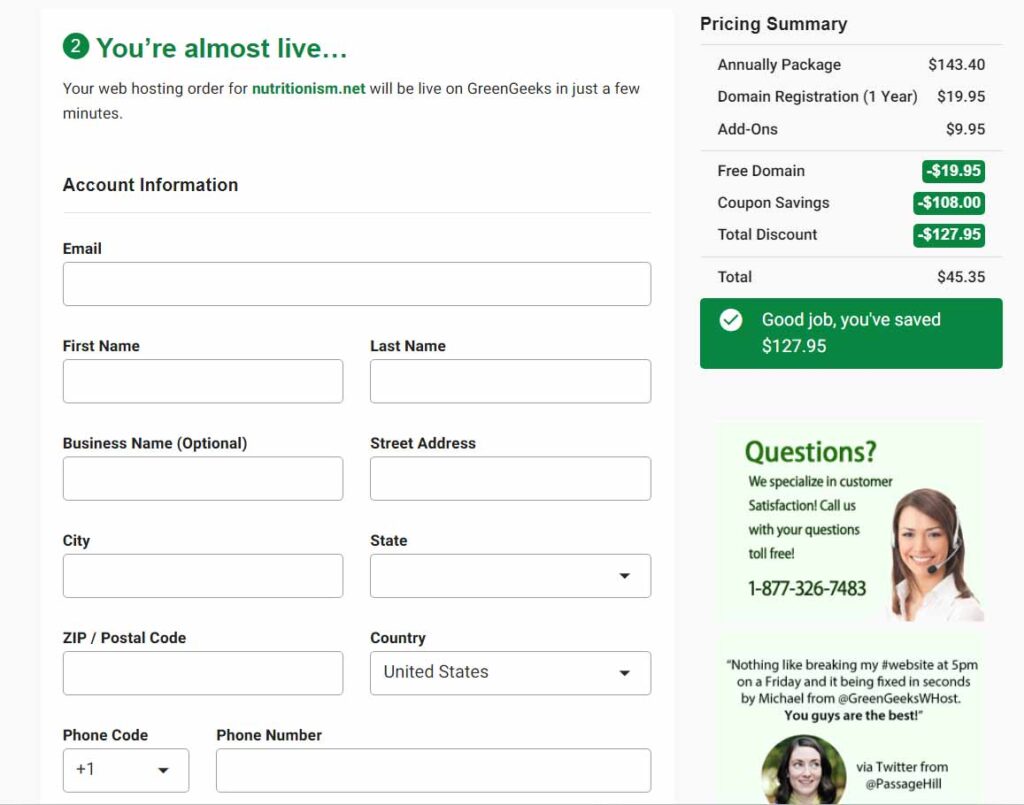
If your desired domain name is available, it will be automatically registered during the sign-up process. Alternatively, you can set up your domain name easily from the Domain drop-down menu.
To install WordPress, simply navigate to the hosting menu, select “Manage” for your site, and choose the one-click installation option.
4. Intuitive Interface
The GreenGeeks dashboard features clear and logical drop-down menus. From the home screen, accessing any feature or setting takes just a few clicks. As I explored the menus, I found everything exactly where I expected, which made it easy to adjust to the new interface.
5. Adjustable Spam Detection
One feature I found particularly useful was the adjustable spam detector, which GreenGeeks doesn’t heavily advertise. You can customize the sensitivity level from 1 (minimal screening) to 5 (maximum screening), depending on how strictly you want emails flagged as spam.
While higher settings may result in more false positives, I appreciated this straightforward and accessible email regulation tool.
6. Free WordPress Migrations
Site migrations can be challenging if you’re not experienced with them. Thankfully, GreenGeeks offers a hassle-free solution: their team handles WordPress migrations upon request, completely free of charge.
This service removes a major obstacle for beginners moving their sites to GreenGeeks from another host.
Performance
1. Solid Technical Performance
To ensure accurate performance testing, I loaded a professional site onto my GreenGeeks hosting plan. This site included images, text, and complex code for interactive elements typical of a promotional site.
I used GTmetrix to test speed, UptimeRobot for reliability, and Sucuri Load Time Tester for global performance evaluation.
Following our testing criteria, I conducted these tests using only GreenGeeks’ built-in optimizations like LiteSpeed Cache. Overall, GreenGeeks delivered excellent performance, with minimal to no downtime observed during reliability tests.
While performance showed slight variations during peak traffic, it rarely impacted visitor experience significantly.
GreenGeeks operates data centers in North America and Europe, allowing you to optimize speed by selecting the closest one to your target audience. For audiences primarily in the US, any US data center would suffice.
2. GTmetrix
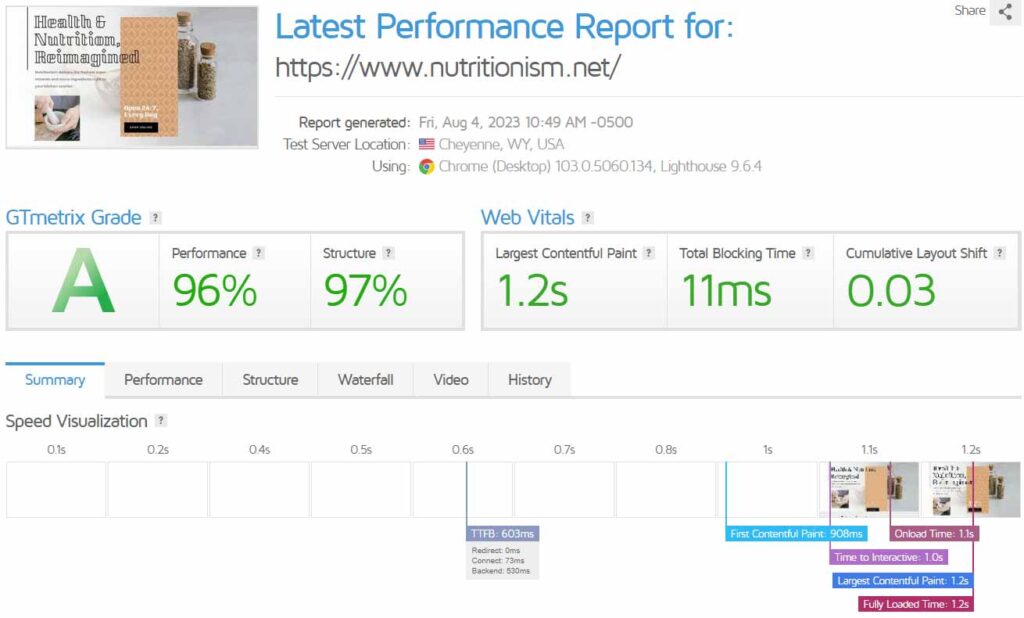
After setting up my site, I monitored local performance metrics using GTmetrix hourly for over a week. Both the GreenGeeks data center and GTmetrix location were in the continental US.
Analyzing the Fully Loaded Time, the test page consistently loaded in 1.2 seconds. While this may not match the sub-second loading times of some providers, it represents very good performance considering the cost.
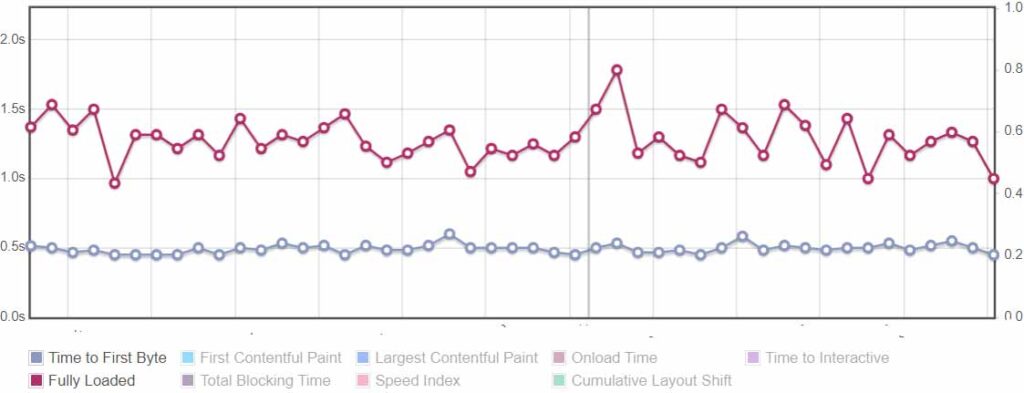
Each data point on the graph represents the average performance from eight tests conducted throughout the day. The majority of these tests consistently show full page loading times of under 2 seconds, which is a satisfactory result even during peak traffic periods.
3. Sucuri Load Time Tester
While GTmetrix tests performance from a single location, Sucuri Load Time Tester compares loading speeds across various locations worldwide.
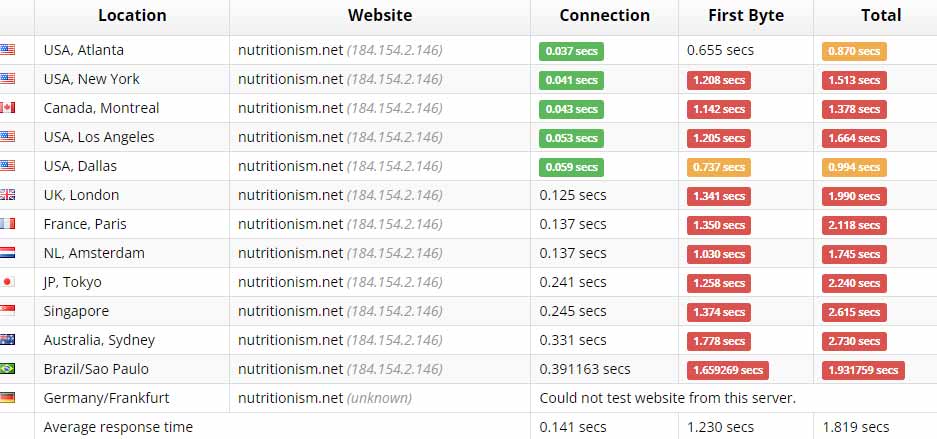
Overall, the results were surprisingly good. Despite some red highlights, loading times in locations across the Atlantic, like the UK and France, remained under 2 seconds. The 2.24-second loading time in Japan also falls within acceptable limits.
GreenGeeks’ performance started to decline noticeably in more distant locations such as Singapore and Australia, where load times approached 3 seconds. During periods of high traffic, it’s possible these times could exceed that threshold.
The absence of a built-in CDN becomes a concern for reaching these regions, but you can opt for a third-party service like Cloudflare to mitigate this issue.
4. UptimeRobot
I conducted a final test using UptimeRobot, focusing on reliability. Over nearly two weeks, I monitored my GreenGeeks site closely. I was thoroughly impressed by the results at the conclusion of the testing period.
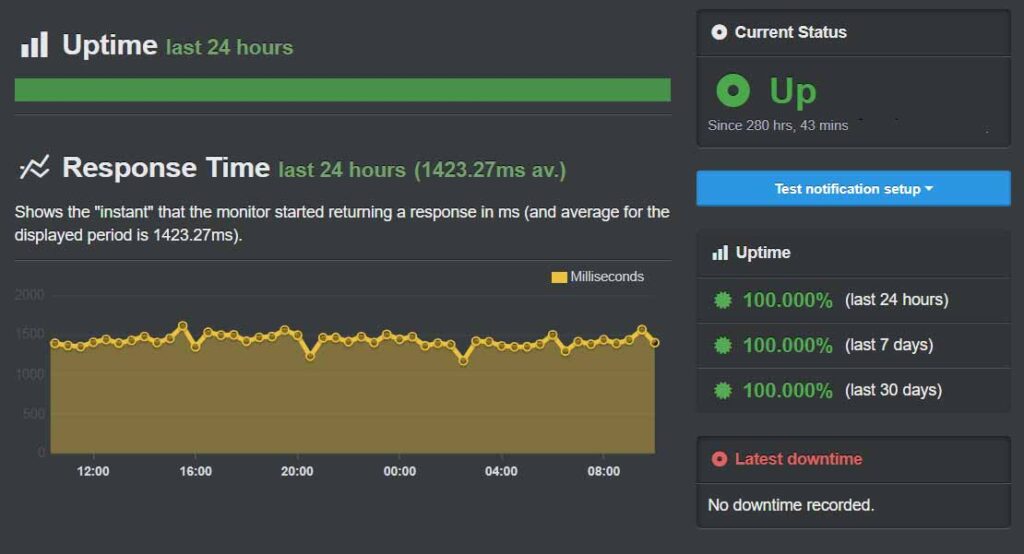
UptimeRobot recorded zero instances of downtime over a span of 280 hours. GreenGeeks offers proportionate compensation in service credits if downtime exceeds 0.1%. For example, 1% downtime in a month would result in a 1% credit of your monthly plan cost. While the compensation package isn’t very generous, GreenGeeks’ reliability ensures you’re unlikely to need it.
Support
Quick, Friendly Support on Multiple Channels
GreenGeeks provides comprehensive support options, including 24/7/365 live chat, ticketing, email, and phone support. What impressed me the most was the consistently quick response times—I always connected to a live chat representative within about a minute, and it rarely took more than 10 minutes to get the answers I needed.
When setting up my account, I also used phone support, which was efficient and helpful. Although phone support is unavailable from 12 AM to 9 AM daily, my experience was positive with short wait times and effective resolution of my issues.
I also tested GreenGeeks’ email support with a question about site optimization and received a same-day response redirecting me to their knowledge base. While the response wasn’t personalized, the provided blog post offered several practical tips to enhance performance.
The GreenGeeks knowledge base impressed me with its wealth of well-written articles. Although I didn’t find video tutorials, the articles feature demonstrative screenshots and clear text instructions that are easy to follow. Overall, I was highly satisfied with the depth and quality of content available in GreenGeeks’ knowledge base.
Pricing
Affordable, Functional Web Hosting
While GreenGeeks presents web hosting and WordPress hosting separately on its homepage, they are essentially the same service. The available plans—Lite, Pro, and Premium—cater to different needs. Lite has some resource limitations but is suitable for hosting one site.
The Pro plan offers excellent value with unlimited storage, email, and site capacity for just a slightly higher cost. In addition to shared hosting (which includes WordPress hosting), GreenGeeks offers VPS options.
Their managed VPS plans strike a good balance between price and features, highlighted by a generous 10 TB transfer limit. However, there are no lower-priced unmanaged VPS options available.
Payment options include monthly, annual, biennial, or triennial billing cycles, but GreenGeeks encourages starting with an annual plan. Annual billing eliminates setup fees and offers significant discounts compared to shorter-term plans, where no discounts are applied.
Upon completing my testing, I decided to utilize GreenGeeks’ money-back guarantee. I contacted their support via email to request a refund and received a prompt response asking if they could address any issues I had encountered.
After confirming my request for a refund, they promptly processed it, and I received the funds back in my account within three days.
1. GreenGeeks Web Hosting
| Plan | Storage | Bandwidth | Number of Site | Price | More Details |
|---|---|---|---|---|---|
| Lite | 50GB | Unlimited | 1 | $2.95 | More Details |
| Pro | Unlimited | Unlimited | Unlimited | $4.95 | More Details |
| Premimum | Unlimited | Unlimited | Unlimited | $8.95 | More Details |
2. GreenGeeks Reseller Hosting
| Plan | Storage | Bandwidth | Number of Site | Price | More Details |
|---|---|---|---|---|---|
| RH-25 | 60 GB SSD | 600 GB | 25 | $19.95 | More Details |
| RH-50 | 80 GB SSD | 800 GB | 50 | $24.95 | More Details |
| RH-80 | 160 GB SSD | 1600 GB | 80 | $34.95 | More Details |
3. GreenGeeks WordPress Hosting
| Plan | Storage | Bandwidth | Number of Site | Price | More Details |
|---|---|---|---|---|---|
| Lite | 50GB | Unlimited | 1 | $2.95 | More Details |
| Pro | Unlimited | Unlimited | Unlimited | $4.95 | More Details |
| Premimum | Unlimited | Unlimited | Unlimited | $8.95 | More Details |
4. GreenGeeks VPS Hosting
| Plan | Storage | Bandwidth | CPU | RAM | Price | More Details |
|---|---|---|---|---|---|---|
| 2 GB | 50 GB SSD | 10 TB | 4 vCPU | 2 GB | $39.95 | More Details |
| 4 GB | 75 GB SSD | 10 TB | 4 vCPU | 4 GB | $59.95 | More Details |
| 8 GB | 150 GB SSD | 10 TB | 4 vCPU | 8 GB | $110 | More Details |
Bottom Line
While GreenGeeks offers solid features and performance, its ease of use and strong support elevate its value. I found GreenGeeks to be straightforward and user-friendly, making it ideal for those new to web hosting.
Additionally, GreenGeeks’ leading environmental commitment is a significant bonus for environmentally-conscious users.