Getimg AI Review: Unveiling Features and Performance
Curious about Getimg? Let me break it down for you. Getimg is a tool that helps you create art. How does it work? Well, it’s got some cool features. But first, let’s talk about the price. Getimg offers different plans, depending on what you need. Now, let’s get into the nitty-gritty details.
With Getimg, you can make all sorts of art. Whether you’re into painting or digital design, it’s got you covered. Plus, it’s easy to use, even if you’re not a pro. One thing to keep in mind is that Getimg isn’t free. But hey, good things often come with a price tag. So, is Getimg the right fit for you? That’s for you to decide.
Ready to give it a try? Let’s see what Getimg can do for your art!
What is Getimg AI?
Getimg AI is a simple AI art creator that uses Stable Diffusion tech to make images from text prompts. It comes with cool editing tools like inpainting and outpainting, perfect for newbies. The platform is easy to start with, offering helpful tips and presets. It’s awesome for artists and designers who want to generate ideas fast.
You can even train your own AI models for faces, objects, or scenes. Plus, they’re hosted on getimg.ai and ready to use in a snap.
Features
Now let’s shed more light on what the platform has to offer:
1. Text to image Generator
At Getimg.ai, the standout feature is its text-to-image tool. This lets you describe images with words, and it creates them for you. There are lots of styles to pick from, like photorealism or cartoons, and over 60 AI models to choose from.
Using it is a breeze: you just write a detailed description, adjust some settings, and voila! Up to 10 images pop up. They’re handy for art, design, or just getting inspired.
You can also tweak stuff like resolution and sampler to get the perfect image. Remember, the better your description, the better the output. So, be clear about the kind of art you’re after when you’re typing in your prompt.
2. Image to image Generator
Getimg.ai has a cool tool called the image-to-image generator. It lets you take an original image and create a new, modified version. You can pick from different styles to make sure the new image looks just right.
You can tweak how much the new image resembles the original by adjusting settings like the strength parameter. It’s simple to use—just upload your image, type in a prompt, and the AI will handle the rest.
The best part? You can use this feature for free for up to 100 images each month. If you need more, there’s always the option to upgrade to a paid plan.
3. Impainting
Getimg.ai has a powerful inpainting feature that allows you to edit images with just text. With this tool, you can remove unwanted parts or fill in missing sections of an image.
For instance, if you want to get rid of a background object in your photo, you just upload the image to Getimg.ai and type a text prompt asking the tool to remove that object. The AI will handle the rest.
You can also use this feature to enhance old photos, making them brighter and more colorful. In short, Getimg.ai’s inpainting feature helps you perfect your images using only text commands.
4. Model Selection
Another great feature of Getimg.ai is model selection. This lets you pick from various AI models for generating images.
We’re currently in the SDXL era of AI models, with SDXL being the latest and greatest from Runway ML. It produces higher quality and more detailed images compared to older models, capturing subtle nuances in prompts. While models like Stable Diffusion v1.5 are still around, SDXL is becoming the new favorite due to its superior performance.
Getimg.ai keeps up with these advancements, making sure you have access to the latest technology. The platform offers a good mix of models, including options for realism, semi-realism, and anime styles. This includes popular and older models like Arcane Diffusion and Ghibli Diffusion.
5. Blend Images
Image blending is another key feature of Getimg.ai. It allows you to seamlessly merge uploaded images into a background, creating entirely new images instead of simple overlays. You can also adjust how strong the blending effect is.
For instance, if you upload two images, Getimg.ai lets you remove the background from one image and blend it into the other as the foreground. The blending process is smooth, and you can control the strength to keep both the foreground and background elements clear and distinct.
6. Dreambooth
Dreambooth in Getimg.ai lets you create your own AI models using uploaded images. With just 10 reference images, you can train the AI to generate images that perfectly match your ideas.
Unlike the image-to-image method, Dreambooth trains the AI with your input images to create personalized models, not just generate images from existing ones. It’s an excellent tool for making custom avatars, product shots, visualizing concepts, or even creating coloring pages. This feature empowers you to easily bring your creative visions to life.
Pricing
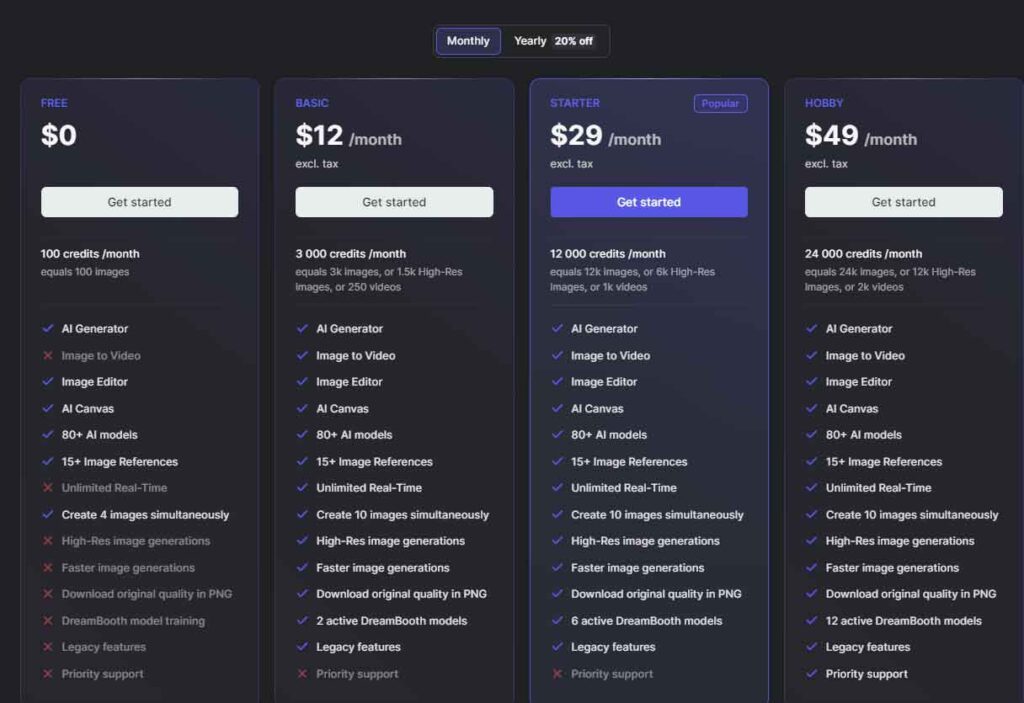
Getimg.ai offers different plans to suit various user needs. When you sign up, you get 100 free images or credits. Plans start at $12 per month for 3,000 images and go up to $49 per month for 24,000 images. Each image generation costs 1 credit, and the default setting allows you to generate 4 images at once.
Higher-tier plans are ideal for enterprise-level users who need extensive image-generation capabilities. Features like Hi-Res Generations, Faster Generations, DreamBooth, and Priority Support are reserved for paid plans, but the core functionality is available in the free plan. You can choose a plan based on how often you use the service and what additional features you need.
Here’s an overview of Hi-Res and Faster Generations features:
- Hi-Res: This stands for high resolution. It significantly improves image quality by upscaling and adding more detail to the images.
- Faster Generations: This feature allows you to generate multiple images at once, making it easier to test prompts quickly. Although it still takes a few seconds to generate images, the ability to create more images simultaneously speeds up the process.
Getimg AI Review – Verdict
With Getimg.ai, you get a range of powerful features for image generation and editing. You can blend images seamlessly or create custom AI models using Dreambooth, catering to various artistic needs. The tool offers flexible plans to suit different usage levels. While some features are limited to paid plans, you can still create up to 100 AI images per month with the free plan.
If you’re looking for an advanced AI image generator with capabilities like text-to-image and image-to-image, Getimg.ai is definitely worth considering!