Descript Review: Transforming Audio and Video Editing

Absolutely, publishing high-quality and actionable videos and podcasts is indeed an effective way to build authority in your niche, establish yourself as a thought leader, generate leads, and ultimately sell more digital products. By offering valuable content for free, you attract followers and subscribers who trust your advice and become part of your community. This trust naturally leads them to consider your products when you launch them.
Descript, an AI-powered video and audio generation and editing platform, can be a valuable tool for content creators looking to streamline their content creation process. With Descript, you can publish videos and podcasts without needing expensive equipment, showing your face, or using your voice. Everything is automated, allowing you to produce a significant amount of content quickly and efficiently, thereby increasing your influence and potential for selling products.
If you’re interested in leveraging the power of AI for your content creation needs, Descript could be worth exploring further. It offers a convenient solution for creating engaging videos and podcasts without the need for extensive technical skills or resources.
What Is Descript?
Descript is a comprehensive audio and video production suite tailored for content creators, offering a multitude of features to streamline content creation and editing. It serves as an all-in-one solution for recording or generating audio and video content, providing tools for efficient editing and preparation for publishing.
With Descript, you can record audio/video podcasts with multiple guests, create product tutorials, produce content for YouTube channels or online courses, and facilitate communication with peers. Its generative AI capabilities simplify content creation and editing, enabling tasks as easy as typing a text document.
For instance, Descript allows you to transform text scripts into HD audio files using AI voices or incorporate webcam or external camera recordings seamlessly into your text script scenes. Here’s a quick rundown of Descript’s key features:
- Record videos from various sources, including webcams, external cameras, or desktop screens.
- Generate AI voices from text for audio narration.
- Utilize the text editor to modify audio and video content.
- Leverage AI-powered editing features to expedite content transformation.
- Clone your voice to generate AI audio content.
- Host HD video and audio podcasts with multiple participants.
- Refine and enhance audio and video quality.
- Access stock visuals to enhance videos and presentations.
- Host and publish videos on a dedicated URL.
Whether you’re starting a podcast or seeking a tool to simplify audio/video publishing, Descript offers comprehensive functionality. However, its content creation and editing capabilities differ from traditional software like Camtasia or Screenflow. Therefore, understanding its strengths and limitations is crucial before integrating it into your business workflow.
In the subsequent sections of this article, we’ll delve into Descript’s core features and assess its main pros and cons to provide a comprehensive understanding of its capabilities.
Quick Verdict
In summary, Descript AI may not cater to professional designers or videographers seeking advanced editing features. However, it’s ideal for online course sellers, content creators, and digital marketers aiming to expand their influence and generate leads by leveraging artificial intelligence to scale video and podcast production.
If you’re curious about how we arrived at this verdict, delve into the full review to explore Descript’s features, pricing, and use cases in detail. Descript can do almost everything you want as a podcaster or video marketer.
Descript Features
1. Remote Podcast Recording
If you’re looking to host multiple guests in a video or audio podcast, you’ll find Descript’s remote recording feature invaluable. Recently, Descript partnered with SquadCast to enhance its podcast recording quality, enabling you to easily invite guests from any device using an invitation link.
Here’s how it works: Descript records the video and audio of each participant locally, ensuring that even a weak internet connection doesn’t compromise content quality, unlike Zoom call recordings. Once the recording is complete, Descript combines the files to create the final version of your show.
Moreover, Descript automatically transcribes your entire show with timestamps, allowing you to edit your content seamlessly within the Descript editor. In our testing with three participants, we found Descript’s remote recording feature remarkably user-friendly and efficient. Inviting guests and joining a call is straightforward, and the platform offers a clean interface with essential options like recording, screenshots, and mute controls.
For audio and video podcasters, this feature significantly reduces recording and editing time, allowing you to prioritize content quality over technical recording intricacies.
2. Video And Screen Recording
With Descript AI, you can easily record videos using your webcam or another camera. You can even use multiple camera angles and edit them together later using Descript’s editor. Now, let’s talk about the main recording features.
Descript lets you record videos in high definition with multiple tracks for both video and audio. This makes it simple to organize your files. Plus, you can choose to have your videos automatically transcribed, saving you time and effort.
Screen Recording
Descript is a great tool for creating product tutorials, walkthroughs, and how-to videos. It’s perfect for explaining things and making presentations. It works like Loom but offers more flexibility, especially for communicating asynchronously with clients or team members.
When you record your desktop screen, your camera view shows up in a corner. This feature allows you to switch between different views smoothly, which is handy for recording online course lessons. In the editing stage, you can add annotations and highlight specific parts of the video to make it clearer and easier to understand.
Webcam/External Camera
Descript makes it easy to record videos using your webcam or external cameras, capturing high-definition quality for your online courses, workshops, YouTube videos, and more.
You can even combine footage from multiple cameras, seamlessly syncing them to appear as one file. Descript keeps the audio and video tracks separate, making editing a breeze.
Plus, it automatically identifies speakers during transcription and highlights their content separately, streamlining the editing process.
Video From Text Script
Descript isn’t exactly like Pictory, which generates videos using AI, but it does help you turn your text scripts into videos quickly. Here’s how:
- First, you can copy and paste your script into Descript and use its AI voices for narration.
- Then, you can add stock visuals from Descript’s library or your own computer to bring your script to life.
Using Descript’s video editor, you can include various visual elements and transitions to make your video more captivating.
Overall, Descript is a powerful tool for online content creators. Whether you’re making videos for your membership community, social media, or online courses, Descript has the tools you need to create engaging content.
3. Auto transcription
Let’s dive deeper into the transcription feature provided by Descript. Descript offers automatic transcription for audio and video files upon uploading to your account. This feature works for webcam recordings, podcasts, and screen recordings as well.
The accuracy of Descript’s transcription is impressive. In our tests, the transcription of an audio file was nearly flawless, even with subpar recording quality. There were only a few errors in some words.
Moreover, Descript automatically identifies multiple speakers and highlights their respective parts. This functionality enables users to create separate scenes and audio tracks for each speaker, making the editing process easier. However, it’s worth noting that this feature may occasionally mix up different speakers.
Descript currently supports transcription in 22 languages, including Spanish, German, French, Italian, Portuguese, Malay, Turkish, Polish, and more. Once your content is transcribed, you can effortlessly edit and repurpose it into various content formats using Descript’s editor.
4. Robust AI Voice Generator And Podcast Editor
Descript offers impressive AI voice generation capabilities, allowing you to transform simple text into engaging podcasts, audio tracks for videos, or even audio versions of your written content. It provides various AI voices with different emotions and pitches to suit your content’s tone.
Now, let’s delve into two unique tools Descript offers:
- Overdub: This feature enables you to clone your voice for content creation. Descript only needs a short sample of your voice to replicate it. Once processed, you can use it to generate AI audio from any text.
- Regenerate: Taking AI voice generation a step further, Regenerate allows you to remove and replace parts of your content by regenerating audio. Unlike regular AI voice generators, Descript automatically adjusts the tone of your AI voice, seamlessly replacing awkward sentences with more accurate language.
This feature is particularly useful for podcasters, as it enables them to modify content without the listener noticing. For instance, you can use Regenerate to rephrase something a guest said in your podcast’s final version. Similarly, you can replace a segment of your content without altering the voice and ambiance of your audio file.
5. AI Powered Video Editing
Descript’s standout feature is its powerful editing capabilities. Despite its user-friendly interface, it boasts advanced audio and video editing features driven by AI, enabling you to overhaul your content entirely.
What’s remarkable is how simple it is to use – it feels as intuitive as editing a text document or crafting a PowerPoint presentation. For instance, by adding a slash “/” before a sentence, you can instantly create a separate scene where you can incorporate new visuals and effects.
Here are some of the main features of Descript’s content editor.
Text Based Video Editing
We’ve covered how Descript transcribes your audio or video content. Most of the editing takes place in the text editor, where you can add or remove parts of your video by editing the script.
For instance, if you want to remove a sentence from your video, you won’t delete that scene or frame from the video track. Instead, you’ll simply navigate to that part of your text script, select the text, and hit backspace. Just like that, it’s removed from your video or audio.
If you wish to replace that part with different dialogue, you can utilize the overdub or regenerate options we’ve discussed earlier.
Audio/Video Enhancements
Likewise, whether you’re recording a remote podcast or a video using your webcam, Descript enhances the quality by providing audio and video filters. For example, if you recorded your video using your laptop’s built-in microphone, Descript will automatically enhance your voice, improving its quality to sound like HD audio.
The same goes for video content. Even if you’ve used a standard webcam, Descript enhances and refines its quality, making it more polished and presentable.
AI powered Audio Editing
Descript offers some useful audio editing tools that streamline the editing process and save time. The first one is the filler-word remover. When activated, this feature automatically detects and eliminates filler words like “umms” and “aahs” from your audio.
This is particularly valuable for podcasters who conduct interviews, as live conversations often contain these filler words, unnecessarily lengthening the content.
The second feature is the silence detector. Once again, Descript automatically identifies extended periods of silence (which you can customize) and allows you to remove them from your script with a single click.
Effects And Transitions
Descript offers a range of features to enhance your content’s visual appeal. You can incorporate attractive transitions between scenes, apply filters to improve picture quality, and include various visual elements such as emojis and objects to make your content more engaging.
One standout feature in Descript is the eye contact effect. If you notice while recording a video that you’re not looking directly at the camera, simply enable this effect, and Descript will automatically adjust your eye position, maintaining better engagement with your audience.
AI-Powered Green Screen
Descript offers the option to change your background even if you don’t have a green screen handy. Through generative AI technology, it creates realistic video backgrounds that align with your content’s style and theme, providing a polished look without the need for additional equipment.
Video Templates
Descript simplifies the video creation process with its video templates. By activating a template, replacing the text, setting the sequence, and applying desired effects, you can quickly produce high-quality videos from text.
In essence, Descript’s robust editor serves as a central hub where you can make professional-grade audio and video enhancements to your content, regardless of your previous editing experience.
6. Social Media Clips
Have you ever noticed those eye-catching social media clips with highlighted captions, progress bars, and other engaging graphics? With Descript, you can easily transform your regular videos or podcasts into captivating clips for platforms like TikTok, YouTube, Facebook, and Instagram.
Simply select a template for your social media clip, add your content, and publish directly to your chosen platform.
This feature allows you to create various types of content, including audiograms, highlighted captions, animated visual elements, shared screen videos, and more, making your content stand out and grab attention on social media.
7. Audio/Video Publishing
When you’ve crafted your video or podcast using Descript, there are several ways to share it with your audience. You can easily push it directly to your favorite social network or podcast directory.
Alternatively, you can host it on a dedicated page with a unique URL provided by Descript. This URL serves as the landing page for your content, which you can promote through email marketing, social media posts, or advertising campaigns.
If you opt to host your content on Descript, you can also embed it in your blog posts and landing pages, enhancing their engagement without adding any extra server load.
Descript Use Cases And Examples
We’ve described Descript’s core features in detail. Now, let’s discuss some of the ways you can use it as a content creator.
1. Audio and Video Podcasts
Descript is widely utilized for creating audio and video podcasts, offering robust features for interviewing remote guests and producing high-quality content to distinguish yourself in your niche. Moreover, with its AI-speech feature, you can initiate a podcast without utilizing your own voice or face in the content, opening up creative possibilities for content creation.
2. Online Course Content
As an online course creator, Descript offers numerous functionalities to enhance your course content. For instance, you can utilize its screen recording feature to film video lessons or provide transcripts of the lessons to your course participants.
Additionally, you can refine your content by applying Descript’s audio and video filters, as well as leveraging its video templates to create polished and engaging course material.
3. Product Demos and Tutorials
If you’re an affiliate marketer or aiming to create product tutorials for your customers, Descript is an ideal solution. It provides highly engaging screen recording features that allow you to zoom in on specific sections of your screen, highlight parts, and incorporate your voice or AI speech in the background, enhancing the overall tutorial experience.
4. Viral Social Media Content
Crafting viral social media content is a powerful strategy for boosting brand awareness, generating leads, and driving sales. Descript offers audiogram templates and social media content design tools that enable you to transform ordinary videos into captivating short-form content, significantly increasing their potential to go viral and amplify your brand’s reach.
5. Repurposing Audio, Video, And Text Content
Absolutely, repurposing content is essential for maximizing your return on investment, and Descript simplifies this process tremendously. For instance, if you have a blog post, you can utilize Descript to transform it into a video or an audio file using its AI-speech feature.
If you possess a video, Descript can transcribe it for you, enabling you to enhance your website’s SEO rankings or extract quotes for social media snippets. Likewise, for lengthy videos, Descript facilitates the creation of multiple social media clips.
Moreover, if you own a long audio podcast, you can convert it into shorter clips using audiogram templates and share them with your audience. With Descript, the possibilities for repurposing content are limitless, enabling you to efficiently extend the reach and impact of your content across various platforms.
Descript Pricing
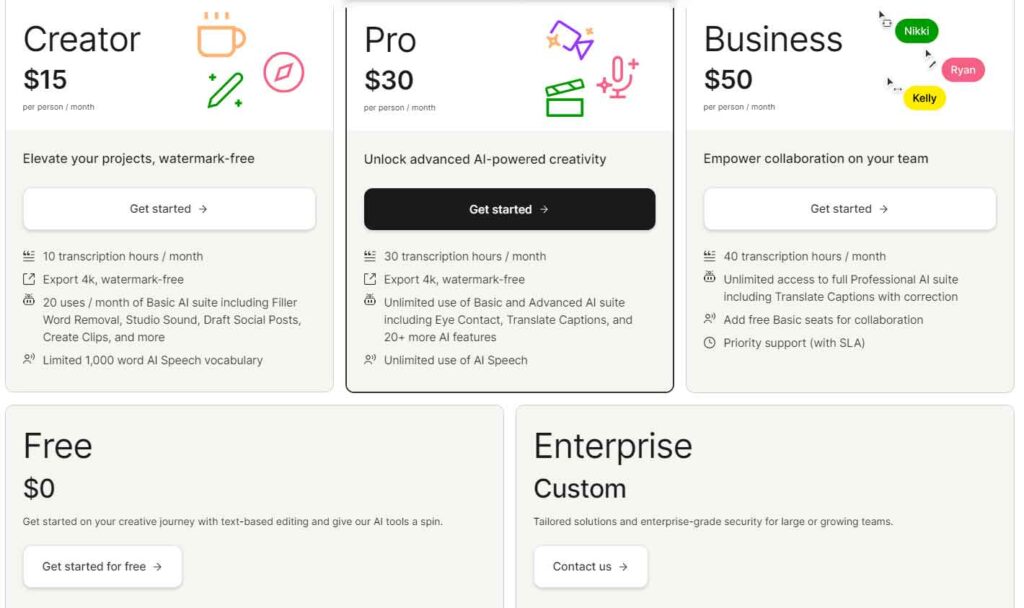
Descript’s pricing structure is notably user-friendly, setting it apart from similar products in the market. Regardless of the subscription plan, users have access to all core features, which is a rarity. While Descript offers a free option, it is limited to 1 hour per month. Nonetheless, this provides ample opportunity to experience its capabilities and make an informed decision about upgrading.
Premium plans start at $12 per month, with pricing adjustments based on the addition of more team members. For professional content creators heavily focused on video and podcasts, the Pro plan is the most suitable option. Priced from $24 per month, this plan allows for transcribing and editing up to 30 hours of content, alongside unlimited access to nearly all Descript features.
Considering its feature set, Descript’s pricing plans are undeniably competitive within the industry.
Descript’s Pros & Cons
Pros
- Has excellent text-based video editing features
- Video editor is packed with features tailored for content creators
- Includes detailed tutorials that walk you through all its core features
- User-friendly and easy-to-use
- AI features like eye contact and filler word detector are quite accurate
Cons
- It’s not entirely web-based and requires you to install a desktop app
- It doesn’t have a mobile app
- It does not offer virtual avatars/presenters
- Speaker detection in auto transcription isn’t as accurate as Descript’s website claims. We have to manually fix incorrect detection several times
Verdict
While Descript isn’t flawless, it’s undeniably an impressive product. We wouldn’t recommend it for professional designers or videographers seeking advanced editing and content processing tools.
However, Descript strikes a fantastic balance of convenience and features for content creators, online course sellers, and digital marketers aiming to scale their businesses with videos and podcasts. Moreover, its pricing plans enable users to explore and utilize its features without straining their budgets.
If you’re planning to launch a podcast or produce more videos in the near future, Descript is the ideal tool to consider.