Cloudways Review: Is It the Ultimate Cloud Hosting Solution?

It’s been six months since I moved my website to Cloudways hosting, using a DigitalOcean server. After thoroughly testing the platform, I’m ready to share my experience in this Cloudways hosting review.
Initially, I faced several challenges with my former web host, Namecheap. I’ll explain what problems I encountered, why I decided to switch, and the performance changes I’ve noticed since moving to Cloudways.
I’ll also share this site’s traffic performance before and after the migration. This comparison will show how important good hosting is for online business success.
If you’re thinking about switching to a new web host but haven’t made up your mind yet, this review might help you make an informed decision. You can also learn more about Namecheap’s cloud hosting and how it stacks up against Cloudways.
Let’s dive into the details. Discover an in-depth Cloudways review, exploring its performance, ease of use, support levels, pricing, and features.
What is Cloudways?
Cloudways is a managed cloud-hosting service that provides fast, feature-packed hosting plans with round-the-clock customer support. Acting as an intermediary, Cloudways connects users with major cloud infrastructure providers like Google, Amazon, and DigitalOcean.
By simplifying the hosting process, Cloudways makes it easy to manage web applications on cloud infrastructure, appealing to beginners and those who want hassle-free hosting without dealing with server management.
Designed for digital marketing agencies, small businesses, e-commerce websites, and marketers, Cloudways offers fast-loading page times, 99.99% uptime, dedicated workflows, powerful web analytics, and advanced web security with Cloudflare Enterprise add-ons.
Reasons Why I Switch to Cloudways
There were several reasons why I needed a better web host. For years, my blog’s traffic wasn’t a big issue for the hosting plan I had. However, as the blog grew in traffic and audience, I needed higher hosting specifications.
I upgraded to a higher plan on my former host with more RAM and CPU power (0.75 Core and 768 MB CPU), but this didn’t solve all my hosting problems. Here were some of the issues I faced:
- Frequent downtime or connection timeouts.
- Annoying HTTP error 429, indicating too many requests.
- Slow page speeds and poor website performance for most users.
- Denied access to install another caching mechanism (the host had its built-in cache function).
- Poor Google Core Web Vitals (CWV) scores.
My former web host wasn’t terrible; the server speed was average. However, it needed to be faster and more reliable. A faster-loading website provides a better user experience and helps with search engine rankings.
Despite my efforts to improve the CWV, nothing seemed to work. The inability to install cache plugins like WP Rocket, FlyingPress, or Perfmatter further compounded the problem.
I decided to switch to another host to resolve issues with CWV, page speed, downtime, and overall performance. I considered a few options like WPX, Kinsta, and Cloudways. After reading numerous positive reviews about Cloudways’ hosting service and support in online communities, I decided to give them a try.
1. Ease of Use
User experience is at the heart of Cloudways’ mission, evident in their intuitive dashboard design and easy access to essential hosting features. From signing up to launching your first server, every step is made simple, though support is just a click away if needed.
Here’s a quick walkthrough of the process:
1. Sign Up: Complete the signup process on Cloudways.
2. Launch Server: After signing up, launch a server.
3. Deploy Application: Choose and install your web application, such as WordPress, Laravel, PHP, Joomla, WooCommerce, a custom app, or Magento.
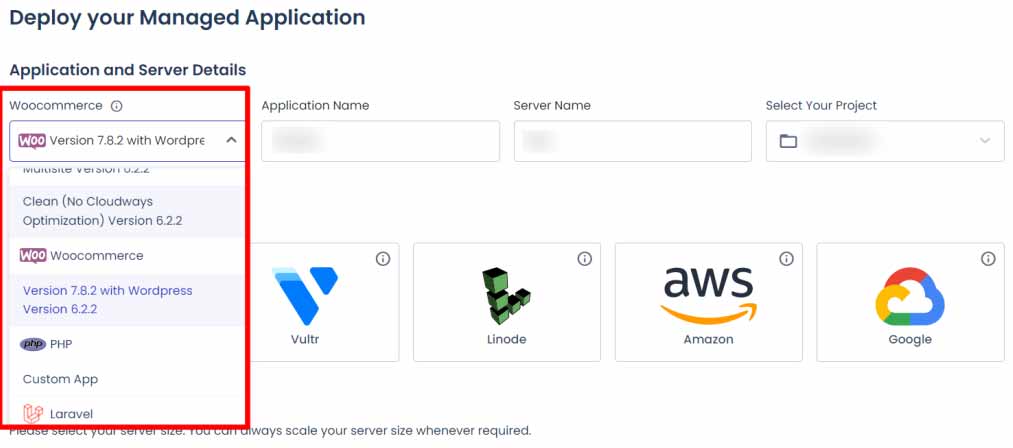
(Note: As of now, Cloudways no longer offers Vultr and Linode cloud servers for new customers.)
- Consider the following when setting up:
- Your preferred cloud server provider
- The web application software you want to use
- Server location and size
- Billing method (hourly or monthly)
Once you’ve made your selections, click the “Launch Now” button at the bottom right corner. Your server and web application will install, and you can start working on your website.
The Cloudways dashboard primarily has two main functions, each leading to various settings:
1. Server Management
2. Web Application Management
This structure makes it easy to manage both your server and your web applications efficiently.
2. Server Management
You can also hover over the side panel to reveal various functions within your Cloudways dashboard.
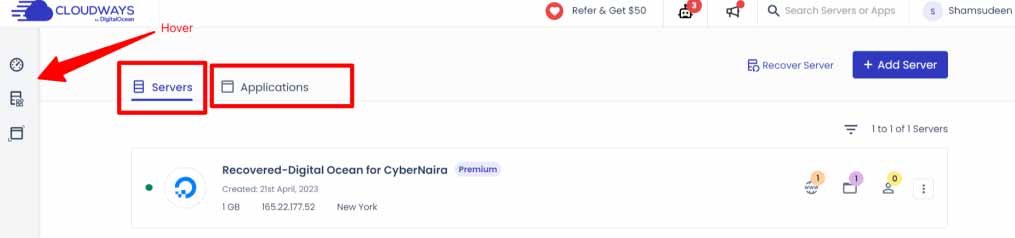
To access server-side management settings, click on the “Servers” tab. This will open up the settings, allowing you to manage details such as:
- Backup
- Vertical Scaling
- Security
- Public IP
- Master Credentials (SFTP and SSH access details)
- Server Username and Password
- Service Management (Apache, MySQL, Varnish, NewRelic, Nginx, etc.)
- SMTP Configuration for outgoing email delivery
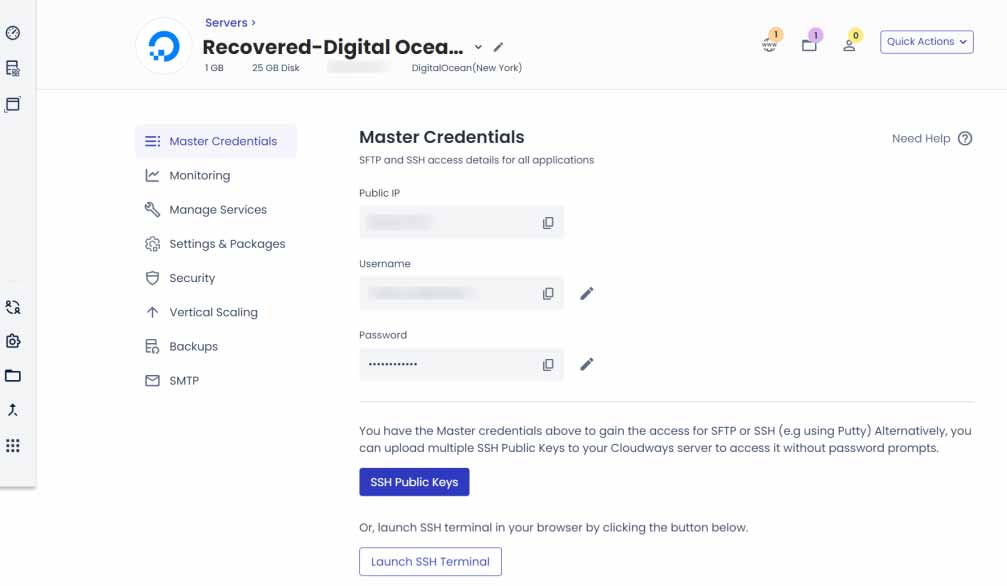
These settings enable you to manage all aspects of server-level tasks and operations. Additionally, you can have multiple servers within a single Cloudways account, with no imposed limit. This flexibility and ease of use ensure that you can efficiently manage your hosting environment.
3. Web Applications Management
The “Application” tab in your Cloudways dashboard lists all the web applications deployed on your Cloudways servers. For example, if you have WordPress sites on a server, they will appear under this tab.
Clicking on an application in the list opens its settings and configurations. Here, you can access various application-level settings such as:
- Application Admin Dashboard Details (username and password)
- Staging Management
- Domain Name Management
- Web Application Security Features
- SSL Certificate
- Cloudways Migration Tools
- Launching Database Access
- Cloudflare Enterprise
- Backup and Restore Tools
- Setting Up Cron Jobs and Optimizing Performance
- Deployment Sites via GIT
- Application Settings
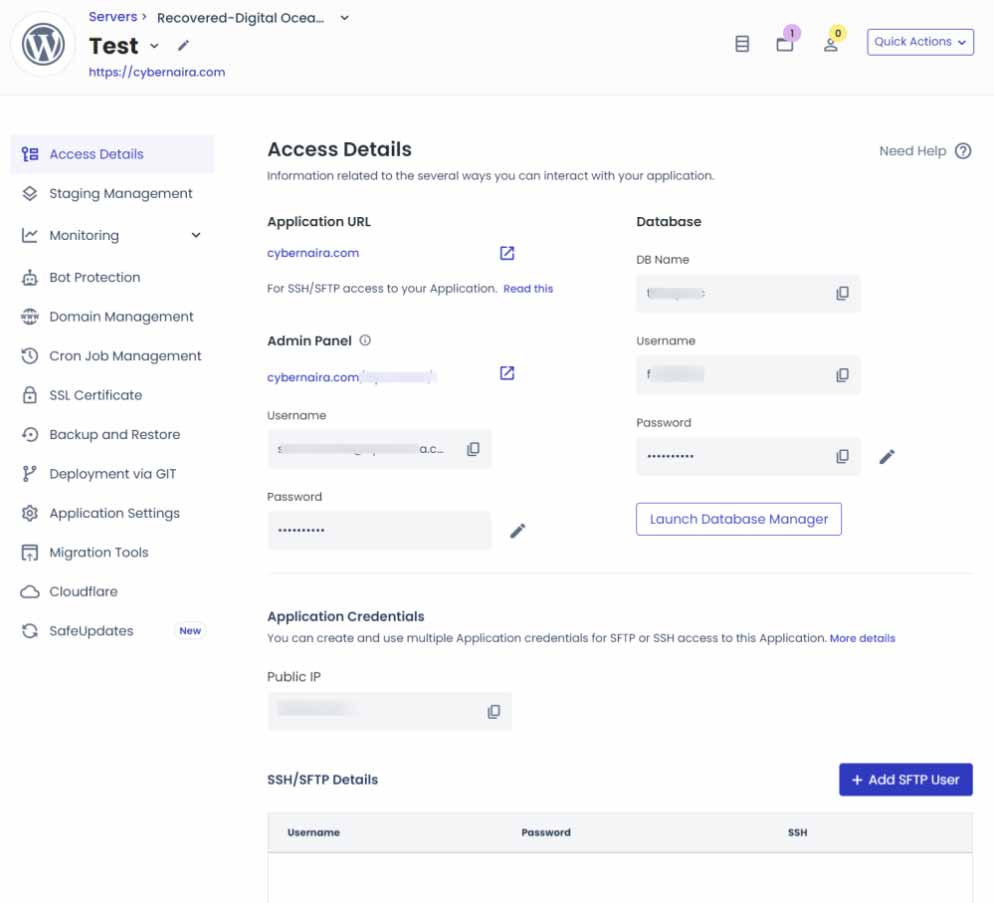
This section allows you to manage and configure all aspects of your web applications, ensuring they run smoothly and securely.
Other notable Functions
Cloudways offers additional settings for managing your hosting account and adding more features. If you hover over the side panel, you can access various other functions.
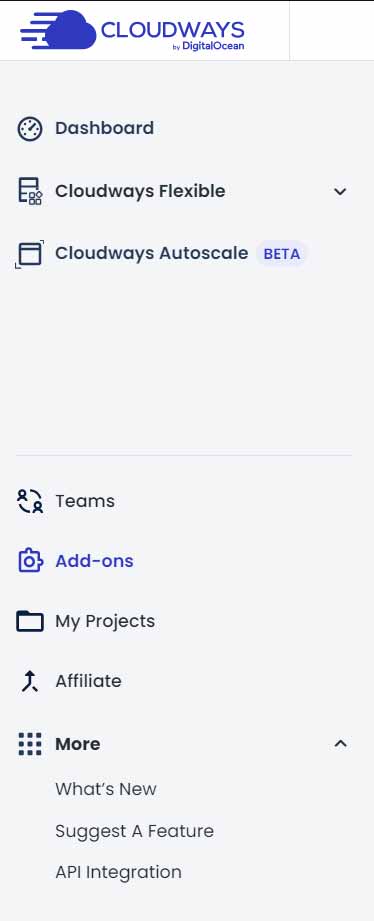
In this section, you can find Cloudways add-ons, which include:
- Elastic Email
- Free Astra Pro Theme License for one year
- Rackspace Email
- Application Migration
- DNS Made Easy
- Cloudflare
- Support Add-on
- SafeUpdates
These add-ons enhance your hosting experience by providing extra tools and services to improve your website’s performance and management capabilities.
Cloudways Key Hosting Features
Cloudways takes a special approach to cloud hosting by combining its own infrastructure with important partnerships. This helps them provide smooth and efficient hosting services. From managing your dashboard to running applications on your web servers, Cloudways has a well-thought-out setup.
Let’s break down the web stack that Cloudways uses on your server.
1. Server Stacks
For users who started with Cloudways after November 2nd, the server is built on **Debian 11** (codenamed “Bullseye”), which is a free and open-source Linux operating system. This forms the base for all Cloudways server setups.
Here’s a simple breakdown of the key components in your Cloudways server stack:
- NGINX: This is an open-source web server known for its stability and performance. It also handles load balancing and comes as the default server for Cloudways.
- Apache: You also have access to the Apache web server and its standard modules. If you need additional modules, you can request them.
- Varnish: This tool speeds up the delivery of content by caching and accelerating dynamic web content.
- Memcache: It improves database performance by caching various elements like database queries, sessions, API data, images, files, and metadata.
- PHP: Cloudways servers use PHP 8.1 by default. You can update to a newer version through the settings page if needed.
- Database: MariaDB 10.5 is the default database server for Cloudways. If you want to understand why Cloudways prefers MariaDB over MySQL, you can read more in their blog.
You can manage all these core services from the server settings page. Here, you can restart, turn off, or activate any service, but be careful not to disrupt your site.
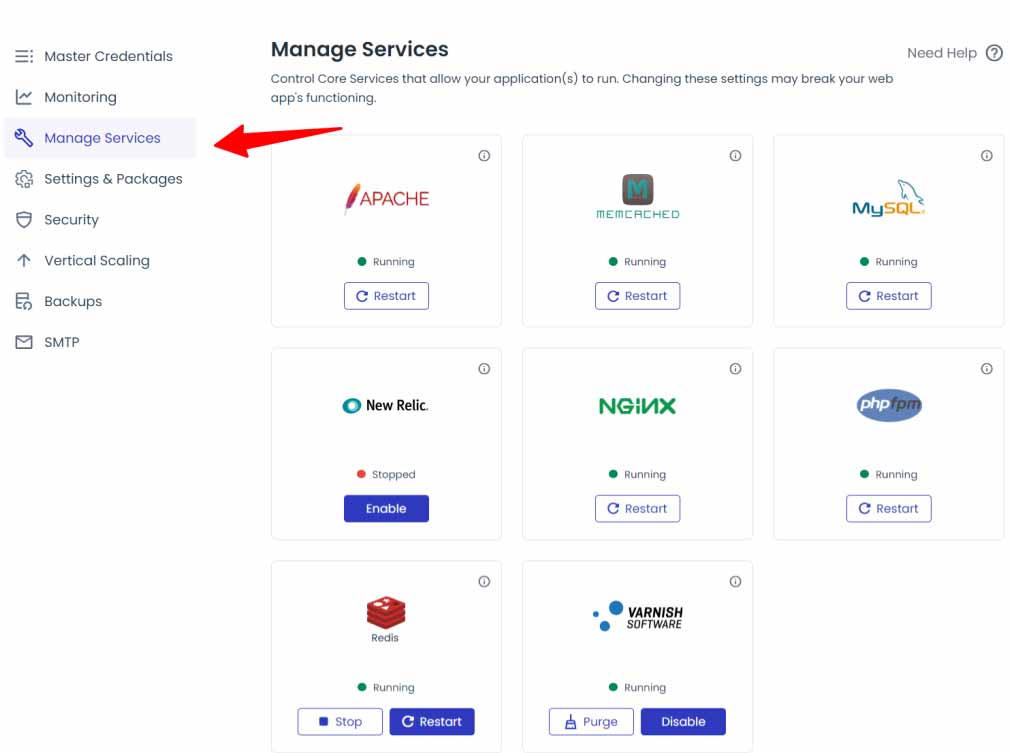
If you’re unsure about what a service does, it’s best to leave it as is to avoid any issues.
2. Cloudways Autonomous
Cloudways has introduced a new hosting option called **Cloudways Autonomous**. This is designed for high-traffic WordPress sites, offering a hassle-free experience by handling all hosting and management tasks for you.
Cloudways Autonomous is powerful—it automatically adjusts server resources based on your website’s traffic and needs. This means it scales up or down as required, so you don’t have to worry about server issues or performance management.
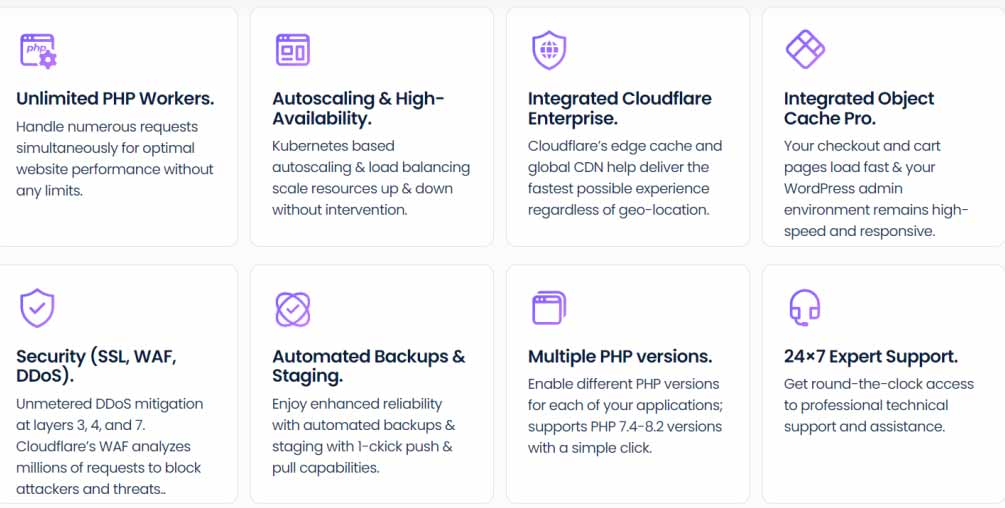
Cloudways Autonomous hosting uses advanced technology to keep your WordPress site running smoothly. It ensures that your site is online 99.99% of the time, even if there are hardware or server problems.
You don’t need to worry about manually adjusting server resources like CPU, RAM, or storage when traffic spikes or during viral campaigns. The system automatically handles these changes for you, so you can avoid constant monitoring.
Cloudways uses Kubernetes infrastructure, which guarantees reliable performance and can support many visitors at once without causing downtime or errors. The hosting plan is designed to handle high traffic efficiently, maintaining speed and performance.
Additionally, Cloudways integrates with Cloudflare Enterprise, offering top-notch security features, global CDN services, and Edge page caching. This makes it a great choice for large eCommerce sites, marketing firms, and any business that wants to focus on growth without managing server details.
For more information on pricing and traffic limits, check out the Cloudways pricing page.
3. Cloudflare Enterprise
Let’s explore how Cloudflare Enterprise enhances your WordPress site’s performance, security, and user experience on Cloudways. When you host with Cloudways, you get access to Cloudflare Enterprise at a special rate.
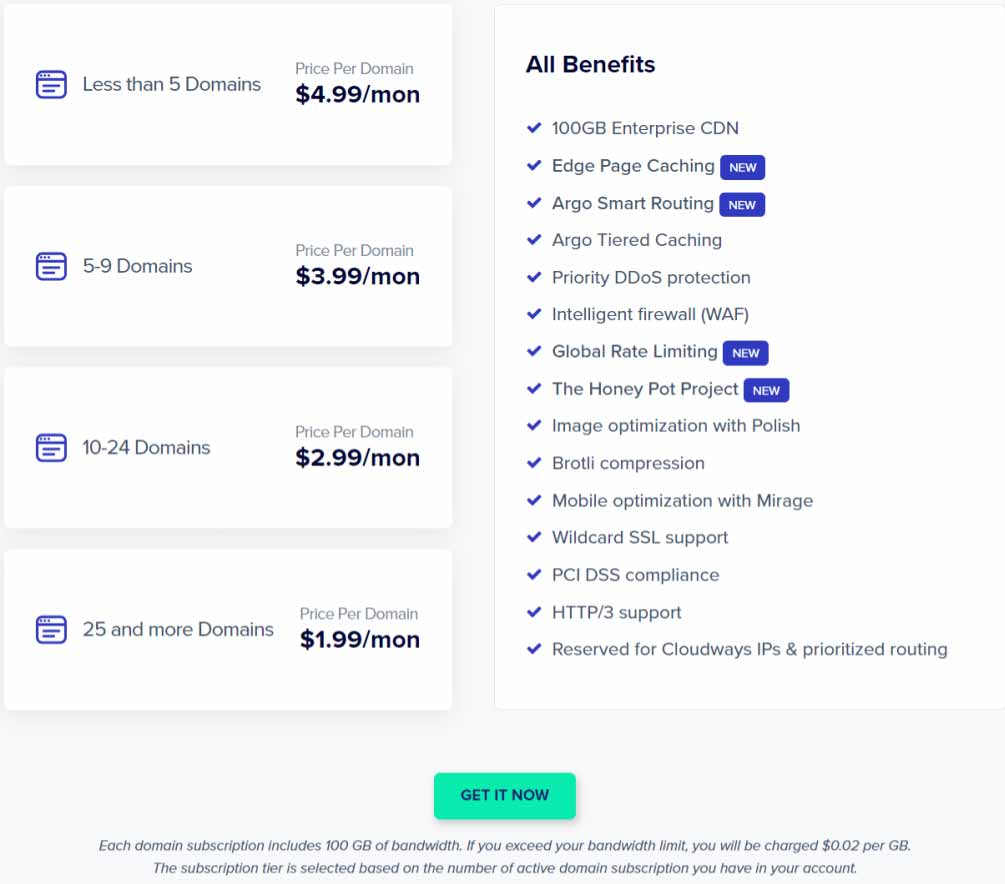
Cloudflare Enterprise brings several key features to the table. First, it includes Algo Smart Routing, which optimizes the paths your site data takes. This premium feature helps speed up your site. You also benefit from strong protection against DDoS attacks and a Web Application Firewall (WAF), which blocks harmful traffic before it reaches your server.
Another major advantage is Edge Page caching. This feature caches your entire website at Cloudflare’s edge servers, boosting performance by improving the Time to First Byte (TTFB) across all locations.
Additionally, Cloudways integrates Cloudflare’s global CDN, which speeds up content delivery worldwide. The service also includes Polish + Mirage for image optimization. This means images are compressed, resized, and optimized for mobile devices. WebP format images are served when possible, and exit gif data is removed.
Brotli compression is another feature that enhances your site’s performance. Plus, Cloudflare Enterprise adds ScrapeShield and file minification settings for extra layers of performance and security.
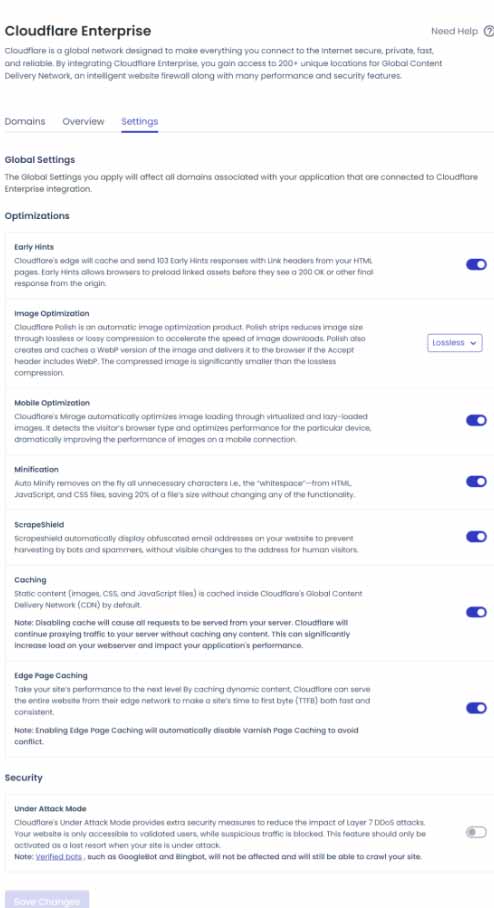
These applications and settings are always active on your server, ensuring top-quality hosting around the clock, every day of the year.
4. Object Cache Pro
Another big advantage of hosting with Cloudways is the free inclusion of Object Cache Pro. Normally, this premium WordPress caching plugin costs $95 a month, but you get it at no extra charge with your Cloudways hosting.
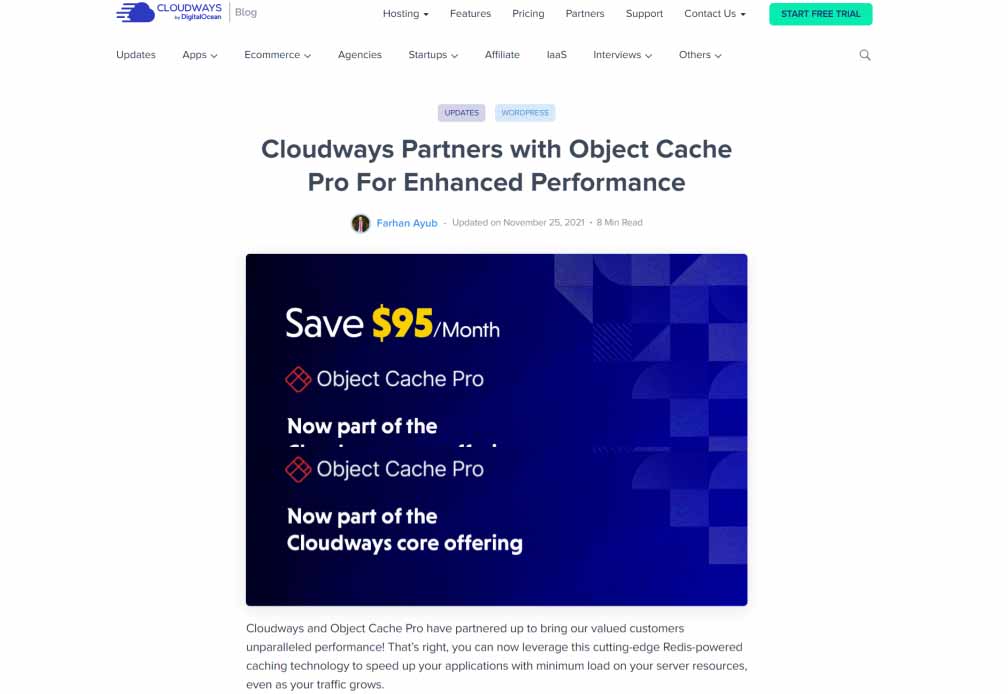
Object Cache Pro is a powerful plugin that outperforms Redis in cache performance and resource efficiency. It’s designed to work seamlessly with WooCommerce, Jetpack, Yoast SEO, and WordPress itself.
This plugin enhances the experience for logged-in users by dynamically generating pages, optimizing database queries, and speeding up WordPress. The best part? You don’t have to pay extra for Object Cache Pro with Cloudways. It’s included for free with every Cloudways plan of 2GB server size or larger.
For WordPress users on Cloudways, this is a major benefit. It ensures your site is optimized with top-notch caching, compression, and performance technologies.
5. Cache Performance and Security Analytics
If you need to check how your Cloudflare add-on is performing, Cloudways provides a detailed dashboard. This dashboard shows you insights into cache performance and security analytics.
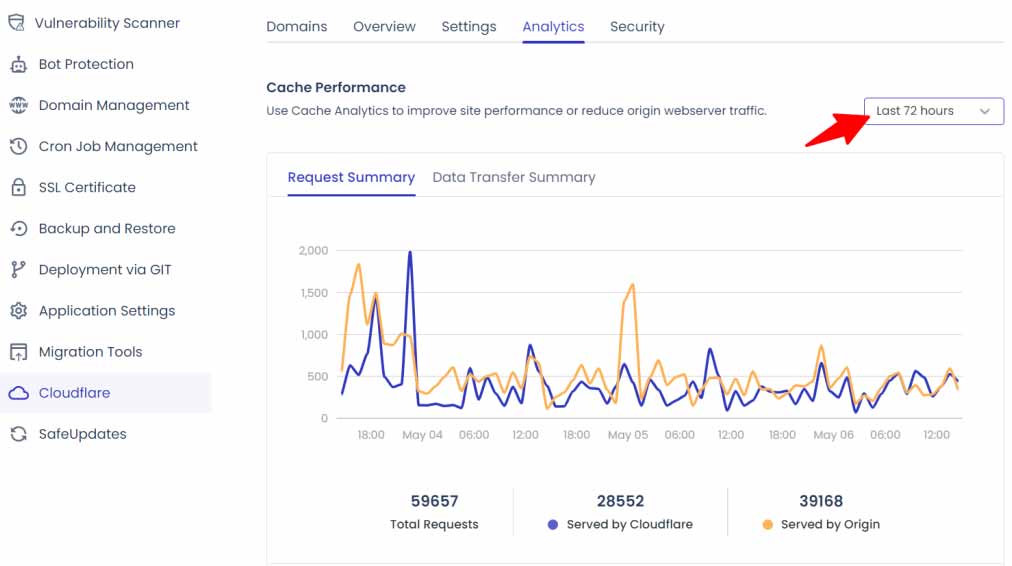
You can track important data about your website’s cache performance using Cloudways’ dashboard. This includes:
- Total requests served
- Number of requests handled by Cloudflare
- Requests served directly by your origin server
- Cache Status Overview, which includes categories like Revalidated, Missed, Expired, Dynamic, Hit, and None
You can also view requests by various sources, such as file type, device, URL path, country, and Edge Status codes. For security events, you can check the top incidents by source, including IP addresses, user agents, URL paths, hosts, countries, and HTTP methods.
For security analytics, Cloudways provides error logs that help you analyze:
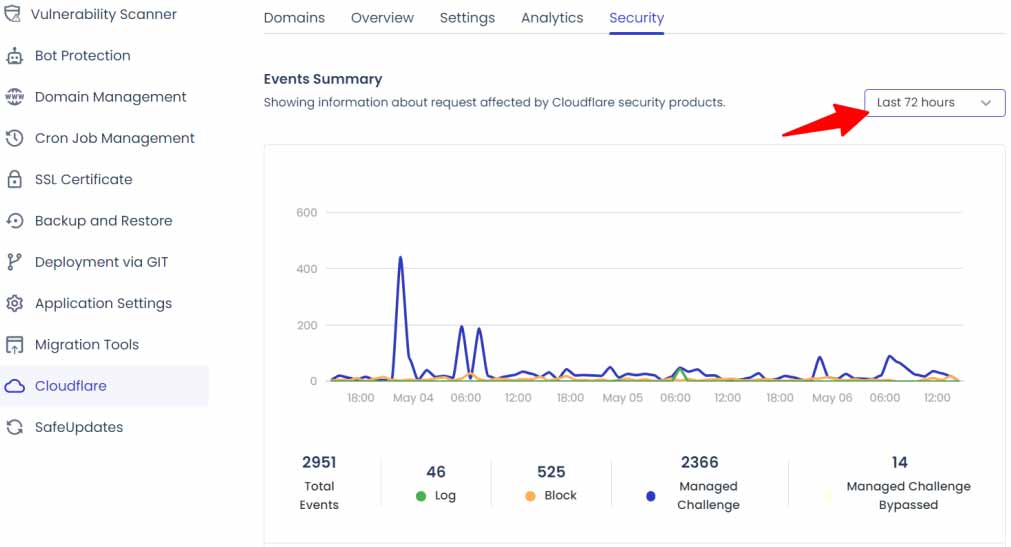
- Total security events
- Managed challenges
- Blocked events
- Events by services, such as custom rules, rate limits, security levels, and managed rules
Currently, you can only access data logs (cache and security analytics) for the past 72 hours. To keep this review focused, I’ll briefly mention other notable features:
- Automatic server-side backups and one-click on-demand restores at $0.033 per GB for off-site backups.
- Free Breeze plugin for caching and performance.
- SMTP server setup for transactional emails.
- DNS management.
- Client billing feature for agencies.
- Staging sites.
- Free SSL certificate.
- HTTPS/3 support with Cloudflare.
- Team collaboration and access control.
- Website monitoring and analytics.
- Cloudflare’s global CDN.
- Bot protection with Cloudflare Enterprise.
- SSD storage.
- Auto-healing to fix server issues automatically.
- Dedicated server resources.
- Redis installation for enhanced performance.
- Phone support with the premium support add-on.
- Proactive application and server monitoring.
- WAF (Web Application Firewall).
- DDoS Protection with Cloudflare Enterprise.
- One-click installation for multiple apps or WordPress sites.
- Access to over 60 global data centers.
- Option to switch between PHP versions.
- Support for MySQL and MariaDB.
And more.
Hosting Performance Test
Unlike many reviews that use test or demo sites, this one is based on real experience with a live production site. I’ve used this site to grow my business and earn a living. It has over 250 published articles, thousands of images, 14 active plugins, and various other resources.
So, this review isn’t about experimental data—it’s about a site I actively manage. If you recall the hosting issues I faced with my previous provider, you’ll know what I was dealing with.
After moving to Cloudways, the first noticeable change was faster web pages. This improvement came even before I installed WP Rocket or activated Cloudflare Enterprise features.
Using the DotCom Web Server Performance Testing tool, I tested from four different locations and found a server load time of just 450 milliseconds.
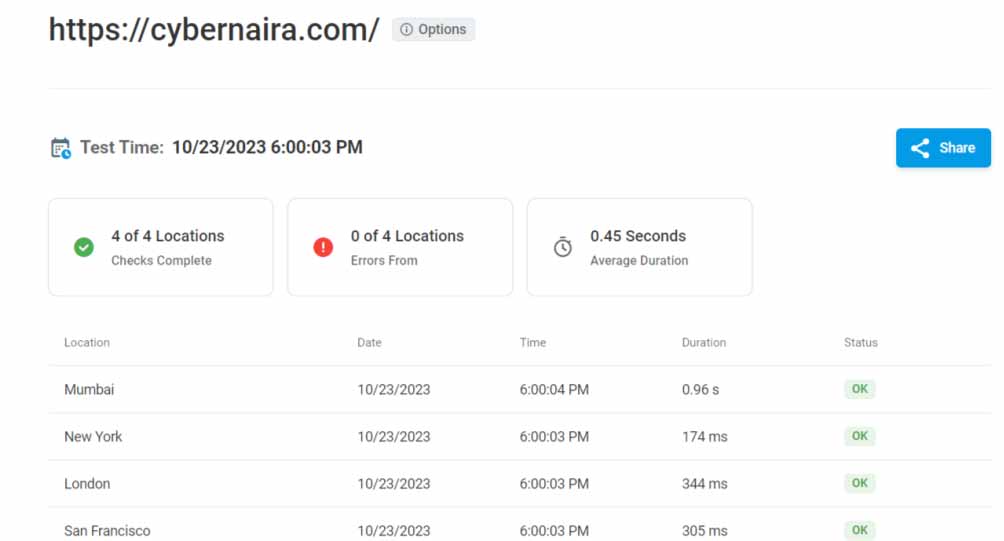
My previous web host had an average load time of 790 milliseconds, which was already fast. However, Cloudways is even quicker.
One major improvement has been the elimination of “HTTP 429 too many requests” errors. Since moving to Cloudways, I haven’t encountered this issue again. Additionally, connection timeouts are a thing of the past—users no longer see timeout error pages when they visit my site.
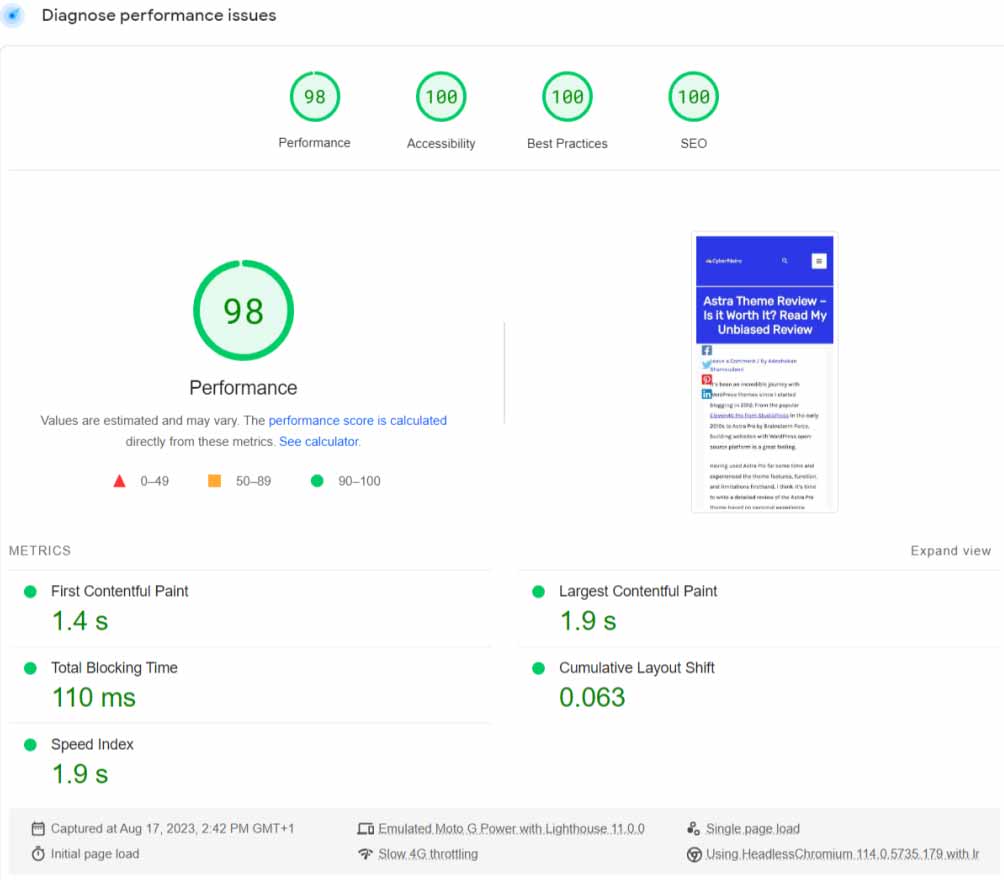
Most importantly, my web pages now score well on Google Core Web Vitals testing tools. Here’s how the site performs on PageSpeed Insights and GTmetrix for mobile tests:
Mobile Test
Desktop Result
Cloudways Support
Support is definitely one of Cloudways’ strengths. They provide responsive, timely, and helpful assistance whenever you need it.
However, it’s important to understand what Cloudways support covers. They offer free 24/7 live chat for all customers, but the level of support you receive depends on your plan. Cloudways has three support levels:
- Standard
- Advanced
- Premium
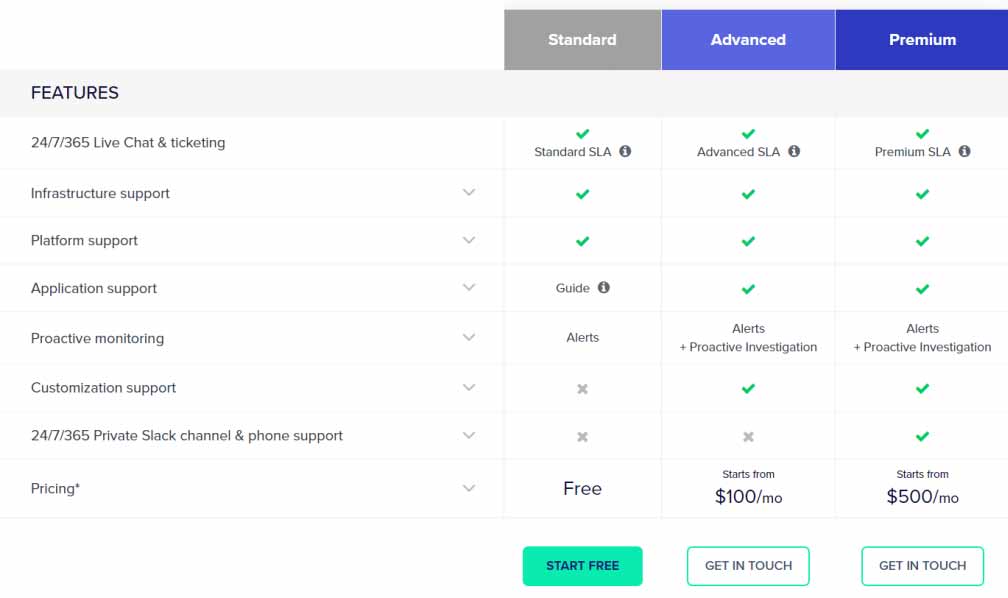
For example, Standard support doesn’t cover issues with applications or proactive problem-solving for server or stack-related problems. Standard users can get help with servers and the Cloudways platform but not with applications installed on the servers.
If you have a problem with your WordPress application, like issues with your blog itself, Cloudways will usually direct you to their guides and resources. For server or platform issues, you’ll receive comprehensive support.
Sometimes, Cloudways does provide application support even for Standard users, and I’ve experienced quick assistance in such cases.
If you need more detailed application support, you can check the additional costs for Advanced and Premium support add-ons on Cloudways’ site.
Cloudways Pricing
Cloudways’ DigitalOcean server offers the most affordable hosting plan. It starts at just $11 per month or $0.0153 per hour, with 1GB of CPU, 25GB of SSD storage, 1GB of RAM, and 1TB of bandwidth.
Digital Ocean
- Starting Price: $11/month
- RAM: 1GB
- Processor: 1 Core
- Storage: 25GB
- Bandwidth: 1TB
Amazon Web Services (AWS)
- Starting Price: $38.56/month
- RAM: 2GB
- vCPU: 2
- Storage: 20GB
- Bandwidth: 2TB
Google Cloud
- Starting Price: $37.45/month
- RAM: 1.75GB
- vCPU: 1
- Storage: 20GB
- Bandwidth: 2TB
One of Cloudways’ advantages is its flexible billing options. You can choose between hourly or monthly billing, depending on your needs. Hourly billing is great for short-term projects or marketing campaigns, while monthly billing is ideal for long-term use.
For a complete breakdown of Cloudways’ hosting plans and pricing, check their pricing page.
Things to Know About Cloudways Hosting
Certain things about Cloudways services might improve your user experience or help you prepare to use the platform.
1. File Manager/cPanel
Cloudways doesn’t offer a built-in file manager like cPanel’s File Manager or Softaculous. If you’re used to these tools, you’ll need to connect to your server using an SFTP program like Filezilla.
You can find your master credentials for SSH or SFTP servers on your server settings page. If you need the connection port for your server, just ask Cloudways customer support.
2. Email Hosting
Cloudways doesn’t offer email hosting, but I don’t see this as a problem. I recommend keeping your website and email hosting separate. This way, if you ever need to migrate your web hosting, you won’t have to reconfigure your email client with a new domain name server, which can be a hassle.
I use Private Email with Namecheap for my email hosting. Although Cloudways provides options like Rackspace and Elastic Email at reasonable prices, I haven’t used them, so I can’t speak to their effectiveness.
3. Billing Structure or Plan
Cloudways does not offer fixed pricing or annual billing plans. Instead, you’re billed monthly based on your resource usage at the end of each month.
Cloudways will send you an invoice during the first week of the following month. It’s important to pay this invoice promptly to avoid service interruptions. If you don’t pay on time, your application may stop working.
To prevent any disruptions, make sure to fund your account before the due date and keep enough funds to cover your expected hosting costs.
Who Should Use Cloudways?
Cloudways offers excellent hosting services, high server performance, and great value for money. However, it might not be the best choice for everyone.
If you’re new to website hosting and find technical terms like CNAME, DNS, or A record confusing, Cloudways might not be suitable. It’s designed more for growing businesses and agencies that need high-quality hosting and support.
Cloudways also doesn’t handle domain registration, so if you need both domain and hosting from the same provider, you’ll need to register your domain with another registrar and point it to Cloudways.
For those looking for managed cloud hosting that’s cost-effective, Cloudways is a strong option. It offers unlimited website hosting, automated daily backups, and robust cloud infrastructure from top brands without the high price tag.
If Cloudways doesn’t seem right for you right now, consider alternatives like Hostinger, HostGator, Domain.com, Nexcess, LiquidWeb, or shared hosts like Namecheap.
Cloudways Pros and Cons
Before signing up for Cloudways hosting, let’s discuss its pros and cons in this Cloudways hosting review.
Pros
- Easy to use
- Affordable
- You’re in control – choose your server and size.
- Pay-as-you go. Pay only for what you use.
- Free automatic backup.
- Flexible billing option
- Free trial periods. No credit card is required.
- Dedicated support system.
- Unlimited website hosting.
Cons
- It needs a bit of a learning curve.
- Does not come with an email account.
- No domain registration services.
Conclusion
If you’re looking for managed cloud hosting, Cloudways is worth checking out. They offer a range of affordable plans suitable for both beginners and businesses with more complex needs. Whether you’re just starting out or running a critical website, Cloudways provides options that fit various business sizes and requirements.