A2 Web Hosting Review: Is It the Best Choice for You?

A2 Web Hosting is a top choice worldwide, ideal for both bloggers and large online stores. It offers dedicated email hosting and is especially favored for WordPress sites. Picking the right hosting service is key for improving your site’s SEO. Delve into our A2 Web Hosting review, exploring its speed-optimized servers, reliability, customer support, and pricing. Discover whether A2 Hosting is the right solution for your website and business requirements.
A2 Hosting Overview
| ⭐ Rating | 4 |
| 💲 Price | Starts From $2.99/mo |
| ⚡ Speed | 1.74 sec |
| 🕒 Uptime | 99.95% |
| 🔗 Free Domain | ❌ No |
| 🌎 Data Centers | USA, Europe, Asia/Singapore |
| ➡️ Migrations | 1 |
| 👨💻 Support | Live Chat, Phone, Email |
| 🛡️ Security | Free SSL, Malware Protection, DDoS Protection, 2FA, Firewall |
| 🔄 Backups | 30 days |
| 💰 Money back guarantee | 30 Days |
| 🔥 Coupon Code | Get extra discount with my link |
What is A2 Web Hosting?
A2 provides various Linux-based hosting options, from shared to managed WordPress, VPS, reseller, and dedicated plans. They guarantee 99.9% uptime and offer continuous support. Their Turbo plans are known for their speed, suitable for busy blogs and large online shops. Each plan includes SSL, site migration, and enhanced security, but doesn’t include extras like domain registration and unlimited websites offered by some competitors
How Does A2 Hosting Work?

A2 Hosting is known for its fast servers and reliable performance across various hosting plans: shared, VPS, dedicated, and reseller. Whether you’re starting a personal blog or managing a large business site, A2 has a suitable plan. Their ‘Turbo Servers’ promise pages load up to 20 times faster than usual, boosting website speed and SEO.
Signing up with A2 is easy: choose a plan that fits your site’s needs for space and traffic. They provide a simple control panel (usually cPanel) to manage files, databases, and emails. A2 also offers one-click setups for WordPress, Joomla, and Drupal, simplifying website creation.
A2 Hosting prioritizes security with free SSL, automatic backups, and strong firewalls. Their support team is available 24/7 to help with any technical questions.
Who Should Use A2 Hosting (and Who Not)?

A2 Hosting is flexible and suits many users, but some features may appeal more to certain groups than others. Let’s categorize them into Who Should Use A2 Hosting and Who Might Not.
Who Should Use A2 Hosting?
Small and Medium-Sized Businesses: A2 Hosting’s reliable performance and scalable options cater well to SMBs aiming for growth and stable online operations without the expense of dedicated servers.
- Bloggers and Developers: Offering developer-friendly tools and one-click installs for popular CMSs like WordPress, A2 Hosting provides flexibility and easy site management, ideal for bloggers and web developers.
- E-commerce Sites: With strong uptime and robust security features including free SSL certificates and server firewalls, A2 Hosting is perfect for e-commerce businesses needing to safeguard customer data and ensure site accessibility.
- High-Performance Websites: Sites requiring fast loading times to enhance user experience and SEO benefit from A2 Hosting’s Turbo Servers, significantly boosting site speed.
Who Might Not Benefit from A2 Hosting?
- Large Enterprises: If you’re a big company with very specific hosting requirements or handle a lot of website traffic, A2 Hosting’s standard server options may not meet your needs. You might prefer a dedicated enterprise solution that offers more customization and can handle higher traffic volumes.
- Users Needing Specialized Hosting Services: Certain niche websites that need special hosting setups, such as Windows-based hosting or customized environments for specific applications, might not find A2 Hosting’s Linux-based options suitable.
If you’re looking for a reliable hosting service for your online activities, A2 Hosting offers a comprehensive solution. Whether you’re already running an online business or planning to start one, consider trying A2 Hosting today.
A2 Hosting: How to Set It Up?
Choosing A2 Hosting is easy and doesn’t require any technical expertise. Its solution is user-friendly and intuitive, allowing you to set up an account and purchase a domain with hosting in just 10 minutes.
For further simplification, let’s walk through a 5-step guide together. I’ll show you each step clearly and in detail.
1. Choose Your Plan

A2 Hosting offers different plans to suit various needs, ranging from basic shared hosting for small websites to robust dedicated servers for larger ones. Each plan includes different storage capacities, speeds, and features such as backups and site transfers.
If you’re starting out, the shared hosting plan is affordable and adequate. For larger websites with higher traffic, consider VPS or dedicated hosting for more performance. Choose a plan that matches your website’s size and expected growth.
2. Buy Your Domain
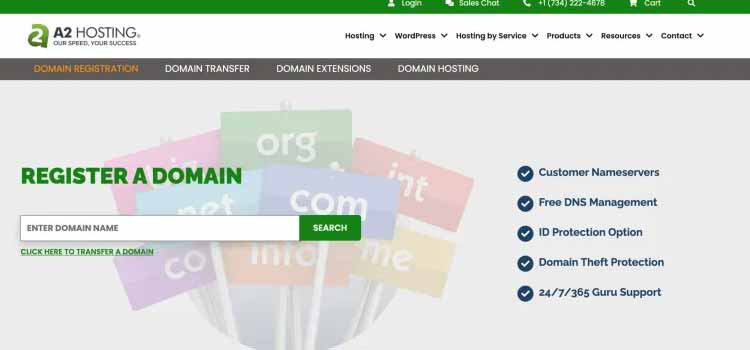
When you’re ready to buy a domain with A2 Hosting, you can do it all on their platform. Begin by searching for your desired domain name to check availability. If it’s available, you can buy it right away. A2 Hosting also offers options for domain privacy and protection to keep your personal information safe. Once you complete the purchase, the domain is yours, and you can start setting up your website.
3. Configure Your Plan
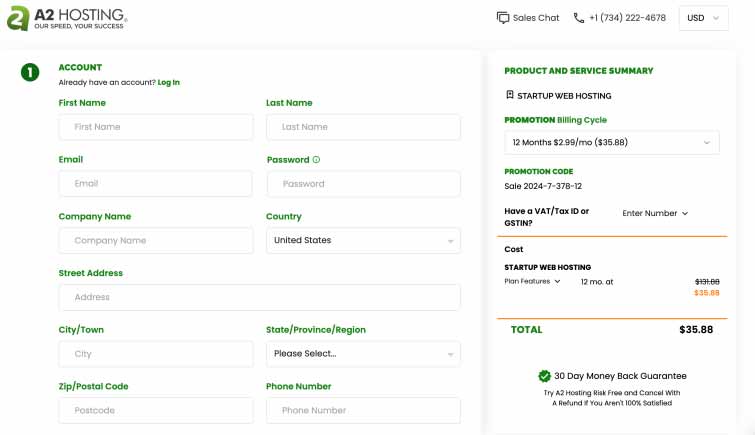
Once you’ve picked your A2 Hosting plan, the next step is to customize it for your needs. This includes choosing your server location, deciding on the operating system, and adding features like SSL certificates or CDN services for faster content delivery. But don’t worry, it’s straightforward.
You’ll also set up your preferred control panel, such as cPanel or Plesk, to manage your website’s backend easily. During this setup, you can adjust resources like RAM and storage based on your website’s requirements. Finally, review your choices to ensure they match what you need before completing the setup. That’s it!
4. Create a Dedicated Email Address for Your New Domain
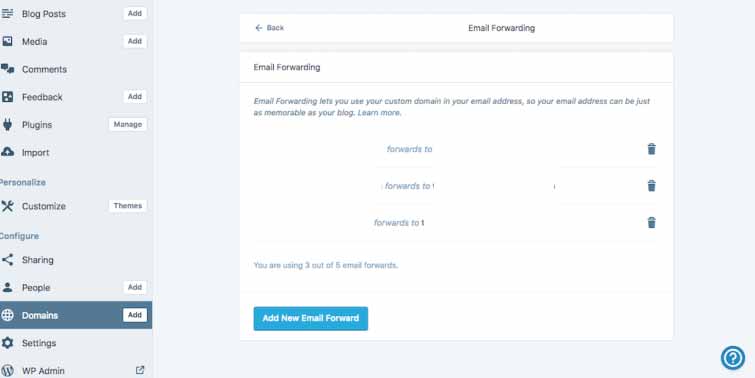
After setting up your domain with A2 Hosting, creating a dedicated email address is straightforward. First, access your hosting control panel and find the email section. Here, you can create a new email account.
Choose a username and domain (like contact@yourdomain.com), and set a secure password for the account. Once created, you can start using this professional email for business communications, which boosts your brand’s credibility and consistency.
You can create as many email addresses as you need. Just remember, having more may incur additional costs for extra server space.
5. Log in to WordPress to Make the Final Steps
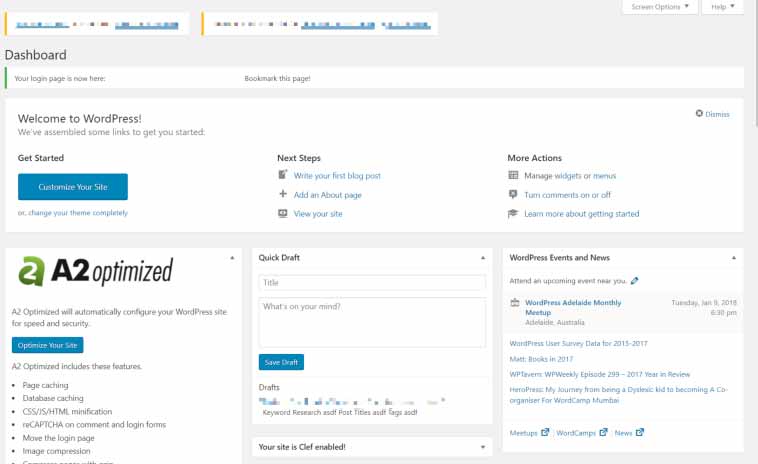
Once your hosting and domain are set up, the final step is to log into WordPress and start building your website. First, if WordPress isn’t already installed, you can do it quickly through your A2 Hosting control panel with just a click.
After installation, you’ll receive your login details via email or directly in your control panel. Use these credentials to log into your WordPress dashboard.
In the dashboard, you can choose themes, add plugins, and begin creating content for your site. This dashboard is where you manage everything related to your website, allowing you to customize and update it as needed.
4 Step Guide How to Log in to the WordPress Panel
- Install WordPress: Access your A2 Hosting control panel and locate the WordPress installation tool, often found under “Softaculous Apps Installer.” Click “Install,” and WordPress will be set up on your domain.
- Receive Credentials: After WordPress is installed, you’ll receive your login credentials. These may appear on your control panel or be sent to your email. Keep these details safe.
- Access Your WordPress Dashboard: Open your web browser and visit your domain (e.g., www.yourdomain.com/wp-admin). Enter the username and password provided during installation to log in to your WordPress dashboard.
- Customize Your Site: In the dashboard, you can customize your site’s appearance by selecting themes under “Appearance” and installing plugins through the “Plugins” menu. Start adding content by creating new posts and pages. Use the tools available to personalize your site and prepare it for visitors.
A2 Hosting Most Important Features
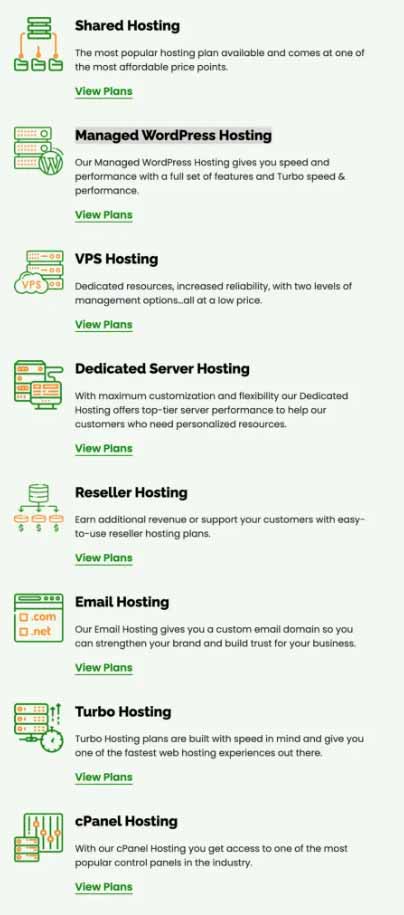
1. Shared Hosting
Shared hosting is a type of web hosting where multiple websites share resources like memory, CPU power, and disk space on a single server. It’s a cost-effective option suited for small businesses, blogs, and personal websites with moderate traffic and simpler needs.
It’s popular for beginners because it keeps costs low while providing essential features to operate a website.
2. Managed WordPress Hosting
Managed WordPress Hosting is a service where the host manages all technical aspects of running a WordPress site. This includes security, speed optimizations, daily backups, WordPress updates, and scalability.
It’s ideal for users who want to focus on their content and business without dealing with the technical upkeep of their site. This hosting type is perfect for WordPress website owners looking for a hassle-free solution with strong support.
3. VPS Hosting
VPS Hosting, short for Virtual Private Server hosting, divides a physical server into several virtual servers. Each user on a VPS gets their own partitioned server with dedicated resources like CPU, RAM, and disk space.
4. Dedicated Server Hosting
Dedicated Server Hosting gives a website its own server, ensuring maximum control, performance, and security. Unlike shared or VPS hosting, all server resources are exclusively dedicated to your site.
This makes it perfect for high-traffic websites, large businesses, and those needing strict compliance for handling sensitive data.
5. Email Hosting
Email Hosting is a service that operates email servers, enabling you to manage email accounts using your own domain (e.g., simon@simongorlak.com).
It’s independent of website hosting, so you can host emails on a dedicated server, enhancing reliability and performance without impacting your website’s hosting.
This service is ideal for businesses looking to maintain a professional image with branded email addresses, ensuring secure and efficient communication. It’s definitely one of my favorite features!
6. cPanel Hosting
cPanel Hosting includes the cPanel control panel interface, which is widely used for managing web hosting environments. It lets users easily handle domains, create email accounts, organize web files, and manage databases through a user-friendly dashboard.
This hosting type is great for beginners in web hosting because it simplifies complex server tasks with its easy-to-use graphical interface. Whether you’re setting up a website, managing FTP accounts, or installing software, cPanel makes these processes accessible and manageable.
A2 Hosting Pricing & Plans
| Feature | Description |
| Speed | USA loads in 4.42s. |
| Uptime | Reliable at 99.94% for the past year. |
| Data Centers | Located across the USA, Europe, and Asia/Singapore. |
| Backups & Restoration | Offers automatic backups with a 30-day retention and one-click restoration. |
| Migration | Provides one free site migration for shared hosting plans. |
| Customer Support | Available around the clock via email, live chat, and phone, with an extensive knowledge base. |
| Features | Includes free Sectigo SSL, cPanel access, A2’s own website builder, Cloudflare CDN, unlimited email accounts, and 100 GB SSD storage. Turbo plans come with Litespeed servers. |
| Security | Enhanced security for $3/month with 2FA, virus scans, SSH access, an IP blocker, ModSecurity, Imunify360, Hotlink Protection, HackScan, Patchman security, and a Barracuda Spam Firewall. |
| Hosting Plans | A range from shared to VPS, WordPress optimized, dedicated, and reseller hosting. |
| Payment Methods | Accepts most credit/debit cards, PayPal, UnionPay, bank transfers, Skrill, checks, or money orders. |
| Refund Policy | Offers a 30-day refund plus a prorated refund policy at any time. |
| Pricing | Starts as low as $2.99 a month. |
| Coupon | Get Up to 76% Off! |
What Does A2’s Pricing Include?
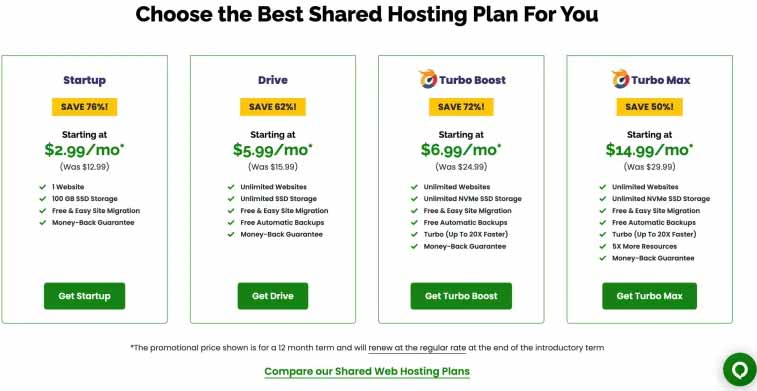
Startup Plan (starts at $2.99/mo)
- One website
- 100 GB SSD storage
- Website staging feature
- Unlimited email accounts
- Selectable data center location
- Complimentary website builder
Drive Plan (starts at $5.99/mo)
- Unlimited websites
- Unlimited SSD storage
- Money-back guarantee
- Free automatic backups
- Free and simple site migration
Turbo Boost (starts at $6.99/mo)
- Unlimited websites
- Money-back guarantee
- Free automatic backups
- Unlimited NVMe SSD storage
- Turbo speed (up to 20x faster)
- Complimentary and straightforward site migration
Turbo Max (starts at $14.99/mo):
- Unlimited websites
- Money-back guarantee
- Free automatic backups
- Five times more resources
- Unlimited NVMe SSD storage
- Turbo speed (up to 20x faster)
- Complimentary and easy site migration
A2 Pros and Cons
Pros
- 99.9% Uptime
- cPanel Interface
- Unlimited Storage
- Solid-State Drives
- Attracta SEO Tools
- Unlimited Websites
- Unlimited Databases
Cons
- Not all plans offer Windows hosting.
- More data centers would be beneficial (there’s currently one primary and three secondary ones).
The Expert Opinion on A2 Hosting
A2 Hosting offers a comprehensive solution that meets all new hosting requirements. In a crowded market with options like GoDaddy, CyberFolks, and HostingGator, choosing A2 Hosting is crucial because it minimizes the need for frequent changes.
A2 Hosting stands out due to its dynamic features, strong security, extensive service backend, and excellent customer support. Reliable support is particularly important for solving issues that could impact sales or site visibility.