In-Depth HeyGen Review: Is It the Right Tool for You
In today’s fast-paced world, efficiency in content creation is key. Have you ever considered using AI video generators? HeyGen is one such tool. It’s powered by artificial intelligence and designed to help businesses create professional-looking videos with just a few clicks.
In this HeyGen Review, I’ll walk you through what HeyGen is, how it works, and its various applications. I’ll delve into its main features, demonstrating how each can benefit you. Plus, I’ll showcase a video I created using HeyGen’s impressive library of over 300 templates. Lastly, I’ll share my personal experience, highlight the pros and cons, and suggest some alternatives I’ve explored.
My aim is to provide you with a thorough HeyGen review so you can determine whether it’s the right fit for your business. Based on my experience, HeyGen is definitely worth considering, so let’s get started!
What is HeyGen?
Founded by Joshua Xu and Wayne Liang in November 2020 in Los Angeles, HeyGen, originally known as “Movio,” is a unique video platform harnessing generative AI to swiftly craft stunning, professional videos.
Through its text-to-speech functionality, HeyGen seamlessly converts your script into natural-sounding dialogue using a vast selection of over 300 voices across more than 40 languages. Additionally, you can choose from a diverse array of over 100 AI avatars, representing different ethnicities, ages, and poses, to deliver your script with lifelike lip-syncing capabilities.
This innovative approach significantly saves businesses time and money by bypassing the need to hire actors and invest in costly recording equipment. HeyGen proves particularly beneficial for businesses seeking to produce video content on a budget, whether for captivating product presentations or informative training videos.
What is HeyGen Used For?
HeyGen is a versatile AI video generator that serves a multitude of purposes:
- Engaging product videos: Showcase your products’ features and benefits through captivating videos using HeyGen’s library of 300+ templates and 100+ AI avatars.
- Training videos: Educate employees or customers effectively with clear narration and engaging AI avatars provided by HeyGen’s text-to-speech feature.
- Explainer videos: Simplify complex concepts into easily digestible content with HeyGen’s generative AI technology, making technical jargon understandable.
- Social media content: Create attention-grabbing videos for social media platforms effortlessly with HeyGen, driving engagement and increasing brand visibility.
- Video advertising: Craft dynamic and compelling advertisements that capture viewers’ attention instantly, moving away from generic ads with HeyGen.
- E-learning content: Enhance the learning experience and engage viewers with engaging e-learning content generated by HeyGen, valuable for educators and online course creators.
- Presentations: Elevate your presentations by incorporating dynamic video animations and elements with HeyGen, leaving a lasting impression on your audience.
And more! These are just a few examples of the diverse ways HeyGen can be utilized to create engaging video content.
Who Can Benefit from Using HeyGen?
HeyGen is a game-changer for startups and small teams looking to create professional videos on a limited budget. Similarly, established enterprises can streamline their video content production by harnessing HeyGen’s powerful AI capabilities. With its versatile features, HeyGen caters to businesses across various industries, including marketing and e-learning, making it suitable for individuals and companies of all sizes.
HeyGen’s emphasis on cost-effectiveness makes it particularly appealing to startups and established enterprises seeking to save money while maintaining high-quality video content. However, HeyGen is accessible to anyone looking to create engaging videos, regardless of their business size or industry. Whether you’re a solo entrepreneur, a small business owner, or part of a large corporation, HeyGen offers the tools you need to bring your creative vision to life.
1. Startups
HeyGen is a game-changer for startups, offering a user-friendly interface and powerful AI capabilities that facilitate the creation of professional videos. By leveraging HeyGen, startups can enhance their brand visibility through dynamic video ads that effectively promote their products or share their company’s story.
With HeyGen’s intuitive tools and advanced features, startups can craft engaging videos that capture the attention of viewers, helping to drive brand recognition and growth.
2. Established Enterprises
HeyGen’s valuable features aren’t just for startups; even larger companies can reap the benefits. By streamlining video content production, HeyGen empowers established enterprises to create engaging videos efficiently. Whether it’s e-learning content or marketing campaigns, HeyGen enables larger companies to connect with their audience effectively.
With HeyGen’s user-friendly interface and advanced AI capabilities, established enterprises can produce high-quality videos that resonate with their audience, ultimately driving engagement and achieving their business goals.
3. Content creators
HeyGen’s AI capabilities are a game-changer for content creators across various platforms. Whether you’re a YouTuber, blogger, or social media influencer, HeyGen offers features to elevate your content creation process.
With HeyGen, you can effortlessly generate captivating intros and outros, incorporate special effects and seamless transitions, and create professional-looking videos that stand out from the crowd.
By harnessing HeyGen’s innovative tools, content creators can unlock new levels of creativity and produce engaging videos that captivate their audience and drive results.
4. Educators
HeyGen’s e-learning capabilities make it a must-have tool for educators striving to deliver engaging and visually captivating lessons. With HeyGen, you can craft interactive educational videos that not only simplify complex concepts but also entertain and inspire students.
Whether you’re teaching in a classroom or online, HeyGen empowers educators to create dynamic learning experiences that cater to diverse learning styles and engage students on a deeper level. By leveraging HeyGen’s innovative features, educators can enhance the effectiveness of their teaching and foster a love for learning among their students.
HeyGen’s AI capabilities revolutionize the video creation process by automating complex and time-consuming tasks such as video editing and animation. With its user-friendly interface, even individuals with minimal experience in video production can easily create professional-looking videos.
By leveraging HeyGen’s innovative technology, users can streamline their workflow and focus on creating content without getting bogged down by technical details. Whether you’re a seasoned videographer or a novice content creator, HeyGen empowers you to bring your creative vision to life with ease and efficiency.
Key Features of HeyGen
HeyGen has many features using AI-powered video creation to deliver professional-quality videos that save time and money. Here are some key features I will explain and show you how to use so you know what HeyGen is capable of:
- Text to Speech
- AI Avatars
- Custom Avatars
- Generative Outfit
- Voice Cloning
- Talking Photo
- Templates
- Zapier Integration
- ScriptGen AI
1. Text to Speech
HeyGen’s Text-to-Speech feature is a game-changer, allowing you to effortlessly transform written text into natural-sounding speech with over 300 voices available in over 40 languages. Plus, you have the flexibility to add half-second pauses wherever necessary in your script to ensure it sounds as natural as possible.
Using HeyGen’s Text-to-Speech feature is a breeze. Simply type your script directly into the video editor or upload an audio file, and HeyGen will work its magic to convert your text into lifelike speech.
Moreover, you have complete control over the accent, speed, and pitch of the speech with easy-to-use toggles conveniently located on the right side of the editor. With HeyGen, creating high-quality voiceovers has never been simpler!
2. AI Avatars
HeyGen boasts an extensive collection of over 100 AI avatars, showcasing diverse ethnicities, ages, and poses. With HeyGen, you can simply write your script or record an audio file, and within minutes, generate a stunning AI Avatar video complete with flawless lip-syncing.
What sets HeyGen’s avatars apart is their unparalleled quality and realism. Each avatar is meticulously crafted using video footage featuring real actors, ensuring top-notch authenticity.
Moreover, HeyGen offers a variety of outfits for each avatar, allowing you to tailor the tone of your video to match your desired style, whether it’s professional, casual, or anything in between. With HeyGen, creating engaging and lifelike videos has never been easier!
3. Custom Avatars
With HeyGen, you have the exciting opportunity to transform yourself into a lifelike AI avatar! Follow these simple steps to create your custom avatar:
- Prepare your equipment: You’ll need a professional camera capable of shooting at 4K resolution with 60 frames per second (FPS) and a greenscreen backdrop.
- Shooting tips: Keep your camera stable, ensure a quiet environment, and set up at least three lights for optimal lighting. Avoid loose or messy hair, beards, jewelry, or clothing with green or striped patterns.
Recording Process
- Stand 6.5 feet from the greenscreen.
- Record yourself reciting a 2-minute speech in a clear, confident tone on any topic, avoiding repetition of sentences or numbers.
- Pause for two seconds after each sentence and incorporate subtle head and hand movements below chest level.
- Do not edit the footage; raw footage is preferred.
- Submission: Once recorded, email the footage to the HeyGen team for review. After approval, your custom avatar will be ready for use in HeyGen’s video creation platform.
- Customization options: You can also upload a custom voice to be used with your avatar for a personalized touch.
The process typically takes a couple of days, and once approved, you can use your custom avatar repeatedly in any video you create using HeyGen. This innovative feature adds a unique and personalized element to your video content, enhancing engagement and connection with your audience.
4. Generative Outfit
With HeyGen, you have the power to customize your AI avatar’s wardrobe to match the style of your videos. Here’s how to generate outfits for your avatar:
- Select your avatar and click “Edit Avatar.”
- In the right panel, choose “Generate.”
- A new window will open where you can describe the clothing you’d like your avatar to wear. For example, you could request a “Denim jacket with white T-shirt.”
- After a few moments, HeyGen will generate outfit options based on your description.
While some options may not look completely realistic, the generated outfits generally fit well and enhance customization possibilities. This feature allows businesses to effortlessly dress their avatars for a tailored representation of their brand.
Whether it’s a sophisticated suit for a corporate video or something more casual for a promotional ad, HeyGen’s AI-generated outfits offer a valuable tool for creating visually appealing and cohesive video content.
5. Voice Cloning
After transforming yourself into an AI avatar, you can further personalize your avatar’s voice using HeyGen’s Voice Cloning feature! Here’s how to do it:
- When editing a video in HeyGen, navigate to the bottom right corner and select the voice option.
- In the window that appears, choose “Clone Voice.”
- HeyGen will guide you through the process of recording your voice.
- Make sure you have a microphone ready, and select one of the eight available languages (English, German, Polish, Spanish, Italian, French, Portuguese, or Hindi).
- Ensure your voice recording is clear, without any background noise, and falls within the length of 2-10 minutes.
- Once your voice recording is complete, you can apply it to your AI avatar and bring it to life!
With HeyGen’s Voice Cloning feature, you can seamlessly integrate your own voice into your AI avatar, adding a personal touch to your video content. Whether you’re creating tutorials, presentations, or promotional videos, having your custom voice paired with your avatar enhances authenticity and engagement with your audience.
6. Talking Photo
With HeyGen’s TalkingPhoto feature, you can breathe life into any image by adding an authentic human voice. Here’s how to create a TalkingPhoto:
- On the HeyGen dashboard, choose “Make a TalkingPhoto Video.”
You’ll have three options:
- Generate a TalkingPhoto by describing your ideal avatar.
- Upload a TalkingPhoto by selecting a photo from your computer.
- Select one of the existing TalkingPhotos from HeyGen.
Simply select the option that best suits your needs, add a script to your photo’s dialogue, and let HeyGen work its magic. Before you know it, your static image will transform into a dynamic, animated TalkingPhoto, ready to captivate your audience with its engaging storytelling.
7. Templates
HeyGen offers an extensive library of over 300 customizable templates tailored for various industries and purposes, including advertisements, e-commerce, explainer videos, social media, and more. Whether you’re posting on platforms like YouTube, Instagram, or TikTok, these templates are available in both landscape and portrait orientations to suit your needs.
I was particularly impressed by the well-designed and easily customizable nature of these templates. Some are even animated, adding an extra touch of engagement to your videos. Moreover, HeyGen allows you to create your custom video templates, ensuring that your videos match your brand or style perfectly.
With such a wide variety of templates available, HeyGen caters to the needs of everyone, from small business owners looking to create engaging advertisements to social media influencers in need of eye-catching content.
Whether you’re promoting products, sharing tutorials, or entertaining your audience, HeyGen’s templates provide a versatile and convenient solution for your video creation needs.
8. Zapier Integration
HeyGen offers seamless integration with Zapier, enabling you to automate your workflow and boost productivity effortlessly. With Zapier, you can connect HeyGen to over 5,000 apps, including project management software, CRM systems, and social media platforms, without writing a single line of code.
For instance, you can automate tasks such as sharing your videos to your preferred platforms or sending notifications when a video is ready for distribution. This automation streamlines repetitive tasks in your business, freeing up your time to focus on more critical aspects of your operations.
By leveraging HeyGen’s integration with Zapier, you can optimize your workflow, increase efficiency, and ensure that your video creation process runs smoothly from start to finish.
9. ScriptGen AI
HeyGen’s ScriptGen AI is a game-changer for content creators, offering a hassle-free solution for generating high-quality scripts in minutes. Here’s how to use ScriptGen AI to write your script:
- Navigate to your HeyGen dashboard and select “Start with ScriptGen AI.”
- This will open a window where you can provide ScriptGen with details about your topic, language preferences, tone of voice, and other relevant information. Alternatively, you can input a URL explaining a product for ScriptGen to analyze.
- Click “Generate Script,” and within seconds, you’ll have a complete script broken down into scenes.
- Review the script, make any necessary edits to enhance engagement or tailor it to your specific needs.
- When satisfied, click “Create Video,” and your script and scenes will automatically be added to the video editor.
ScriptGen by HeyGen is a valuable tool for saving time and effort in brainstorming ideas and crafting the perfect script, especially if you’re not sure where to start or lack confidence in your writing skills.
I was impressed by the accuracy and quality of the scripts generated by ScriptGen AI with just some basic information about my video’s topic. It’s an efficient and effective way to streamline the scriptwriting process and ensure your video content is engaging and well-crafted.
Getting Started with HeyGen
Getting started with HeyGen is a breeze, and I’ll walk you through my experience to help you get started too:
- Visit the HeyGen homepage and click on the “Try HeyGen for Free” button.
- You’ll be directed to the HeyGen dashboard, which impresses with its clean and user-friendly interface. Navigation is straightforward, with all features clearly laid out for easy access.
- Before diving into creating your video, take advantage of the free tutorials available. You can access these tutorials at the top left of the dashboard. I found them to be clear and helpful, providing valuable guidance.
- If you need more in-depth tutorials, you can find them on HeyGen’s official YouTube channel by scrolling to the bottom of the page.
- At the top of the dashboard, you’ll find four different ways to start making an AI video:
- With an Avatar
- Using ScriptGen AI
- Making a TalkingPhoto Video
- Starting with a Template
6. For the quickest and easiest way to create a video, I recommend selecting one of HeyGen’s premade templates. It’s a hassle-free way to kickstart your video creation process.
Following these steps, you’ll be well on your way to creating engaging AI videos with HeyGen in no time!
Pros and Cons
Pros
- Simplifies the video creation process, eliminating the need for expensive equipment.
- Over 300 customizable templates.
- Create a custom template to match your brand exactly.
- Over 100 avatars to choose from across a range of genders, ages, and ethnicities.
- ChatGPT integration to help with writing the script and speed up the process.
- Translate the script into 50 languages.
- The Avatars are believable and high resolution (4K).
- Zapier integration allows you to streamline your workflow.
- Create your own custom avatars with custom voices.
- ScriptGen instantly writes scripts to save time.
- HeyGen is cloud-based, and everything is stored on the Internet – no download required!
Cons
- Some customization options are limiting. For example, it would be nice to make the avatar’s body language and facial expressions more relaxed or excited.
- Recording a custom voice is limited to only eight languages (English, German, Polish, Spanish, Italian, French, Portuguese, and Hindi).
- Video duration may be limiting, especially for those who want to create longer videos.
pricing details for HeyGen
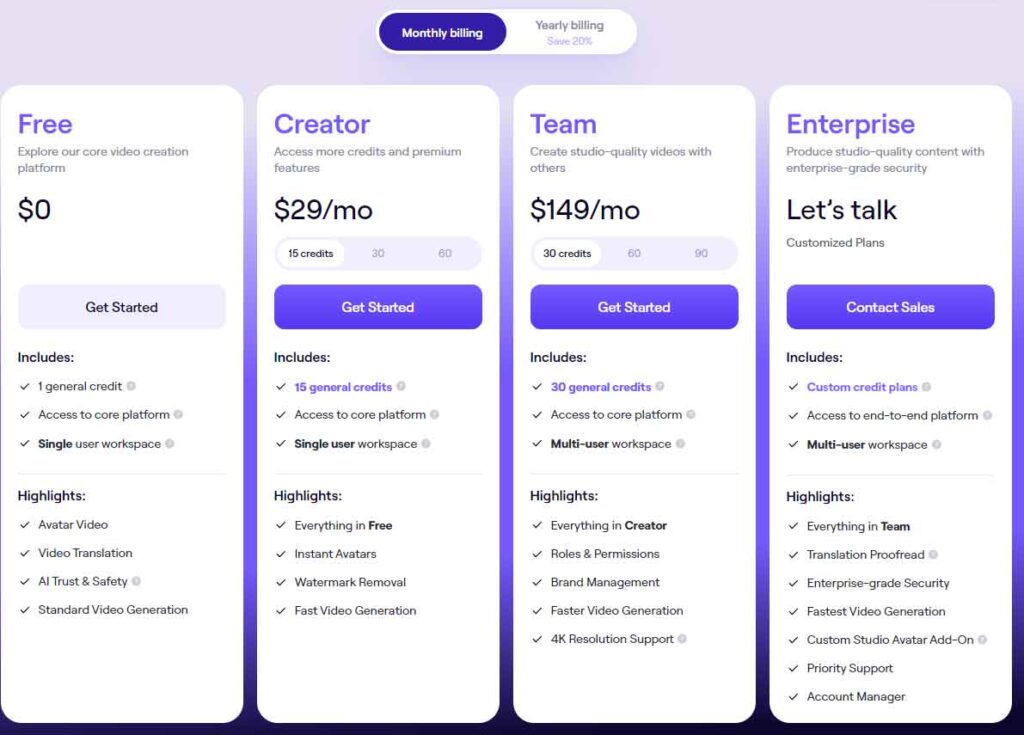
1. Free Plan
- 1-minute video credits per month.
2. Essential Plan
- Starting at $30 per month.
- Increased video credit limits compared to the free plan.
- Suitable for individuals and small businesses.
3. Pro Plan
- Starting at $225 per month.
- Higher video credit limits compared to the Essential plan.
- Ideal for businesses with higher video production needs.
4. Enterprise Plan
- Custom pricing.
- Tailored for large-scale businesses with extensive video production requirements.
Additionally, HeyGen offers a 20% discount on yearly subscriptions compared to monthly payments for 12 months. These pricing options cater to a range of users, from individuals with occasional video needs to large enterprises with high-volume production requirements.
HeyGen Alternatives
Here are some of the most popular HeyGen alternatives I’ve tried and how they compare to HeyGen. Here are three alternatives to HeyGen that offer unique features and capabilities:
1. Synthesys
- AI video generator that transforms text into high-quality voiceovers using human-like voices.
- Offers Text-to-Video (TTV) technology with avatars, templates, and an AI Image generator.
- Provides 69 avatars based on real humans, speaking over 140 languages in 254 creative styles.
- Allows creation of custom avatars.
- Suitable for users seeking more languages and flexible pricing options.
2. DeepBrain AI
- Powerful AI video generator enabling video creation from text in under five minutes.
- Offers over 100 avatars speaking over 80 languages and over 65 customizable templates.
- Integrates ChatGPT for easy script generation.
- Provides various export options including entire video (.MP4), audio only (.WAV), and Chromakey.
- Recommended for users seeking more export options and a streamlined workflow.
3. Synthesia
- AI video generator offering over 140 avatars, 120 languages, and 60 templates.
- Features a screen recorder and extensive customization options, including custom templates and avatars.
- Allows uploading of brand assets for maintaining brand consistency.
- Trusted by major companies like Google and Nike.
- Similar to HeyGen in user-friendliness and flexibility.
Final Thoughts
Your review of HeyGen highlights its revolutionary impact on video creation for businesses. The platform’s user-friendly interface and customizable templates make it accessible to anyone, resulting in high-quality videos with ease.
HeyGen’s realistic human avatars, impressive audio, and seamless lip-syncing contribute to an authentic viewing experience. The platform’s wide range of customization options, from templates to avatars and voiceovers, empowers users to maintain their brand identity across all videos.
The versatility of HeyGen makes it suitable for various purposes, including explainer videos, product demos, and social media content. Its integration of artificial intelligence represents the forefront of video creation technology, offering endless opportunities for individuals and businesses alike.
Overall, your positive experience with HeyGen emphasizes its significance in the ever-evolving landscape of video creation, encouraging others to explore its potential and embrace the future of AI-driven content production.