Synthesia Review: Transforming Video Production with AI
Struggling with cumbersome production setups and lengthy editing sessions? Synthesia AI is revolutionizing traditional video editing by simplifying video creation to the extent of typing text into a document. It achieves this by leveraging multiple layers of AI to generate human-like videos featuring avatars delivering your script. In this AI tool review, we’ll thoroughly explore this innovative platform that effortlessly transforms text into publish-ready videos.
What is Synthesia?
Synthesia stands out as an AI-driven video creation tool, empowering users to craft high-quality, engaging videos without the need for expensive equipment or specialized skills. Its unique approach involves generating AI avatars, synthetic individuals with human-like features, who appear to speak words provided from a video script.
Synthesia accomplishes this through a series of AI tasks:
- It converts a supplied video script into an audio format using AI text-to-speech technology.
- The AI voice generator can be customized to a specific language, accent, or dialect.
- It synchronizes the audio with the avatar’s facial expressions and mouth movements.
- The final video is rendered and ready to use.
Synthesia has established itself as one of the leading platforms in this field, and in this review, we’ll delve deep into all of its features to provide you with a comprehensive understanding of its capabilities.
Synthesia Features
Synthesia has the potential to become a favored AI tool in your video creation workflow due to its multifaceted capabilities as a multimodal generative AI system. Here are some of its notable features:
1. Dozens of AI Avatars
Synthesia boasts a diverse collection of over 150 visual AI avatars, each bringing a multicultural flair to your videos. Furthermore, new avatars are continuously added each week, ensuring fresh and diverse options for users. Additionally, Synthesia supports well over 120 languages, accents, and local dialects, offering extensive linguistic diversity. With such a wide array of options, creating striking and original videos tailored to your content becomes effortlessly achievable.
2. Templates and Custom Backgrounds
Synthesia offers a plethora of video templates, providing professional and aesthetically pleasing starting points for your projects. Additionally, the custom background feature allows for easy incorporation of your brand’s colors, ensuring brand consistency throughout your videos.
Furthermore, Synthesia simplifies the process of converting PowerPoint files into templates by transforming each slide into a background scene. This feature streamlines the transition from traditional presentation formats to engaging video content, enhancing the versatility and accessibility of the platform.
3. Media Library and Collaboration
In addition, Synthesia offers a cloud media library where you can store all your frequently used images, videos, music, and font assets for seamless video creation. This feature ensures easy access to your essential resources, streamlining your workflow and saving time during the content creation process.
Moreover, Synthesia caters to teams by supporting multiple users and providing robust sharing features. With this functionality, your entire team can access previously created videos and collaborate on your latest projects, fostering productivity and cohesion within your team.
4. Descript Integration
The integration between Descript and Synthesia offers users the best of both worlds, combining Descript’s AI-powered audio and video editing capabilities with Synthesia’s advanced video creation features. This integration proves particularly beneficial for individuals who leverage Descript’s “Overdub” feature, which can clone your voice for use in Synthesia.
For content creators with a strong branding reliant on their personality, this integration is invaluable. It enables you to replicate your voice and apply it to video scripts, simplifying the video creation process while maintaining consistency with your established branding.
Synthesia’s API
The Synthesia API serves as a sophisticated interface for seamlessly integrating data into an automated video creation workflow. With this capability, users can set up templates equipped with dynamic variables that retrieve data from external sources via API calls.
This functionality enables the creation of streamlined videos tailored for personalization or other data-centric video use cases. While it may be considered a technical feature, it offers tremendous potential for enhancing video content creation processes, allowing for greater flexibility and customization in video production.
Synthesia AI Pricing
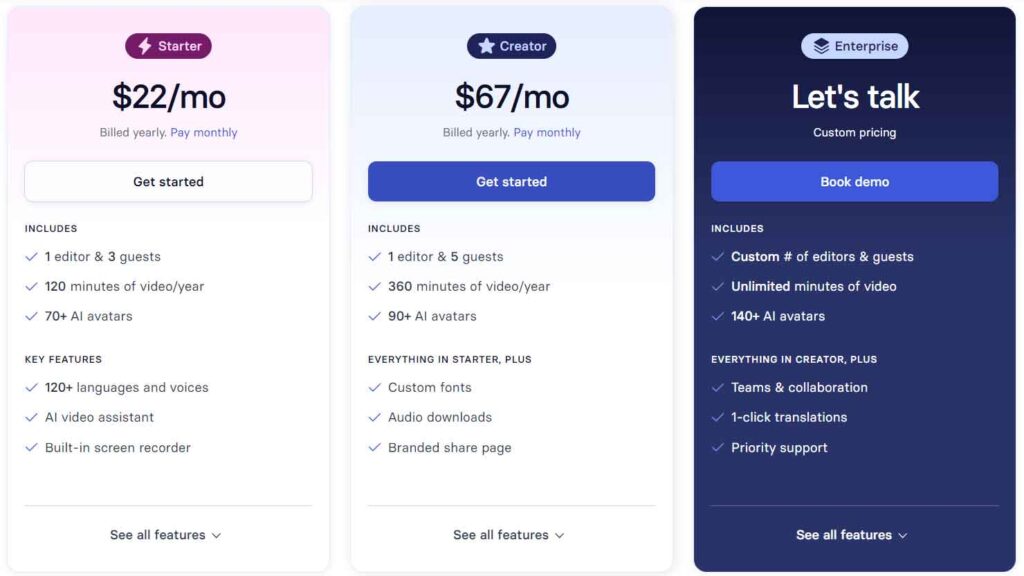
Synthesia provides a range of pricing options tailored to meet various needs and budgets. Let’s take a closer look at each tier:
1. Personal Plan- $30/Mo
- Includes 10 video minutes per month and access to text-to-video capabilities.
- Supports over 120 languages but offers a smaller selection of AI avatars.
- Best for: Individual creators or small businesses seeking to create professional videos without extensive resources. Social media advertisers may find this plan particularly beneficial due to its limited video output.
2. Enterprise Plans
- Designed for extensive use, offering additional features suited for larger teams and complex projects.
- Increases limits for scenes per video (from 10 to 50), expands the selection of AI avatars (over 140+), and provides unlimited video creation.
- Cost: Custom pricing based on sales conversation
- Best for: Larger organizations or businesses with substantial video creation needs.
It’s important to note that Synthesia’s pricing is relatively higher compared to other AI video makers. However, the platform offers a free trial, allowing users to test its capabilities before committing to a paid plan.
Whether you’re an individual content creator or part of a larger team, Synthesia offers pricing options tailored to your needs. Just keep in mind that premium features come at a premium price.
Synthesia Pros and Cons
Synthesia is one of the better AI avatar video generators, but it is still worth looking at what it is good at versus what it may lack.
Pros
Synthesia offers an intuitive user experience, ensuring easy navigation and allowing users to focus on creating compelling videos effortlessly.
Moreover, the platform prioritizes quality, delivering high-fidelity videos that captivate audiences and enhance brand presence. Leveraging cost-effective AI technology, Synthesia enables users to produce videos faster and with fewer resources, resulting in significant time and cost savings. Its versatility shines through, whether you’re crafting a corporate presentation or a social media ad, with a wide range of customization options to meet diverse needs.
Furthermore, Synthesia’s support for multiple languages and accents enhances its appeal, enabling users to reach global audiences effectively and seamlessly.
Cons
While Synthesia provides a respectable selection of avatars and voices, it may still lack diversity for users with specific branding requirements. Additionally, occasional hiccups in lip-syncing and pronunciation may occur, detracting slightly from the professionalism of the videos produced.
Cost is another consideration. While Synthesia offers an introductory trial, accessing its full range of features comes at a price. The personal tier, for instance, may only be sufficient for creating one 10-minute video per month or multiple short videos, which may not meet the content demands of certain scenarios.
Synthesia Alternatives
Not every AI video platform goes the route of generating AI avatars. We’ll feature other AI video platforms that might interest you.
1. Descript
Synthesia and Descript cater to content creators but specialize in different areas. Synthesia excels in AI-driven video creation, offering a diverse range of AI avatars, customizable backgrounds, and multilingual capabilities. It’s ideal for users seeking high-quality videos without the need for an entire production team.
On the other hand, Descript is a go-to platform for video and audio editors, especially podcasters. It focuses on editing and transcription services, featuring the unique “Overdub” function for text-based audio editing.
Despite their differences, both platforms share common features such as text-to-speech capabilities, user-friendly interfaces, and a commitment to delivering high-quality output. Depending on your specific needs and preferences, either Synthesia or Descript could be the perfect fit for your content creation endeavors.
2. FlexClip
Synthesia and FlexClip both streamline the video creation process but cater to different user needs. Synthesia stands out for its robust AI-driven video functionalities, featuring AI avatars and multilingual support for users aiming to produce professional-grade videos.
In contrast, FlexClip prioritizes user experience, offering a simple platform that’s ideal for beginners and small businesses. While both platforms aim to make video creation accessible, Synthesia emphasizes advanced AI avatars, whereas FlexClip focuses on AI voiceovers accompanied by stock images and videos.
Ultimately, both Synthesia and FlexClip are strong platforms, each excelling in its own niche. The choice between them depends on your specific requirements and preferences.
Synthesia Use Cases
Synthesia AI is super versatile and can be used in lots of different ways.
For starters, in marketing, it’s great for making videos in different languages, which helps brands reach more people worldwide. In education and training, it takes boring text and turns it into cool interactive videos. Customer service can use it to make personalized videos that make customers happier.
But it’s not just about making videos. Lots of industries can benefit from using Synthesia AI:
- Marketing
- Training and Development
- Customer Service
- Language Learning
- Recruiting
- Compliance
- Education
- Human Resources
- Sales
- Product Development
- IT Operations
- Manufacturing
- Financial Services
- Medical and Healthcare
- Retail
If you want to save money, time, and get your stuff out there faster, using cool video tech like Synthesia is a smart move. It’s ready to help you do just that.
Conclusion
Synthesia AI lets you make super realistic videos using top-notch artificial intelligence. It’s really good with AI voices and getting better with its AI Avatar video characters, with facial expressions and mouth movements improving over time.
Overall, Synthesia AI is pretty awesome. It’s great for education, entertainment, marketing, and simple storytelling. But, it’s not flawless; you might need to tweak things a bit for the best results.
If you’re curious and want to give Synthesia AI a try, go for the personal plan. You can also check out their examples to see what others have made. The Enterprise plan might be worth it for unlimited downloads, but it depends on your needs and budget.
If you liked this review, you might enjoy our thoughts on other products like ChatGPT, Character AI, and Writesonic.
And if you’re on the hunt for more tools, take a look at our ultimate collection of the best AI tools to help you get stuff done.