InVideo Review: The Ultimate Tool for Video Creation
There’s no doubt that video content is a crucial tool for marketers, creators, and businesses of all sizes. It offers a way to tell engaging stories and promote brands effectively. However, making videos can be time-consuming, expensive, and require technical skills.
This is where AI video generators like InVideo come in handy! InVideo lets you create professional-looking videos in just minutes, even if you have no editing experience. In this review, we’ll cover what InVideo is, who can benefit the most from it, and its key features. I’ll also show you a step-by-step guide on how I quickly made this YouTube explainer video.
Additionally, I’ll share my top tips for writing effective video prompts, discuss the pros and cons of the platform, and mention some great InVideo alternatives I’ve tried. By the end of this review, you’ll have all the information you need to decide if InVideo is the right AI video generator for you. Let’s dive in!
What is InVideo?
InVideo is one of the top AI video generators, making it easy and quick to create high-quality videos. It’s a game-changer for social media content strategies, business video marketing, and more.
With InVideo, all you need to do is write a descriptive prompt. The AI will then generate YouTube explainer videos and shorts for you. After that, you can use InVideo’s robust editing tools to customize every part of your video. This includes changing scenes with text prompts and adjusting the script. You can also start with one of the 5,000+ templates available, which are perfect for any social media format.
InVideo offers more than just video creation. It features an AI slideshow maker, AI talking avatars, an AI script generator, and an AI voice generator. Plus, it provides access to over 16 million royalty-free stock footage clips, ensuring you won’t have any copyright concerns.
In summary, InVideo is a powerful tool that simplifies video creation, making it accessible to everyone, regardless of their editing skills.
Who is InVideo Best For?
InVideo is a fantastic tool for anyone looking to create high-quality AI videos quickly and efficiently. However, there are a few groups of people who benefit the most from using InVideo:
Content Creators
Content creators, particularly YouTubers with limited video editing experience, can benefit greatly from InVideo. Its key features, like the AI YouTube Video Maker, make it simple to produce high-quality videos quickly. Additionally, the AI voiceover tool is invaluable for creating professional voiceovers for videos in just a few minutes.
Bloggers
For bloggers looking to elevate their content, InVideo provides an effortless way to add engaging videos to their blog posts. By simply pasting a link into InVideo’s platform, bloggers can convert their written content into dynamic videos that captivate their audience. These videos can then be embedded into articles, boosting reader engagement.
Businesses
InVideo caters to both small and large businesses by offering various features to enhance their digital presence. One standout feature is the AI slideshow creator. This tool enables companies to craft visually appealing pitch decks, proposals, educational materials, and showcases of their work for clients. It saves time and ensures presentations are professional and polished.
Real Estate Agents
InVideo is a game-changer for real estate agents aiming to create engaging video content. With the help of a talking avatar, agents can showcase properties and provide virtual tours to potential buyers, even if they can’t be there in person. This not only saves time and effort but also enables agents to reach a broader audience and generate more leads.
Customer Service
InVideo’s talking avatar feature is a significant asset for the customer service industry. It can answer frequently asked questions or provide step-by-step instructions, saving time for both customers and businesses. This not only enhances efficiency but also leaves a lasting impression of professionalism and dedication to customer satisfaction.
Educators
InVideo’s features are invaluable for educators striving to craft visually engaging and informative educational videos. Utilizing the AI YouTube Video Maker, teachers can convert their lesson plans into captivating videos that captivate students’ attention. By incorporating visuals, animations, and voiceovers, they enhance the learning experience, making it more interactive and memorable.
Marketers
InVideo provides features like the AI YouTube Video Maker, empowering marketers to enhance videos with text overlays, transitions, and music. This capability enables the creation of visually stunning ads, promotional videos, or product demos that grab attention and leave a lasting impression on the audience.
With its extensive library of stock footage and templates, marketers have the resources to create compelling content that resonates with viewers.
InVideo Key Features
InVideo offers a wide range of features to simplify video creation.
Here are InVideo’s key features:
- AI YouTube Video Editor
- AI Slideshow Maker
- AI Talking Avatar
- AI Script Generator
- AI Voice Generator
- InVideo Studio
- 5,000+ Templates
1. AI YouTube Video Editor
InVideo’s standout feature is its AI YouTube video generator, making it effortless to create monetizable YouTube videos with just a text prompt. It handles everything, from scripting to incorporating video clips, text, background music, and transitions. All that’s left for you is to add your final touches using the editor!
If you haven’t seen it yet, here’s a video I made using InVideo’s AI YouTube video maker:
The entire process was seamless, taking only minutes to generate the entire video! Say goodbye to struggling with complex video editing software, hunting for perfect stock footage, or spending hours writing scripts. With InVideo’s intuitive interface and AI technology, you can effortlessly create captivating videos in your niche.
2. AI Slideshow Maker
With InVideo’s slideshow maker, you can quickly and effortlessly create slideshow videos. The AI slideshow maker streamlines the process by generating an AI voiceover with a script, selecting suitable footage, and adding text and background music based on your text prompt. While the process is similar to the AI YouTube Video Maker, here we’re focusing on creating slideshows instead of videos.
You have the option to upload your own photos or choose from InVideo’s vast collection of over 16 million stock media items. This tool is versatile and ideal for both personal and business use. You can create engaging photo slideshows, portfolios, promos, product explainers, presentations, showcase work to clients, and much more with ease.
3. AI Talking Avatar
InVideo’s AI Talking Avatars, available on the App Store and Google Play store for mobile devices, empower users to create lifelike videos featuring a human presenter, even without video production skills.
Here’s how simple the process is:
- Choose from preset AI avatars or create your own by uploading photos.
- Add a voice by selecting from preset options or recording your own.
- Upload your script for the avatar to speak.
For personal use, this tool is great for crafting customized greetings, unique announcements, or captivating content. For businesses, it’s ideal for:
- Content Creation: Enhance videos, podcasts, or live streams by adding engaging characters.
- Real Estate: Develop custom virtual tours to showcase properties, leading to more sales as potential buyers can explore from home.
- Hospitality: Answer frequently asked questions to exceed guest expectations.
- Retail: Provide personalized product descriptions, advice, and support for a virtual shopping experience similar to an in-store visit, boosting sales.
- Education: Personalize digital learning experiences to foster unity and active participation, especially in remote learning environments for teachers.
4. AI Script Generator
InVideo’s AI Script Generator is a powerful tool that uses AI to craft scripts for your videos. It generates scripts with captivating openings and compelling calls to action, transforming them into high-quality videos ready for publication.
This generator works swiftly, allowing you to spend less time scripting and more time brainstorming ideas. The quality of the scripts is top-notch, offering educational and enjoyable content for your target audience.
Whether you’re creating content for YouTube videos or movies, incorporating InVideo’s AI Script Generator into your video production workflow can optimize your process and enhance the quality of your output.
5. AI Voice Generator
InVideo’s AI Voiceover generator allows you to enrich the authenticity and depth of your videos by creating genuine male and female voice narrations at no cost!
Here’s how to generate an AI voiceover with InVideo:
- Select one of the workflows when developing an AI video.
- Enter the script and choose a gender and accent.
- Use InVideo’s MP4 to MP3 converter to download the voiceover as an MP3 file.
This tool is perfect for content creators seeking realistic-sounding voiceovers for their content. It’s also invaluable for those in marketing or corporate presentations!
6. InVideo Studio
InVideo’s Studio offers a wide range of tools for creating intros, outros, ads, birthday videos, Instagram videos, and invitations! These videos are watermark-free and come with 6,000 pre-designed templates, allowing you to generate videos in minutes. They’re available in landscape, square, and portrait formats.
- The intro maker is ideal for showcasing your brand, launching a product, or introducing a business event.
- The outro maker is perfect for YouTube video outros, helping to promote your channel, showcase other videos, and include call-to-action buttons.
- The video ad maker is suitable for various industries like e-commerce, real estate, and sales promotions, expanding your marketing reach on social media platforms like TikTok.
- The birthday video maker is great for creating personalized birthday greetings, slideshows, or short clips, complete with stock videos, stickers, transitions, and effects.
- The Instagram video editor offers popular templates that can be personalized with transitions, effects, filters, text boxes, and more, making it perfect for travel or promotional videos.
Lastly, the invitation maker is ideal for crafting videos for business invitations, wedding invites, or birthday celebrations. You can choose from a wide variety of templates and customize colors, text, photos, and music to match your theme perfectly.
7. 5,000+ Templates
InVideo provides thousands of video templates suitable for social media, business, or creating memes. These templates are user-friendly, fully customizable, and save you plenty of time compared to creating your own from scratch! They’re available in the most popular formats: landscape (16:9), square (1:1), and portrait (9:16).
Top 9 Tips for Writing Effective InVideo Prompts
Here are some top tips for writing effective AI video text prompts:
- Use a commanding tone to guide the AI.
- Clearly outline your topic (e.g., “5 reasons why InVideo is the best AI video generator”).
- Specify the type of video (e.g., YouTube Short, YouTube Explainer video, recent events video).
- State the desired duration of the video (e.g., 60 seconds).
- Describe the desired language and tone (e.g., simple, energetic, female, American).
- Specify the main points to be discussed at the beginning and end of the video.
- Provide a blog post article that the AI can reference for additional information, if available.
- Be detailed and specific for the best results.
- Use Google Chrome for the optimal experience.
Pros and Cons
Pros
- Generates engaging videos in minutes.
- A tutorial video will help guide you through the process.
- Workflows to help with writing the most effective prompts.
- Edit videos with text prompts using AI.
- Export videos in HD or 4K.
- 5,000+ video templates in landscape, square, or portrait formats.
- Human-like AI voices that sound realistic.
- Access to 16 million+ hyper-relevant, royalty-free stock footage from sources like iStock, Storyblocks, and Shutterstock.
- Fully cloud-based and accessible in your browser (no download required).
Cons
- There is a potential lack of engagement for viewers due to the automated nature of AI-generated videos.
- You cannot upload the video directly to YouTube or Facebook.
- Must fact-check the script to ensure everything is accurate.
Price
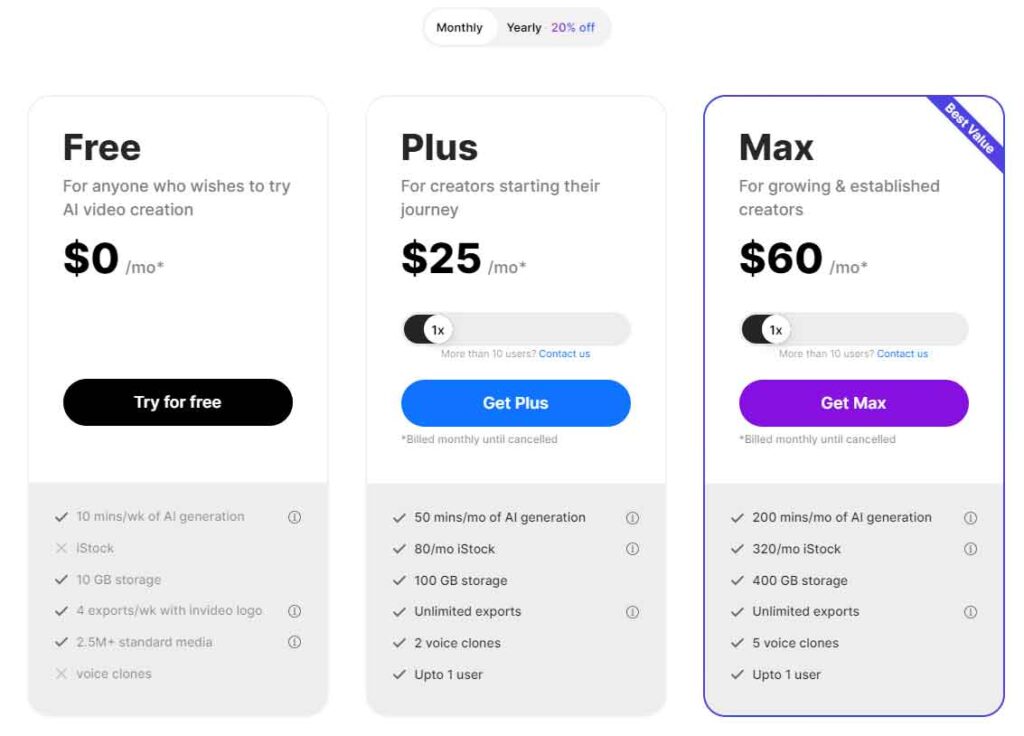
InVideo offers two plans for its video editor: Unlimited and Business. The key differences between these plans lie in the number of videos users can export per month and the usage limits on Premium Images/Videos.
Under the Business plan, users are limited to 60 exports per month and can utilize up to 300 Premium Videos per month. Conversely, the Unlimited plan caters to all user needs, allowing unlimited exports and video usage.
The Unlimited plan is priced at $60 per month for monthly subscriptions and $30 per month for annual subscriptions. In contrast, the Business plan costs $20 per month for monthly subscriptions and $10 per month for annual subscriptions.
3 Best InVideo Alternatives
I’ve researched different video editing tools and identified three alternatives to InVideo. You can explore the reviews for each option to gain more insight and determine which tool best fits your requirements.”
1. Pictory
Pictory stands out as a favored AI video generator among content marketers, aiding in the creation of highly shareable videos to drive leads and sales swiftly and effortlessly. Pictory shares several similarities with InVideo; both platforms utilize scripts to generate videos in minutes and offer text-based editing functionalities. Moreover, they allow the transformation of entire blog posts into videos.
However, the most notable distinction lies in the variety of templates available. InVideo boasts over 5,000 templates, whereas Pictory offers only a limited selection. Additionally, InVideo encompasses a broader range of features, including the AI talking avatar and AI slideshow maker. On the other hand, Pictory excels in script editing tools, offering capabilities such as automatic removal of “uhs” and “ums” and script trimming for short-form videos.
If your priority is comprehensive script-editing tools tailored for efficiently converting long-form content into short-form, Pictory emerges as the preferable choice. For a platform teeming with an extensive array of features and templates, InVideo is the ideal option. Regardless of your selection, both platforms serve as excellent tools for crafting AI-generated videos within minutes.
2. Synthesys
Synthesys emerges as another AI video generator, boasting over 80 AI avatars for video creation along with an AI voice generator and an AI image generator. This platform integrates AI avatars seamlessly into videos and offers an AI image generator.
While InVideo also allows the inclusion of talking AI avatars in videos, this feature is not accessible on desktop and requires downloading the InVideo app. However, InVideo stands out with its vast selection of templates, exceeding 5,000 options, compared to Synthesys’s 50 templates. Furthermore, InVideo heavily relies on stock media, providing access to over 16 million stock footage items sourced from platforms like iStock, Storyblocks, and Shutterstock.
If you’re inclined towards generating effective ads, presentations, and training videos using AI avatars with realistic voiceovers, Synthesys is the preferable choice. Conversely, if your goal is to create videos utilizing millions of high-quality stock footage items highly relevant to your script, InVideo proves to be the ideal solution.
3. Synthesia
Synthesia stands out as another impressive AI video generator, boasting some of the cleanest and most professional-looking templates among the platforms I’ve tried. Its AI avatars are convincing, allowing for subtle gestures like head nods and eyebrow raises, enhancing the lifelikeness of the avatars. Additionally, Synthesia offers some of the most realistic-sounding AI voices, ensuring that the videos you generate will undoubtedly grab people’s attention.
A prominent difference between InVideo and Synthesia is the abundance of AI avatars. Synthesia provides over 150 diverse avatars, whereas InVideo heavily relies on its vast library of 16+ million stock footage. Synthesia also includes a built-in screen recorder, allowing users to record their screens and immediately embed the footage into their video projects.
However, InVideo has its strengths too. It offers an AI slideshow maker, a feature not available in Synthesia, along with a significantly larger selection of templates. InVideo provides over 5,000 templates, whereas Synthesia offers just over 65.
If you prioritize using high-quality AI avatars in your videos and desire access to a built-in screen recorder, Synthesia is the ideal choice. On the other hand, if you seek an excellent AI video generator with access to millions of highly relevant stock footage items and thousands of templates, InVideo is the way to go.
InVideo Review
InVideo stands out as one of the leading AI video generators, thanks to its exceptional features and user-friendly interface. From its YouTube Video Editor to its AI Voice Generator, InVideo offers a plethora of tools that streamline video creation for content creators, marketers, and business owners alike.
Upon starting my journey with InVideo’s AI video generator, I was impressed by the simplicity of creating an account and immediately generating videos. One standout feature of InVideo is its extensive collection of stock footage, boasting over 16 million highly relevant options. This abundance made finding the perfect clips for my video projects a breeze.
Upon generating the video, I was pleasantly surprised by how seamlessly the stock footage complemented the AI voiceover. Speaking of the voiceover, it sounded remarkably realistic and precisely matched my expectations. Editing the video was a joy, as I could easily swap out footage and edit the script. The ability to incorporate text directly into the video further enhanced my workflow.
I trust that my review of InVideo has been insightful for you! Integrating AI productivity tools like InVideo into your workflow can significantly streamline your content creation process. With a wide range of features catering to creators across industries, InVideo enables instant video generation for any social media platform.
If you’re seeking an AI video generator that combines simplicity with robust capabilities, look no further than InVideo. Dive in today and unlock your creativity like never before.