DesignEvo Review: Unveiling Features and Performance
Creating a logo is crucial for any marketing strategy as it allows businesses to establish their brand across various platforms like websites, marketing materials, and merchandise. Traditionally, this process involved hiring a graphic designer or navigating the design process independently, which could be challenging for new business owners.
Fortunately, logo makers like DesignEvo simplify this task. In this review, we’ll delve into how DesignEvo makes it easy to create a compelling logo for your business. We’ll explore its features, pricing, and show you how to get started. Let’s get started!
What is DesignEvo?
DesignEvo is an online logo maker that offers thousands of templates and a straightforward logo editor, allowing users to create custom logos for their businesses with ease.
Founded in 2017, DesignEvo aims to assist small businesses and startups in designing their logos effortlessly. Unlike traditional methods that may involve sketching or using advanced software like Adobe Illustrator, DesignEvo simplifies the process. Users can simply open the logo editor and craft a new, effective logo for their brand in just minutes.
Features of DesignEvo
Although DesignEvo corners the market for simplicity, that doesn’t mean you have to sacrifice features. It’s a complete online logo editor with tools such as thousands of free templates and icons, a text editor, and font and color options.
1. 1000’s of Pre-Made Logo Templates
One of the standout features of DesignEvo is its extensive library of over 10,000 pre-made templates. Each template includes an icon, type treatment, and customizable colors, making it easy for users to find a design that fits their brand.
Users can easily navigate through the templates by searching keywords or exploring categories like Animals & Pets, Food & Drink, Lifestyle, Medical, Non-profit, Sports & Fitness, and many others. The Popular category showcases some of the most favored options available.
Once you find a template you like, you can customize it further using DesignEvo’s logo editor. Hovering over a logo allows you to save it as a favorite, explore similar styles, adjust colors and fonts, or choose a different icon to tailor it to your brand’s unique identity. This flexibility ensures that you can create a logo that truly represents your business.
2. Logo Editor
DesignEvo excels not only in its extensive library of pre-made logos but also in its intuitive logo editor. The founders have streamlined the editor to focus on essential features, making it incredibly user-friendly for creating custom logos. While it may not have all the advanced features of complex software, DesignEvo provides everything you need to get the job done effectively.
In the editor, you’ll find:
- Thousands of icons to choose from.
- Hundreds of fonts in various styles to customize your text.
- A color picker to maintain consistency across your logo design.
If you ever need assistance during the design process, DesignEvo’s website offers plenty of tips and tricks to guide you along the way. This combination of simplicity and functionality makes DesignEvo a powerful tool for anyone looking to create a professional logo quickly and efficiently.
DesignEvo Review: Icons
In DesignEvo’s icon tab, you have a wide array of options to choose from. Here’s how it works:
- Choosing an Icon: You can browse through thousands of icons categorized by business type. This makes it easy to find one that fits your industry or theme.
- Customizing the Icon: After selecting an icon, you can customize its appearance. This includes changing its color, flipping it horizontally or vertically, and adjusting its opacity to suit your design needs.
- Positioning and Rotation: Elements in your design can be adjusted by clicking and dragging them within the design area. You can move icons up or down, and rotate them manually using the rotate tool to achieve the perfect placement.
DesignEvo’s interface simplifies these tasks, allowing you to create a customized logo efficiently with just a few clicks and adjustments.
DesignEvo Review: Text
In DesignEvo, you have a wide selection of fonts to design your logo’s name and slogan. Here’s how it works:
- Choosing Fonts: You can browse through hundreds of fonts categorized into styles such as bold, sans serif, funny, handwriting, and more. Additionally, there are pre-made styles available with various effects to add flair to your text.
- Customizing Fonts: Once you’ve selected a font, you can customize it further:
- Adjust the font size to make it fit perfectly in your design.
- Choose a color that complements your logo’s theme.
- Modify the font weight, add decorations like underlines or shadows, adjust opacity for transparency effects, and align the text precisely within your design.
DesignEvo’s font customization options give you the flexibility to create a logo that matches your brand’s personality and style preferences. Whether you prefer a clean and modern look or something more playful and decorative, you’ll find the tools you need to bring your vision to life.
DesignEvo Review: Shapes
In DesignEvo, you have access to a diverse range of shapes to enhance your logo design. Here’s how it works:
- Adding Shapes: You can choose from hundreds of shapes categorized into badges, decorations, lines, solid shapes, banners, symbols, and more. These elements can add visual interest and structure to your logo.
- Customizing Shapes: Like other design elements in the editor:
- You can change the color of shapes to match your brand’s color scheme.
- Adjust the orientation of shapes by flipping them horizontally or vertically.
- Modify the opacity of shapes to control their transparency and blending with other elements in your design.
These customization options allow you to create a logo that is not only visually appealing but also aligned with your brand identity. Whether you’re aiming for a minimalist design or something more intricate, DesignEvo provides the tools to bring your logo concept to fruition.
DesignEvo Review: Backgrounds
In DesignEvo, you have several options for customizing the background of your logo:
- Transparent Background: You can set your logo’s background to be transparent. This is useful if you want your logo to seamlessly blend into different backgrounds without any visible color or design.
- Solid and Gradient Colors: Alternatively, you can choose from solid colors or gradient colors to give your logo’s background a distinct look. Solid colors provide a simple backdrop, while gradients offer a more dynamic and eye-catching effect.
These options allow you to tailor your logo’s background to suit your brand’s aesthetics and ensure it stands out effectively in various applications, from digital platforms to printed materials.
DesignEvo Pricing
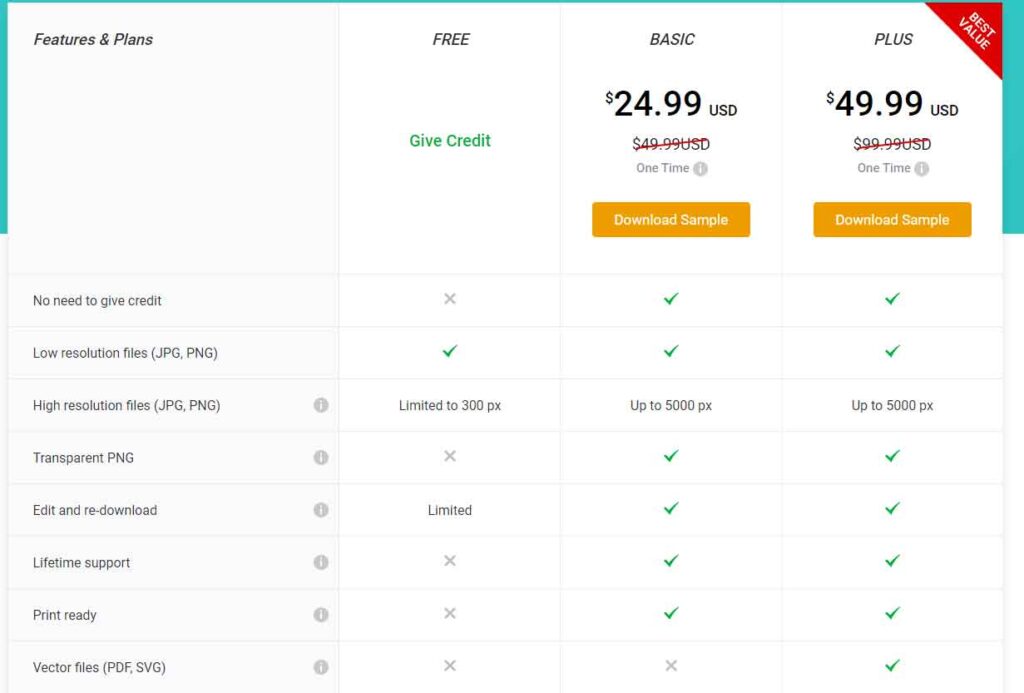
DesignEvo offers two pricing tiers for purchasing your logo, each catering to different needs:
1. Basic Package
- $24.99 one-time fee
- Includes a high-resolution JPG and PNG of up to 5000px.
- Allows ongoing edits to your logo after purchase.
- Provides lifetime support and print-ready files.
- However, does not include font files, copyright ownership, or access to vector files.
2. Plus Package
- $49.99 one-time fee
- Includes everything in the Basic package.
- Adds PDF and SVG vector files, font files, and copyright protection.
- Ideal for using your logo across various platforms and marketing materials without limitations.
Additionally, DesignEvo offers a free tier:
Allows you to download a 300x300px logo with a requirement to attribute DesignEvo wherever you use it. For most users, the Plus package offers the best value as it provides comprehensive file formats, copyright protection, and the flexibility to use your logo without restrictions across different applications.
DesignEvo Pros and Cons
To provide a comprehensive DesignEvo review, let’s highlight its pros and cons:
Pros
- Intuitive and Easy to Use: DesignEvo offers a user-friendly interface, making it accessible even for beginners.
- Extensive Selection: It boasts thousands of templates, icons, and fonts, ensuring users can find a suitable design quickly.
- One-time Fee with Editability: Unlike some competitors, DesignEvo allows ongoing edits to your logo after purchase for a one-time fee.
- Helpful Resources: A robust blog provides valuable tips and tricks for creating effective logos.
Cons
- Limitations of Free Version: The free version limits logo downloads to 300x300px and requires attribution to DesignEvo.
- Lack of Copyright Protection: The free and Basic plans do not include copyright protection, which may be a concern for some users.
- Competitive Alternatives: For users needing comprehensive branding solutions or higher resolution options, alternatives like Looka or Adobe Express may be preferable.
In summary, DesignEvo stands out for its ease of use, vast selection of design elements, and affordability with ongoing edit capabilities. However, users should consider the limitations of the free and Basic plans regarding logo size and copyright protection, especially if seeking a more robust branding solution.
Final Thoughts on DesignEvo
DesignEvo is an excellent platform for quickly creating effective logos, even if you have little to no design experience. It allows users to craft logos with custom icons, slogans, and backgrounds, providing a plethora of options including over 10,000 templates, hundreds of fonts and icons, and customizable colors. The intuitive logo editor is specifically designed for beginners, ensuring a straightforward design process.
With its affordable pricing and robust features, DesignEvo is highly recommended for anyone needing a logo quickly and efficiently. However, if you require a complete branding kit beyond just logo creation, Looka might be a better fit due to its comprehensive branding solutions.
Looking for more business-related content? Explore our business category for useful tips, tool recommendations, and more to support your entrepreneurial journey.