Transform Text to Audio: Explore Speechify Review
Speechify is gaining significant attention in the realm of text-to-speech technology, and its acclaim is well-deserved. Founded by Cliff Weitzman, a dyslexic college student from Brown University, in 2017, the app was born out of a noble vision to revolutionize how individuals consume written content. Over the years, Speechify has evolved from a startup to a leading text-to-speech application, renowned for its ability to enhance reading speed and assist those with ADHD and dyslexia, among other benefits.
In this review, I’ll provide an in-depth exploration of what Speechify is and who stands to benefit from its usage. I’ll guide you through the process of getting started with Speechify and delve into its array of features. Each feature will be examined to elucidate its function and usage, providing you with a comprehensive understanding of Speechify’s capabilities.
Furthermore, I’ll outline the pros and cons of Speechify, offering insights into its strengths and areas for improvement. Additionally, I’ll introduce some alternative text-to-speech solutions that I’ve personally tested, empowering you to make an informed decision about whether Speechify is the right choice for your needs.
What is Speechify?
Cliff Weitzman, a dyslexic student attending Brown University, conceived and developed Speechify in 2017 to address his personal challenges in keeping up with class readings. Recognizing the broader need for a tool to aid individuals facing similar difficulties, Weitzman envisioned Speechify as a groundbreaking solution to alleviate the struggles associated with reading and information consumption.
At the core of Speechify lies its advanced text-to-speech functionality, which empowers users to convert written text into spoken words using over 100 natural-sounding AI voices across 50 languages.
This feature allows users to customize the voice, accent, language, and speaking rate according to their preferences, facilitating reading speeds up to 9 times faster than the average rate. Particularly beneficial for individuals with ADHD, dyslexia, and other reading challenges, Speechify enhances information retention and comprehension.
Users can access Speechify through its online platform, as a Chrome extension, or by downloading the app for iOS or Android devices.
In addition to its text-to-speech capabilities, Speechify offers an AI voiceover generator with a vast library of over 200 AI voices spanning more than 60 languages. This feature enables users to create natural-sounding voiceovers for various applications, including advertisements, videos, podcasts, and audiobooks.
In summary, Speechify’s origin story, primary features, and versatility in addressing diverse needs make it a valuable tool for individuals seeking to overcome reading challenges. In the subsequent sections of the article, we will delve deeper into Speechify’s features and functionality to provide a comprehensive understanding of its capabilities and how it operates.
Who Should Use Speechify Text to Speech?
Several groups of people can benefit significantly from using Speechify’s text-to-speech feature:
1. Writers & Editors
Indeed, Speechify’s text-to-speech feature serves as a valuable tool for writers by providing an additional layer of proofreading and editing support. By listening to the text being read aloud, writers can effectively identify errors, such as typos, grammar mistakes, and awkward phrasing, that may have been overlooked during silent reading.
This auditory feedback offers writers a fresh perspective on their writing, enabling them to catch and rectify any issues before finalizing their work. Ultimately, Speechify enhances the quality and polish of written content, ensuring that it is error-free and refined.
2. Individuals with Dyslexia & ADHD
Absolutely, Speechify offers a lifeline for individuals with dyslexia and ADHD, providing them with a powerful tool to overcome the challenges associated with reading. By converting text into speech, Speechify allows these individuals to bypass the traditional reading process, which can often be frustrating and difficult.
The ability to customize the speaking rate and select from a diverse range of voices further enhances accessibility, enabling users to tailor their reading experience to their specific preferences and needs.
This feature empowers individuals with dyslexia and ADHD to engage with written content in a way that is comfortable and manageable for them, ultimately fostering a more inclusive and supportive learning environment.
3. Students
Speechify is a valuable tool for students, offering them the ability to listen to their study materials, which can enhance their comprehension and reading speed. This feature proves particularly beneficial for students facing tight deadlines or those who may be struggling to keep up with their assignments.
Additionally, the Speechify app’s functionality extends to converting physical textbooks and study materials into audio format simply by taking a picture of the page. This innovative feature streamlines the process of accessing educational content, providing students with a convenient and efficient way to engage with their study materials.
Overall, Speechify empowers students to optimize their learning experience and achieve academic success by offering accessible and adaptable tools for studying and absorbing information.
4. Businesses
Speechify serves as a valuable tool for businesses aiming to boost productivity by transforming written documents and emails into natural-sounding voiceovers. This functionality allows employees to conveniently listen to reports, presentations, and training materials, whether they’re on the move or engaged in multitasking activities.
By providing this accessible method of consuming information, Speechify enables businesses to create more engaging and effective learning experiences for their employees. Ultimately, this contributes to improved knowledge retention, enhanced communication, and increased productivity within the organization.
5. Teachers
Integrating Speechify into educational settings empowers teachers to craft a more inclusive learning environment that caters to diverse learning styles. By converting lesson plans and teaching materials into audio format, educators can accommodate auditory learners and individuals with reading difficulties, such as dyslexia.
Moreover, leveraging Speechify during reading activities can significantly enhance students’ reading comprehension and fluency by providing them with an alternative method of engaging with text. Through these innovative approaches, teachers can foster greater accessibility and effectiveness in their instructional practices, ultimately promoting academic success for all students.
Who Should Use Speechify AI Voice Studio?
Speechify’s AI Voice Studio is a versatile tool that caters to individuals across various fields, enhancing productivity and accessibility in multiple ways:
1. Podcast Hosts
Podcast hosts benefit from Speechify’s voice generator by effortlessly converting podcast scripts into natural-sounding audio. This automation saves time and effort, enabling hosts to focus on creating engaging content while the AI technology handles narration duties.
2. Content Creators
Course creators streamline their workflow and improve accessibility for students by automating course voiceovers with Speechify’s AI Voice Studio. This allows learners to access course materials at their own pace, while creators save time and resources.
3. Youtube Creators
YouTube creators elevate their videos’ auditory appeal by converting scripts into high-quality audio narration with Speechify’s voice generator. This simplifies the recording and editing process, ensuring professional and engaging content that captivates viewers.
4. Audio Producers
Audiobook producers revolutionize their production process by leveraging Speechify’s AI Voice Studio. Instead of hiring voice actors or spending hours recording, producers can input text and generate consistent, high-quality narration, saving time and costs while maintaining professional standards.
5. Phone Systems
Phone systems can benefit from Speechify’s voice generator to create automated messages. By converting text into speech, businesses enhance customer experience and brand image with seamless and professional phone interactions.
6. Sales Professionals
Sales professionals leverage Speechify’s AI Voice Studio to craft persuasive sales presentations. Converting scripts into natural-sounding audio allows for captivating pitches, saving time in preparation and leaving a lasting impression on potential clients.
In summary, Speechify’s AI Voice Studio empowers individuals across industries to streamline workflows, improve accessibility, and deliver engaging content with ease and efficiency.
Speechify Features
Here are Speechify’s main features that I will explain and show you how to use:
- Text to Speech
- AI Voice Studio
- AI Avatars
1. Text to Speech
Speechify offers a free, online text-to-speech generator featuring over 100 natural-sounding AI voices across 50 languages. No account creation is necessary to access this tool. Users simply input their text, choose their preferred voice and speed, then click “Play”. In mere seconds, Speechify transforms written text into clear and lifelike speech.
The platform provides multiple ways to access text-to-speech capabilities:
- Online interface
- Chrome extension
- Mobile apps for iPhone, iPad, and Android
- Desktop apps for Mac
- Edge add-on
- PDF reader integration
On mobile devices, users can utilize Speechify’s image recognition feature, enabling them to capture text from images and convert it into speech. This functionality has earned Speechify the top spot in the app store’s text-to-speech category, boasting over 250,000 five-star reviews.
One of Speechify’s standout features is its ability to read text at a speed nine times faster than the average reading pace, allowing users to consume more information in less time.
2. AI Voice Studio
In addition to its text-to-speech capabilities, Speechify offers an AI Voice Studio feature, providing access to over 200 AI voices across more than 60 languages. This feature enables users to create natural-sounding voiceovers for various purposes, including advertisements, videos, podcasts, and audiobooks.
Creating voiceovers with Speechify’s AI Voice Studio is a straightforward process:
- Input the desired text into the provided field.
- Select a voice and adjust settings such as listening speed, tone, pauses, pitch, volume, and pronunciation to customize the output.
- Click “Share” or “Export” to save or share the generated voiceover file.
The interface is user-friendly, and users can find helpful tips and guidance through the Speechify Academy.
3. AI Avatars
Speechify goes beyond text-to-speech and AI voiceovers with its AI Video Generator feature. With access to hundreds of customizable AI avatars, users can bring their voiceovers to life quickly and affordably, without the need for traditional video shoots.
These AI avatars are particularly effective for enhancing presentations and sales decks, capturing viewers’ attention with visually engaging content. The AI Video Generator syncs the voiceover with the chosen avatar’s movements, resulting in a dynamic video presentation.
Users can leverage Speechify’s AI avatars across various social media platforms, including Instagram, TikTok, Facebook, and YouTube. The platform offers full customization options, allowing users to adjust their avatar’s tone, emotion, and other attributes to create a lifelike appearance.
Editing videos is seamless with Speechify’s intuitive user interface and drag-and-drop functionality. Additionally, the platform integrates seamlessly with popular platforms such as Notion, WordPress, and HubSpot, providing users with flexibility and convenience in their content creation process.
Pros and Cons
Pros
- Translates your written content into more than 60 languages.
- Assists individuals with dyslexia, ADHD, and general reading challenges.
- Enhances reading speed by 9x.
- Can read emails aloud or listen to favorite audio books
- The Chrome extension further enhances the convenience of converting text-to-speech.
- Lots of customization options for voiceovers.
- The human-like quality of these AI voices is some of the best I’ve tried.
- Variety of over 100 text-to-speech voices and over 200 voices for voiceovers.
- Create custom voiceovers.
- AI avatar video generator.
- Available on desktop or mobile.
Cons
- Advanced features require a subscription.
- Some voices might take more work to customize to sound realistic.
- It lacks some features that might be useful, like an AI Writer and Art Generator.
- Reading speed can be unnecessarily fast.
Pricing
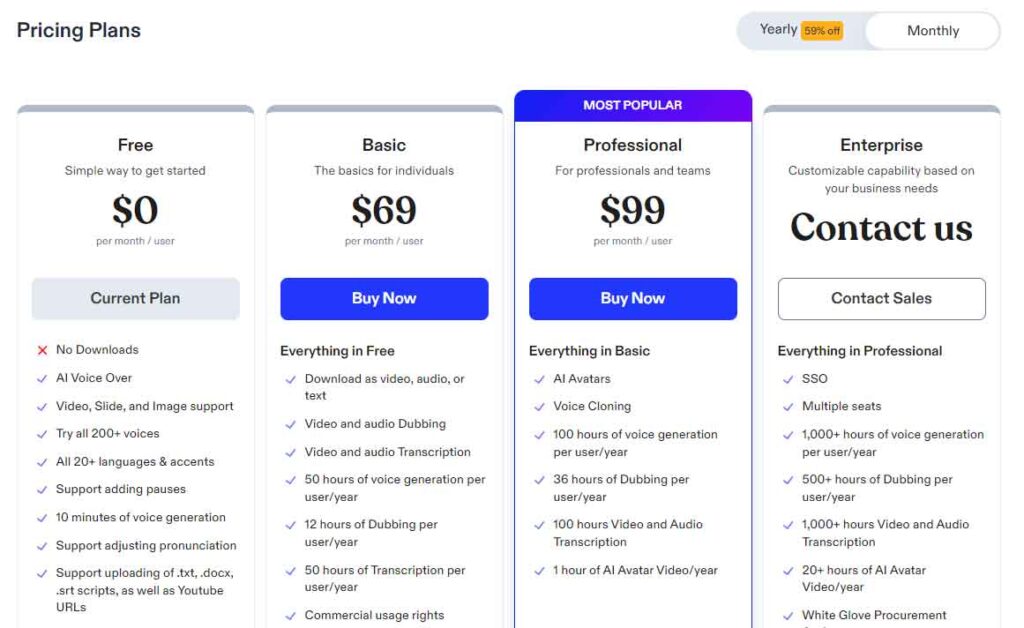
The standalone text-to-speech tool offered by Speechify has its own pricing structure separate from the Speechify Studio, which includes transcription, dubbing, and AI videos.
The text-to-speech (TTS) tool offers a free version with access to 10 standard voices and standard reading speed.
To access the full voice library and unlock additional features such as increased reading speed and additional languages, users can opt for a premium subscription priced at $139 per year. This premium plan provides access to a broader range of voices and enhanced functionalities to meet diverse user needs.
When it comes to Speechify Studio plans, they include the following:
- Free
- Basic
- Professional
- Enterpise.
1. Free plan
With the Free plan offered by Speechify, users gain access to a comprehensive library of AI voices, languages, and accents. This plan enables users to create AI voiceovers, dub audio and video files, and transcribe content. However, there is a limitation: all projects are saved as drafts, and downloading is disabled.
2. Basic Plan
The subscription for Speechify’s paid plan is $69 per month per user. This plan provides users with several benefits, including:
- 50 hours of voice generation per year
- 12 hours of dubbing per year
- 50 hours of transcription per year
- Commercial usage rights
3. Professional Plan
At $99 per month per user, the Professional plan from Speechify offers expanded features including access to AI avatars and voice cloning. Additionally, it removes limits on voice generation, dubbing, and transcription, allowing up to 100 hours per year for each. This plan also enables the creation of one-hour AI avatar videos annually.
4. Enterprise plan
The Enterprise plan from Speechify offers custom pricing and includes extensive benefits such as over 1,000 hours of voice generation, 500+ hours of dubbing, and 1,000+ hours of transcription per year.
Additionally, it provides over 20 hours of AI Video Avatar per year along with premium features like Single Sign-On (SSO), custom invoices, and a dedicated customer success manager. It’s worth noting that Speechify doesn’t offer refunds for monthly subscriptions, and any refunds are only valid within seven days of purchase.
Best Speechify Alternatives
Here are the best Speechify alternatives you’ll find that I have also personally tried!
1. Lovo.ai
Lovo.ai is recognized for its cutting-edge AI technology that seamlessly converts text into lifelike speech. It boasts an extensive collection of over 500 AI voices, supporting 20 emotions and 150 languages, making it one of the most versatile platforms available. Additionally, Lovo.ai offers unique features like an AI writer, art generator, and video editor, although it lacks AI avatars for lip-syncing text like Speechify.
For users seeking the most realistic AI voices and comprehensive language support, Lovo.ai is an excellent choice. However, if your focus is primarily on improving reading speed and aiding individuals with reading difficulties, Speechify may be more suitable.
2. Murf AI
Murf AI and Speechify both offer powerful text-to-speech capabilities, catering to different user needs. While Speechify prioritizes enhancing reading speed and aiding individuals with reading disabilities, Murf AI targets content creators with its focus on voiceovers and content generation.
One notable difference is Murf AI’s integration with Google Slides and Canva, providing convenient add-ons for users. In contrast, Speechify distinguishes itself with realistic AI avatars that lip-sync text, offering a visual component to content.
For users seeking to improve reading efficiency or requiring AI avatars, Speechify is the preferred option. Conversely, content creators looking for high-quality voiceovers and streamlined content creation may find Murf AI more suitable.
3. Synthesys
Synthesys and Speechify both offer AI-driven text-to-speech capabilities, but their focus and offerings cater to different user needs. While Synthesys emphasizes commercial applications like voiceovers for podcasts and marketing, Speechify prioritizes aiding individuals with reading challenges and enhancing reading speed.
Synthesys boasts a vast library of over 300 voices in 140 languages, along with an AI video generator featuring over 60 avatars. In contrast, Speechify provides over 200 high-quality voices in over 60 languages and offers hundreds of AI avatars for video creation.
One notable distinction is Synthesys’ integrated AI art generator, adding another dimension to content creation. Conversely, Speechify’s focus on reading enhancement and accessibility sets it apart, making it ideal for individuals seeking to read faster or overcome reading difficulties.
In summary, for users looking for a platform tailored to content creation with a robust voice and video generator, Synthesys is the preferred choice. On the other hand, those prioritizing reading improvement or accessibility features may find Speechify more suitable.
4. WellSaid Labs
WellSaid Labs and Speechify both excel in providing AI-generated voiceovers, but they differ in their language offerings and additional features. WellSaid offers over 50 lifelike AI voices specifically for English voiceovers, catering to brands seeking high-quality narration for various applications. In contrast, Speechify boasts a broader range of features, including over 200 voices in more than 20 languages, along with AI avatars and audiobook capabilities.
For users focused solely on obtaining realistic English voiceovers, WellSaid is an excellent choice. However, for those requiring support for multiple languages and seeking additional functionalities like AI avatars and audiobooks, Speechify provides a more comprehensive solution.
Speechify Review: My Experience
Your review of Speechify highlights its effectiveness in aiding your writing process and the versatility it offers in voice options and customization. The user-friendly interface and integration with the Chrome extension have made it convenient for you to access the text-to-speech feature.
The ability to adjust speed and choose from hundreds of voices, along with support for over 60 languages, has allowed you to tailor your content to a diverse audience. Additionally, the inclusion of AI avatars adds a personal touch to your creations. Your positive experience with Speechify and your recommendation make a compelling case for others to give it a try. Thanks for sharing your insights!