Unlock the Future of Audio: Dive into Our Murf AI Review
Creating voiceovers for videos and other projects has long been a challenge for digital creators, being both time-consuming and costly. However, thanks to recent advancements in artificial intelligence (AI), this process has become far more efficient. One such solution making waves in the industry is Murf AI, a popular AI voice generator. In this post, we’ll delve into what Murf AI has to offer and how it can streamline the voiceover creation process for content creators.
What is Murf AI?
Murf AI is an impressive AI voice generator renowned for its ability to produce realistic voiceovers for various projects. Powered by machine learning and generative AI, Murf sets itself apart by delivering human-like voices that resonate with listeners. With a vast library of over 120 voices, each possessing distinct characteristics and styles, finding the perfect fit for your needs is effortless.
However, Murf AI offers more than just voice generation capabilities. It extends its functionality to video creation as well. While it differs from traditional AI video generators, Murf provides access to millions of stock music, image, and video assets. This feature enables users to craft compelling videos tailored for web content, social media platforms, marketing campaigns, training materials, and more.
Benefits of Using Murf AI
Murf AI stands out as a robust software solution with numerous benefits catering to diverse user needs. Whether you’re a seasoned business professional seeking efficiency or a novice marketer aiming to enhance your outreach efforts, Murf AI offers a reliable platform for generating high-quality voiceovers for your projects.
Here are some key advantages of using Murf AI:
1. Time and Cost Savings
With Murf AI, you can effortlessly produce natural-sounding voiceovers in just a few clicks, eliminating the need to hire professional voice actors or spend extensive time editing recordings.
2. Extensive Voice Options
With a selection of over 120 voices available in 20 languages, Murf AI ensures that users have ample choices to suit their specific requirements and preferences.
3. Rich Media Assets
Murf AI provides access to a vast library of millions of media assets, empowering users to create engaging videos directly within the editor. Additionally, users have the flexibility to upload their own videos and media assets for seamless integration and on-brand results.
4. Customization Capabilities
The voice editor tool offered by Murf AI enables users to fine-tune various aspects such as pitch, tone, and speaking style, allowing for personalized and tailored voiceovers tailored to the project’s needs.
5. User-Friendly Interface
Murf AI boasts an intuitive dashboard and user-friendly interface, making it easy for users of all skill levels to navigate and utilize its features effectively. With minimal tools to learn, users can quickly get up to speed and start creating compelling content.
Overall, Murf AI offers a comprehensive solution for generating voiceovers with ease, versatility, and customization options, making it a valuable asset for content creators across various industries and skill levels.
Murf AI Features
Murf AI provides a wide range of capabilities for generating voiceovers in projects. Let’s examine these features to gain a better understanding of what’s available upon signing up.
1. Text-To-Speech
We believe that Murf AI’s standout feature is its text-to-speech functionality. As mentioned earlier, it boasts a selection of 120 AI voices across 20 languages, ensuring that you can discover the ideal match for your needs. Through user-friendly tools, you can modify various aspects of your voice, such as style, tone, speed, and more. Additionally, the platform facilitates the incorporation of pauses at strategic points, resulting in exceptionally natural-sounding voices.
2. Canva Add On
For Canva users seeking to integrate voiceovers seamlessly into their projects, Murf offers a convenient solution. With full integration with Canva, importing voiceovers becomes effortless. These voiceovers can be utilized across various platforms, including Facebook or Instagram videos, AI presentations, and beyond.
3. AI Voice Cloning
Murf AI also offers a notable feature: voice cloning. Although it’s a separate purchase, it’s a valuable addition to the platform. This feature operates by recording your voice and subsequently uploading the samples to Murf’s team.
From there, they construct a custom AI voice tailored to your specifications. Optimal results are achieved with professional equipment. Ultimately, you obtain a precise replica of your voice, ready to be utilized across all your projects. This tool particularly benefits medium to large businesses aiming to optimize voiceover processes, leading to significant time and cost savings.
4. Voice Over Video
If you’re in need of quick and effortless narration for your video content, Murf AI’s voiceover video feature offers an ideal solution. Whether you’re crafting a captivating commercial, an informative tutorial, or a comprehensive learning management system (LMS), this tool caters to your needs.
What’s more, it grants you the freedom to unleash your creativity by providing access to millions of images, music, and video assets for building videos from the ground up. Murf AI boasts a diverse range of AI voices, spanning various ages, ethnicities, genders, and characteristics, ensuring ample choices for your project.
However, it’s worth noting that we encountered some minor issues with the video preview feature during our testing, so it’s advisable to keep this in mind.
5. Google Slides Add-On
Adding voiceovers to your presentations and using Google Slides is a breeze with Murf AI’s convenient add-on. This feature seamlessly integrates with Google Slides, enabling you to effortlessly incorporate spoken words into your slides. With the add-on, you can write and edit your voiceover script directly within the Google Slides interface, streamlining the process.
What’s more, you’ll have access to all the voices included in your plan, conveniently accessible within Google Slides. Additionally, the AI feature intelligently selects the most suitable voice for your project based on the content of your presentation, enhancing the overall user experience.
6. Murf API
Are you seeking AI voice integration for your application or website? Murf API offers a solution for this. Similar to the voice cloning feature, you’ll need to reach out to Murf to create a tailored solution. The API provides access to over 40 available voices for integration. However, this feature requires a separate purchase and is not included in their subscription plans.
For smaller businesses, the cost of API integration may be prohibitive, at around $3,000 per year. Nevertheless, for larger corporations, this expense represents significant savings compared to hiring voice actors.
Murf AI Pricing
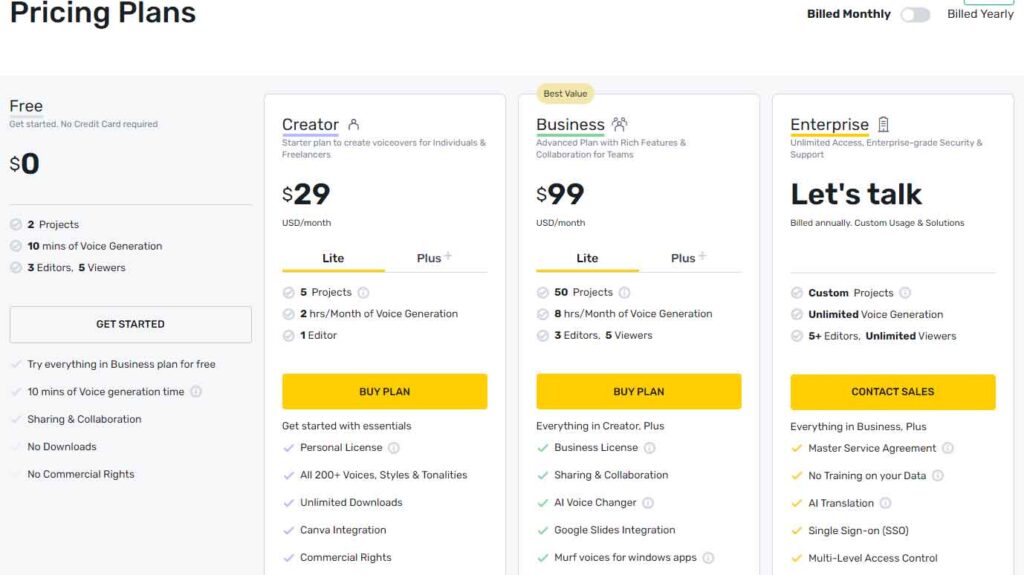
If you’re contemplating signing up for Murf AI, you’ll be pleased with its affordable pricing structure. They offer a range of options, including a free tier and three paid plans, catering to various needs. The free plan provides access to 32 AI voices, 10 minutes of voice generation, 10 minutes of transcription, and up to three users. However, downloading generated content is not available on this plan, serving primarily as a trial option for users to explore Murf’s capabilities.
Moving up, the Basic Plan offers unlimited downloads, 60 basic voices, access to 10 languages, 24 hours of voice generation per user per year, and access to over 8000 licensed soundtracks. This plan starts at $19 per user per month when billed annually. Stepping up to the Pro plan, priced at $26 per month, offers all the features of the Basic Plan but expands access to over 120 AI voices, 20 languages, the AI voice changer, commercial usage rights, and high-priority support.
For larger teams or enterprises, the Enterprise plan, priced at $75 per month for 5 users, offers everything included in the Pro plan, with additional perks like unlimited voice generation, transcription, and storage. Moreover, it includes a dedicated account manager, advanced collaboration tools, and a security assessment, particularly crucial considering the voice cloning feature’s potential risks amidst concerns about deep fakes and impersonation.
Pros and Cons of Murf AI
To be transparent for our readers, weighing the pros and cons of subscribing to Murf AI is important. While there are a lot of pros, including the wide range of AI voices available, there are some cons that you should be aware of.
Pros of Using Murf AI
- Over 120+ realistic AI voices with support for 20+ languages
- Saves time and money over hiring professional voice actors
- Simple interface
- Many ethnicities, tones, and styles to choose from
Cons of Using Murf AI
- The free plan doesn’t allow downloads
- Customization of pitch and tone could be better
- Potential security concerns with voice cloning
- In our experience, the voice-over-video tool is a bit buggy at times
Final Thoughts on Murf AI
Murf AI emerges as a versatile and invaluable asset for crafting voiceovers across presentations, videos, and various media formats. Boasting a repertoire of over 120 lifelike voices and extensive language support exceeding 20 languages, it streamlines the process, conserving both time and resources while facilitating the creation of engaging voiceovers.
Nevertheless, it’s essential to acknowledge that Murf AI is not devoid of shortcomings. Users may encounter occasional glitches with the voice-over-video tool, and there’s a perceived need for enhanced customization options concerning pitch and tone. Despite these minor drawbacks, Murf AI shines brightly in its domain, primarily distinguished by the exceptional realism of its voice outputs. For those seeking a swift and efficient means to generate natural-sounding voiceovers, Murf AI undoubtedly stands out as a top-tier solution.