Rytr Review: Your Intelligent Writing Companion
In the ever-evolving realm of content creation, new tools and AI technologies are reshaping the way we write. One such tool gaining traction is Rytr AI, a prominent AI writing assistant. This detailed Rytr review delves into the platform, spotlighting its distinctive AI-driven features for content creation. Continue reading to explore the strengths and weaknesses of Rytr AI, aiding in your decision to determine if it aligns with your needs.
Read our Rytr review to discover its AI writing capabilities, user interface, pricing, and overall effectiveness for generating high-quality content.
What is Rytr AI?
Rytr is an AI writing tool designed to simplify the creation of high-quality content. Perfect for website copy, marketing materials, and blog posts, this online platform streamlines the writing process. With just a click, users can access features such as SEO meta descriptions, blog outlines, and social media ad copy. Trusted by millions of users, Rytr AI aids copywriters, marketers, and entrepreneurs in crafting top-notch content effortlessly.
How does Rytr AI work?
Rytr AI leverages OpenAI’s GPT-3 technology to learn language intricacies by analyzing vast amounts of text data from the web. This knowledge empowers the software to generate original content for various applications, typically avoiding plagiarism. Its capabilities include generating text, answering questions, summarizing, translating, and more. For further insights into AI, consider reading our guide on How to Learn AI.
Breaking Down Rytr AI Features
Rytr AI offers a range of features designed to simplify content organization and optimization. Let’s delve into each key feature to uncover the full capabilities of this AI writing assistant.
1. Document Management
Rytr AI’s Document Management feature serves as the cornerstone of the platform, meticulously organizing your writing projects for enhanced productivity. Upon logging in, users are greeted with a tutorial video offering a comprehensive overview of the platform’s functionalities, followed by access to a personalized dashboard.
Within this dashboard, users can effortlessly categorize their ongoing projects into folders and documents. The intuitive interface allows for the creation of new folders or documents with a simple click on icons located in the top-right corner and selecting “Create.”
Once a document is established, a single click opens it in Rytr’s rich text editor. Here, users can collaborate with the AI to craft content tailored to their specific needs. This seamless transition from document organization to content creation underscores Rytr as a versatile tool, perfectly suited for various writing endeavors.
2. AI Writer
Rytr’s AI Writer feature stands out as a robust tool that simplifies the content creation process. Positioned on the left-hand side of the interface, users can access this feature through the “Ryte for me” button.
Upon initiation, users select their preferred language. Notably, Rytr offers support for over 30 languages, including English, Spanish, Chinese, Arabic, and more, expanding the reach of generated content.
Next, users can choose from a diverse range of tones, with over 20 options available to match specific needs. Whether it’s an urgent tone for a flash sale, an appreciative tone for a review, or an authoritative tone for a blog post, Rytr provides ample choices.
The “use case” option allows users to define the type of content they require, whether it be blog outlines, email copy, or product descriptions. With over 40 pre-set use cases and the option for custom ones in paid plans, Rytr caters to a wide array of content needs.
Finally, users input their primary keyword, select the desired number of variants, choose a creativity level, and Rytr takes care of the rest. For instance, when testing the tool by generating an SEO meta-description for the title “Best Video Editing Tools,” the results were notably impressive.
3. AI-Powered Rich Text Editor
Rytr’s Rich Text Editor serves as a cornerstone of its content generation capabilities, elevating the platform above standard text editors. Upon content generation, Rytr seamlessly opens it in the Rich Text Editor, which initially appears similar to conventional text editors. Users encounter a familiar interface featuring a typing window and a toolbar with formatting options.
However, the true power of the Rich Text Editor lies in Rytr’s AI capabilities. For example, we enhanced a previously generated blog post outline by highlighting specific sections, including keywords. Rytr offers innovative options to augment content using AI. One such option is the “Paragraph” button, which automatically generates a complete paragraph of content to enrich the selected section of the blog post.
While the output is commendable, it may not always match the quality of human-authored content, occasionally containing grammatical errors and repetition. Nevertheless, it serves as a valuable starting point, saving time and effort.
For those seeking more substantial content expansion, Rytr allows users to click “Continue Ryting,” which generates additional content. While this feature demonstrates the limitations of AI, with outputs occasionally lacking coherence within the article’s context, it underscores the reality that AI technology has yet to fully replicate the artistry of human writing.
In this case, I highlighted a paragraph of the “Introduction” section initially created. Consequently, Rytr generated a lengthy paragraph, albeit focused solely on the initially highlighted paragraph.
4. Plagiarism Checker
Rytr AI includes a valuable Plagiarism Checker feature designed to ensure the originality of your content before publication. Once you’ve completed your content within the text editor, you can easily run it through this tool. To initiate the plagiarism check, select the text you wish to verify and navigate to More > Plagiarism. Within moments, the results will appear in a window at the bottom right corner of the screen.
If your content is free from duplicate material, it will display “no matches were found.” However, if any matches exist with existing web content, Rytr will identify the sources and indicate the percentage of matched words.
This feature empowers users to maintain the integrity of their work, ensuring it is entirely original and free from any unintended similarities with content found elsewhere on the internet. Rytr’s Plagiarism Checker provides a valuable safeguard for content writers, assisting them in producing high-quality and authentic content.
5. AI Image Generator
Rytr AI not only generates text but also offers an intriguing feature for AI-generated images. To utilize this feature, users must open a document and describe their desired appearance in the text. Once the description is complete, they should highlight the text and click the “AI image” button.
We tested this feature by requesting Rytr to create a self-portrait of the iconic Kobe Bryant in action on the NBA court. The results were captivating, capturing the essence of the basketball legend at his best and producing a memorable image that aligns with his legacy.
It’s important to note that Rytr’s image generator has its limitations. However, its utility for content creators in need of original photos for their articles is evident. This addition to Rytr’s toolkit empowers users to enhance their textual content and create visual elements that enrich the overall reader experience.
6. Rytr Chat
Rytr Chat provides users with a conversational interface to interact with the AI writing assistant. Unlike predefined use cases, users can directly type their commands into the chat window, and Rytr will promptly generate the desired content, displaying it within the chat interface.
This dynamic feature is versatile and can generate various types of content, including blog posts, emails, social media updates, product descriptions, landing pages, and more. Additionally, Rytr Chat allows users to customize the tone and style of the content to their specific preferences, whether it’s a “friendly and persuasive” blog post or a “professional and informative” email.
For example, in a practical demonstration, Rytr Chat effortlessly creates an outline of the best video editing tools, highlighting its ability to simplify and expedite high-quality content generation. Eventually, it produces an outline that includes the most recommended video editing tools, such as Adobe Premiere Pro and Final Cut Pro X.
Pros and Cons of Rytr AI
We find it beneficial to explore the strengths and weaknesses of Rytr AI. It presents valuable insights for individuals and businesses aiming to improve their content creation processes. We will delve into the key benefits that make Rytr AI an appealing choice for various writing needs. However, we will also scrutinize the constraints and problems that users might face.
Pros of Using Rytr AI
- Rytr AI supports multiple use cases effectively.
- It enhances short-form content and outlines efficiently.
- It presents unique features like an AI image generator and a writing portfolio page builder.
- The tool is user-friendly and easy to navigate.
Cons of Using Rytr AI
- It is less effective for long-form content, showing more strength in shorter-range
- Rytr AI lacks a detailed SERP analysis, which could benefit SEO optimization.
- There is room for improvement in keyword research capabilities.
- The user interface (UI) could be made more intuitive for a smoother user experience.
Rytr AI Pricing and Plans Review
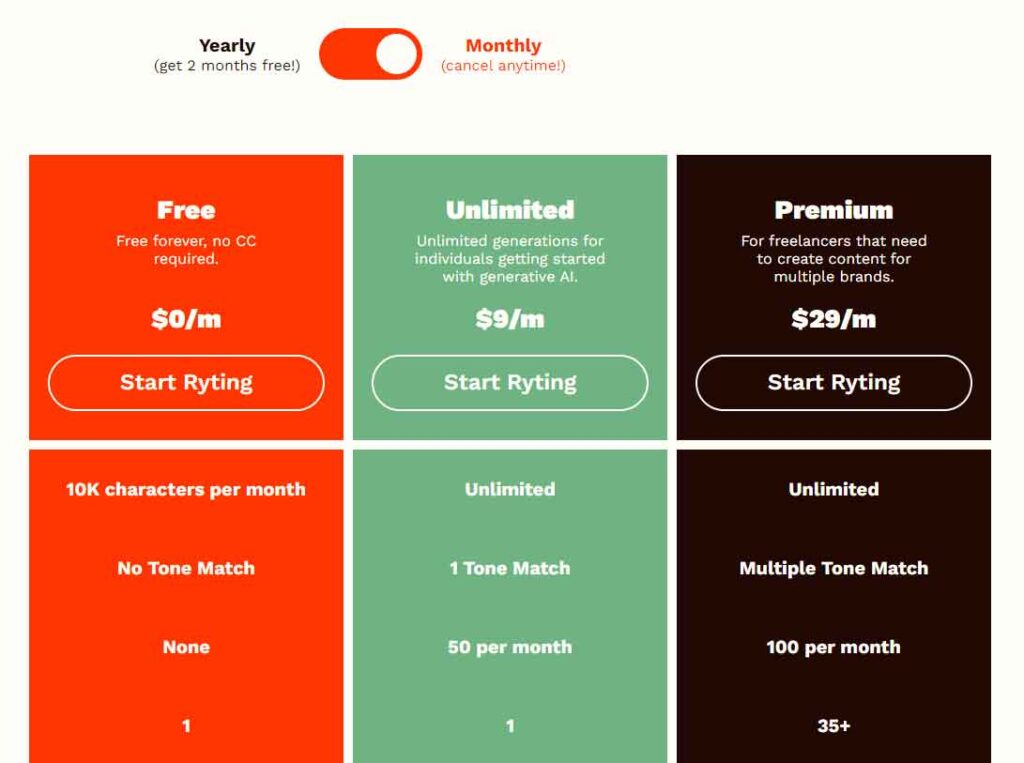
Rytr AI provides two distinct pricing plans tailored to accommodate different needs and budgets, with a free trial available for users to explore the software before committing to a subscription.
The Free Plan allows users to generate up to 10k characters every month. Additionally, it offers access to over 40 use cases, content creation in more than 30 languages, and a choice of over 20 tones. Users also benefit from a built-in plagiarism checker and the ability to generate up to five AI-generated images monthly.
On the other hand, the Saver Plan is priced at $9 per month or an annual cost of $90. This plan includes the ability to create 100k characters per month, access to over 40 use cases, content creation in over 30 languages, and a choice of over 20 tones. It also covers the plagiarism checker and allows users to produce 20 AI-generated images monthly. A unique feature of this plan is the option to create custom use cases.
The Ultimate Plan, priced at $29 per month or $290 annually, offers unlimited character generation per month and provides access to various features similar to the previous plans. Additionally, it includes a dedicated account manager and offers efficient email and chat support.
Alternatives to Rytr AI
While Rytr AI offers a robust suite of AI writing tools, there are several alternative platforms worth exploring, each with its own unique features and capabilities. Whether you’re a content creator or in need of assistance with writing projects, exploring these alternatives may help you find a tool better suited to your specific needs. Let’s briefly discuss some prominent alternatives to Rytr AI, providing insight into their capabilities, use cases, and advantages.
1. Jasper AI
Jasper AI stands out as a potent content creation tool, leveraging its Boss Mode feature to generate around 80% of your content automatically. This leaves the remaining 20% for manual proofreading, ensuring high-quality output. With its versatility, Jasper AI can accommodate various content types, making it a flexible choice for writers.
Moreover, Jasper AI seamlessly integrates with Surfer SEO, enabling users to optimize their content for targeted keywords and enhance search engine visibility. While it lacks built-in content support or grammar-checking tools, users can pair it with external applications like Grammarly for additional assistance.
Additionally, Jasper AI offers an intriguing feature for AI art generation, adding a creative dimension to its capabilities.
2. Writesonic
Writesonic excels in generating a variety of online content, including landing pages, ads, blogs, and product descriptions. With its ability to produce long-form content, it’s well-suited for creating extended articles to meet diverse writing needs.
One of Writesonic’s key advantages is its provision of multiple output options for each generation, offering users flexibility in selecting the most suitable content.
A notable feature of Writesonic is its functionality as a browser plugin, seamlessly integrating with various web pages and applications for convenient access. This integration enhances user experience by streamlining the content creation process and enabling quick generation of high-quality content directly within familiar environments.
3. Copy AI
Copy.ai is a versatile platform offering a range of services tailored to various needs, including email marketing, blog content, and social media posts. Leveraging natural language processing technology, it assists businesses, marketers, and sales professionals in efficiently generating high-quality content across multiple platforms.
One of its standout features is its support for over 29 languages, ensuring accessibility to a diverse user base.
A notable innovation by Copy.ai is its chatbot feature, which performs a myriad of tasks, including summarizing YouTube videos and transforming LinkedIn profiles into concise bullet points. This feature enhances productivity by automating repetitive tasks and simplifying complex content creation processes, further solidifying Copy.ai as a valuable tool for content generation.
Conclusion
Rytr AI emerges as a comprehensive and adaptable AI writing tool, offering numerous benefits to professionals and content creators alike. With support for various use cases, proficiency in multiple languages, and an innovative AI image generator, Rytr proves invaluable in streamlining workflows and enhancing productivity. Its user-friendly interface further adds to its appeal, making it accessible to a wide audience.
However, like all AI writing tools, Rytr has its limitations. It cannot fully replicate the expertise and creativity of a skilled human writer, particularly when it comes to producing intricate and nuanced long-form content. While it excels in tasks such as generating article outlines and overcoming writer’s block, users may find themselves wanting more for managing the entire content creation process.
Nevertheless, Rytr shines in its designated use cases, offering a valuable tool for quickening workflows and aiding in content creation tasks. To fully experience its benefits, users can explore its free plan before considering upgrading to unlock additional features and capabilities. Overall, Rytr can serve as a valuable addition to any writing toolkit, providing a means to kickstart and expedite writing tasks with ease.